Wayback Machinekoobas.hobune.stream
May JUN Jul
Previous capture 13 Next capture
2021 2022 2023
1 capture
13 Jun 22 - 13 Jun 22
sparklines
Close Help
  • Products
  • Solutions
  • Made with Unity
  • Learning
  • Support & Services
  • Community
  • Asset Store
  • Get Unity

UNITY ACCOUNT

You need a Unity Account to shop in the Online and Asset Stores, participate in the Unity Community and manage your license portfolio. Login Create account
  • Blog
  • Forums
  • Answers
  • Evangelists
  • User Groups
  • Beta Program
  • Advisory Panel

Navigation

  • Home
  • Products
  • Solutions
  • Made with Unity
  • Learning
  • Support & Services
  • Community
    • Blog
    • Forums
    • Answers
    • Evangelists
    • User Groups
    • Beta Program
    • Advisory Panel

Unity account

You need a Unity Account to shop in the Online and Asset Stores, participate in the Unity Community and manage your license portfolio. Login Create account

Language

  • Chinese
  • Spanish
  • Japanese
  • Korean
  • Portuguese
  • Ask a question
  • Spaces
    • Default
    • Help Room
    • META
    • Moderators
    • Topics
    • Questions
    • Users
    • Badges
  • Home /
avatar image
0
Question by sylar93 · May 01, 2014 at 08:07 AM · drawslingshot

Angry Birds dotted trajectory for the slingshot

Hello everybody . So i used this script for a game that i`m trying to make . http://forum.unity3d.com/threads/86472-Drag-Shot-Mover-Get-your-physics-objects-moving!?highlight=slingshot

It works perfectly but i would like to change the range indicator (it`s a circle or hexagon to be exact) to a dotted trajectory line like in angry birds .

Thank you in advance .

Comment
Add comment · Show 12
10 |3000 characters needed characters left characters exceeded
▼
  • Viewable by all users
  • Viewable by moderators
  • Viewable by moderators and the original poster
  • Advanced visibility
Viewable by all users
avatar image fafase · May 01, 2014 at 08:31 AM 0
Share

If you have an hexagon it probably joins points with edges, ins$$anonymous$$d draw sphere at those points and remove the lines.

avatar image sylar93 · May 01, 2014 at 09:13 AM 0
Share

ok so i dont know if i didnt explain correctly what i needed but i dont think i need that . I want to remove the hexagon range indicator completely!

[This is what i have](/storage/temp/25964-screenshot+2014-05-01+12.10.35.png)

This is what i want to have This is what i want

[1]: /storage/temp/25964-screenshot+2014-05-01+12.10.35.png

avatar image fafase · May 01, 2014 at 09:35 AM 0
Share

There is no pic to see what you have already. As for the angry birds dots it is just the projectile motion equation at discrete times.

avatar image sylar93 · May 01, 2014 at 10:27 AM 0
Share

click on "This is what i have"

avatar image Graham-Dunnett ♦♦ · May 01, 2014 at 11:23 AM 0
Share

(the link really doesn't work)

Show more comments

2 Replies

· Add your reply
  • Sort: 
avatar image
2

Answer by Julie Raiyani · Jun 27, 2014 at 02:46 PM

Hello sylar93,

Here is the perfect solution of your problem , visit below link.

How to display projectile trajectory path in Unity 3D?

Thanks, Julie.

Comment
Add comment · Show 1 · Share
10 |3000 characters needed characters left characters exceeded
▼
  • Viewable by all users
  • Viewable by moderators
  • Viewable by moderators and the original poster
  • Advanced visibility
Viewable by all users
avatar image SarfaraazAlladin · Mar 03, 2017 at 08:28 PM 0
Share

Thanks for the link! this is perfect (even 3 years later )

avatar image
0

Answer by perchik · May 01, 2014 at 03:17 PM

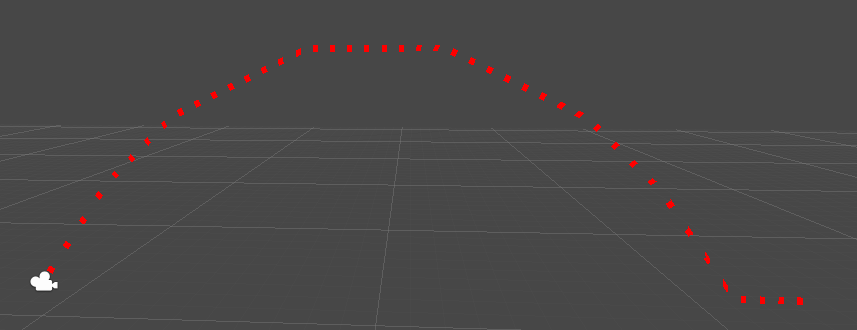
I don't have a clue what you're talking about with the hexagon, but it sounds like you just need some kind of LineRenderer with a dotted texture. Use some kind of loop to add points to the linerender with a parametric form of the projectile equation. You can add a texture that is half transparent to make a good dashed line.

Here's what I through together real quick by manually setting some points on the line
alt text

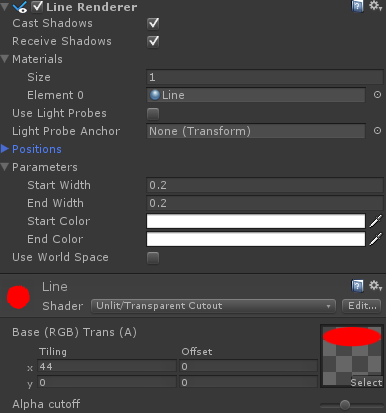
using these settings:

alt text

Notice my texture is a circle followed by transparent space


projectile.png (25.0 kB)
projectile2.png (22.2 kB)
Comment
Add comment · Show 1 · Share
10 |3000 characters needed characters left characters exceeded
▼
  • Viewable by all users
  • Viewable by moderators
  • Viewable by moderators and the original poster
  • Advanced visibility
Viewable by all users
avatar image perchik · May 01, 2014 at 03:18 PM 0
Share

alt text (the texture I used)

dottedline.png (2.4 kB)

Your answer

Hint: You can notify a user about this post by typing @username

Up to 2 attachments (including images) can be used with a maximum of 524.3 kB each and 1.0 MB total.

Follow this Question

Answers Answers and Comments

24 People are following this question.

avatar image avatar image avatar image avatar image avatar image avatar image avatar image avatar image avatar image avatar image avatar image avatar image avatar image avatar image avatar image avatar image avatar image avatar image avatar image avatar image avatar image avatar image avatar image avatar image

Related Questions

How to draw 3D text from code 4 Answers

Draw to follow 5 Answers

How to draw a (helix shape) road for moving objects in unity3d? 0 Answers

Color Handles.DrawLine 1 Answer

Draw a circle on touchscreen 1 Answer


Enterprise
Social Q&A

Social
Subscribe on YouTube social-youtube Follow on LinkedIn social-linkedin Follow on Twitter social-twitter Follow on Facebook social-facebook Follow on Instagram social-instagram

Footer

  • Purchase
    • Products
    • Subscription
    • Asset Store
    • Unity Gear
    • Resellers
  • Education
    • Students
    • Educators
    • Certification
    • Learn
    • Center of Excellence
  • Download
    • Unity
    • Beta Program
  • Unity Labs
    • Labs
    • Publications
  • Resources
    • Learn platform
    • Community
    • Documentation
    • Unity QA
    • FAQ
    • Services Status
    • Connect
  • About Unity
    • About Us
    • Blog
    • Events
    • Careers
    • Contact
    • Press
    • Partners
    • Affiliates
    • Security
Copyright © 2020 Unity Technologies
  • Legal
  • Privacy Policy
  • Cookies
  • Do Not Sell My Personal Information
  • Cookies Settings
"Unity", Unity logos, and other Unity trademarks are trademarks or registered trademarks of Unity Technologies or its affiliates in the U.S. and elsewhere (more info here). Other names or brands are trademarks of their respective owners.
  • Anonymous
  • Sign in
  • Create
  • Ask a question
  • Spaces
  • Default
  • Help Room
  • META
  • Moderators
  • Explore
  • Topics
  • Questions
  • Users
  • Badges