
Wayback Machinekoobas.hobune.stream
May JUN Jul
Previous capture 13 Next capture
2021 2022 2023
1 capture
13 Jun 22 - 13 Jun 22
sparklines
Close Help
  • Products
  • Solutions
  • Made with Unity
  • Learning
  • Support & Services
  • Community
  • Asset Store
  • Get Unity

UNITY ACCOUNT

You need a Unity Account to shop in the Online and Asset Stores, participate in the Unity Community and manage your license portfolio. Login Create account
  • Blog
  • Forums
  • Answers
  • Evangelists
  • User Groups
  • Beta Program
  • Advisory Panel

Navigation

  • Home
  • Products
  • Solutions
  • Made with Unity
  • Learning
  • Support & Services
  • Community
    • Blog
    • Forums
    • Answers
    • Evangelists
    • User Groups
    • Beta Program
    • Advisory Panel

Unity account

You need a Unity Account to shop in the Online and Asset Stores, participate in the Unity Community and manage your license portfolio. Login Create account

Language

  • Chinese
  • Spanish
  • Japanese
  • Korean
  • Portuguese
  • Ask a question
  • Spaces
    • Default
    • Help Room
    • META
    • Moderators
    • Topics
    • Questions
    • Users
    • Badges
  • Home /
avatar image
0
Question by NxDs · Jan 04, 2015 at 04:28 AM · terrainproceduralmatching

How to make multiple terrains match together?

I'm working on a procedural terrain generation using a Simplex noise algorithm and placing 9 tiles(terrains) in a 3x3 square. The problem is that the terrains aren't matching together like in the image:
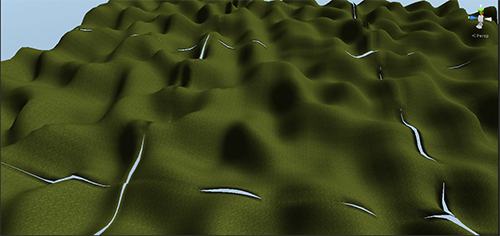
alt text

And this is the code which generates the heights for every tile:

 private void GenerateHeights (int tileZ, int tileX)
 {

 if (tiles [tileZ, tileX] == null)
     return;

 Terrain tempTerrain = tiles [tileZ, tileX].terrainTile;

 int width = tempTerrain.terrainData.heightmapWidth;
 int height = tempTerrain.terrainData.heightmapHeight;
 
 float xRatio = frequency / (float)width;
 float zRatio = frequency / (float)height;

 float[,] heights = new float[height, width];

 for (int z = 0; z < height; z++) {
    for (int x = 0; x < width; x++) {
      float noiseX = (x + tempTerrain.transform.position.x) * xRatio;
      float noiseZ = (z + tempTerrain.transform.position.z) * zRatio;
      heights [z, x] = noiseGenerator.Noise (noiseX, noiseZ) * detailScale;
    }
 }

  tempTerrain.terrainData.SetHeights (0, 0, Normalize (heights));
 }

If i comment this function i get 9 perfectly aligned square plane tiles so the initial alignement is correct... I found this script (stitchscape) which i think i could solve my problem but it is not free in the asset store

I forgot to mention that i already call the SetNeighbors function for every tile and this improves a little the result but it's not enough

capture.png (289.7 kB)
Comment
Add comment
10 |3000 characters needed characters left characters exceeded
▼
  • Viewable by all users
  • Viewable by moderators
  • Viewable by moderators and the original poster
  • Advanced visibility
Viewable by all users

2 Replies

· Add your reply
  • Sort: 
avatar image
0

Answer by getyour411 · Jan 04, 2015 at 06:36 AM

Buy Stitchscape

Comment
Add comment · Show 3 · Share
10 |3000 characters needed characters left characters exceeded
▼
  • Viewable by all users
  • Viewable by moderators
  • Viewable by moderators and the original poster
  • Advanced visibility
Viewable by all users
avatar image NxDs · Jan 04, 2015 at 08:43 AM 0
Share

Thanks but i would like a solution more "DIY", maybe finding the error in the code because the tiles don't mismatch too much so it is not completely wrong.

avatar image AlucardJay · Jan 04, 2015 at 09:57 AM 0
Share

agreed, it has something to do with the way you are accessing the noise.

The edge of one terrain needs to read the same data as the matching seam of the next terrain. For this, modify the step :

 float xRatio = frequency / (float)(width - 1);
 float zRatio = frequency / (float)(height - 1);

untested. I'm not sure this if this is exactly where the step needs to be modified, but that's the theory.

avatar image NxDs · Jan 05, 2015 at 09:11 AM 0
Share

Ok thanks I got better results following your hints but it's still not matching... I need to find how much and where subtract to make them match

avatar image
0

Answer by vbs · Sep 10, 2017 at 09:10 PM

For your width and height you should use heightmapResolution values. Here's another similar question: http://answers.unity3d.com/questions/966290/aligning-simplex-noise-generated-terrain.html

Comment
Add comment · Share
10 |3000 characters needed characters left characters exceeded
▼
  • Viewable by all users
  • Viewable by moderators
  • Viewable by moderators and the original poster
  • Advanced visibility
Viewable by all users

Your answer

Hint: You can notify a user about this post by typing @username

Up to 2 attachments (including images) can be used with a maximum of 524.3 kB each and 1.0 MB total.

Follow this Question

Answers Answers and Comments

5 People are following this question.

avatar image avatar image avatar image avatar image avatar image

Related Questions

How to generate a grid for procedurally generated platforms 1 Answer

Procedurally generating terrain? 0 Answers

Terrain Generation Question - Unity Limitations - Procedural Terrain and Deformation of 2d Squares (Like Terraria) 0 Answers

QuadPlane to Sphere Terrain Generator Misaligned 1 Answer

A* Procedural Terrain 1 Answer


Enterprise
Social Q&A

Social
Subscribe on YouTube social-youtube Follow on LinkedIn social-linkedin Follow on Twitter social-twitter Follow on Facebook social-facebook Follow on Instagram social-instagram

Footer

  • Purchase
    • Products
    • Subscription
    • Asset Store
    • Unity Gear
    • Resellers
  • Education
    • Students
    • Educators
    • Certification
    • Learn
    • Center of Excellence
  • Download
    • Unity
    • Beta Program
  • Unity Labs
    • Labs
    • Publications
  • Resources
    • Learn platform
    • Community
    • Documentation
    • Unity QA
    • FAQ
    • Services Status
    • Connect
  • About Unity
    • About Us
    • Blog
    • Events
    • Careers
    • Contact
    • Press
    • Partners
    • Affiliates
    • Security
Copyright © 2020 Unity Technologies
  • Legal
  • Privacy Policy
  • Cookies
  • Do Not Sell My Personal Information
  • Cookies Settings
"Unity", Unity logos, and other Unity trademarks are trademarks or registered trademarks of Unity Technologies or its affiliates in the U.S. and elsewhere (more info here). Other names or brands are trademarks of their respective owners.
  • Anonymous
  • Sign in
  • Create
  • Ask a question
  • Spaces
  • Default
  • Help Room
  • META
  • Moderators
  • Explore
  • Topics
  • Questions
  • Users
  • Badges
