
Wayback Machinekoobas.hobune.stream
May JUN Jul
Previous capture 13 Next capture
2021 2022 2023
1 capture
13 Jun 22 - 13 Jun 22
sparklines
Close Help
  • Products
  • Solutions
  • Made with Unity
  • Learning
  • Support & Services
  • Community
  • Asset Store
  • Get Unity

UNITY ACCOUNT

You need a Unity Account to shop in the Online and Asset Stores, participate in the Unity Community and manage your license portfolio. Login Create account
  • Blog
  • Forums
  • Answers
  • Evangelists
  • User Groups
  • Beta Program
  • Advisory Panel

Navigation

  • Home
  • Products
  • Solutions
  • Made with Unity
  • Learning
  • Support & Services
  • Community
    • Blog
    • Forums
    • Answers
    • Evangelists
    • User Groups
    • Beta Program
    • Advisory Panel

Unity account

You need a Unity Account to shop in the Online and Asset Stores, participate in the Unity Community and manage your license portfolio. Login Create account

Language

  • Chinese
  • Spanish
  • Japanese
  • Korean
  • Portuguese
  • Ask a question
  • Spaces
    • Default
    • Help Room
    • META
    • Moderators
    • Topics
    • Questions
    • Users
    • Badges
  • Home /
avatar image
0
Question by Requid · Dec 14, 2014 at 06:03 PM · animationmodelsmechanimfingermakehuman

Makehuman mechanim Finger problem

Hey guys,
I'm new to mecanim and animations... I've just imported a character from makehuman + blender to unity and when i attach an animator-controller to the model the fingers are looking very strange:alt text
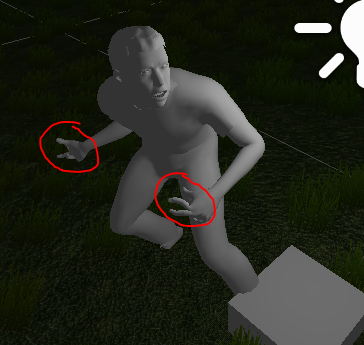
Does anyone know a solution for this?
Thanks in advance!!!

problem.png (170.5 kB)
Comment
Add comment · Show 5
10 |3000 characters needed characters left characters exceeded
▼
  • Viewable by all users
  • Viewable by moderators
  • Viewable by moderators and the original poster
  • Advanced visibility
Viewable by all users
avatar image tanoshimi · Dec 14, 2014 at 06:06 PM 0
Share

Looks like the finger bones in your rig are rotated strangely - take a close look at them in Blender.

avatar image Requid · Dec 14, 2014 at 06:33 PM 0
Share

They aren't strange in blender. They only look like that when I play an animation.

avatar image tanoshimi · Dec 14, 2014 at 06:45 PM 0
Share

And what was the rig used for the animation? Were they rotated strangely there?

avatar image Requid · Dec 14, 2014 at 07:07 PM 0
Share

in unity, I clicked on Configure in Rig Tab and there are the strange fingers again. I rotated them to the right pose, but unity says Character is not in T-Pose. I saved it, but this didn't solve the problem either...

avatar image TSRajesh · Dec 15, 2014 at 06:09 AM 0
Share

I had encountered similar problem, (still unsolved), where the issue was the animation which was made for one finger, but mecanim has 5 fingers... In that case, one one finger was animating and the remaining 4 fingers were kinda stiff.. (Entirely opposite to a "Stiff $$anonymous$$iddle Finger". Heh)

2 Replies

· Add your reply
  • Sort: 
avatar image
1

Answer by TSRajesh · Dec 15, 2014 at 06:11 AM

Edit: I fixed similar problem by adding animation to the remaining 4 fingers. Most free mocaps animate only one (or two) fingers (or none at all)

You might want to see one more thing.. that caused me similar problem.. Even though mecanim does a pretty decent job of importing rigs based on bone names, it sometimes assigns wrong fingers. eg. index finger to small finger etc.. you may want to tweak the assignment.

Comment
Add comment · Share
10 |3000 characters needed characters left characters exceeded
▼
  • Viewable by all users
  • Viewable by moderators
  • Viewable by moderators and the original poster
  • Advanced visibility
Viewable by all users
avatar image
1

Answer by kressdev · Mar 02, 2015 at 12:03 PM

Unity seems to be mixing up the bones from blender. In blender the bones seem to be correct. If you open the blend file in unity, and apply rig humanoid -> configure -> mapping left/right hand finger bones are in the wrong locations. You can manually reorder the finger bones, apply pose, and save the mapping and reload the corrected mapping again if needed in the future.

Comment
Add comment · Show 1 · Share
10 |3000 characters needed characters left characters exceeded
▼
  • Viewable by all users
  • Viewable by moderators
  • Viewable by moderators and the original poster
  • Advanced visibility
Viewable by all users
avatar image Stormy102 · Mar 16, 2016 at 04:22 PM 0
Share

Thanks man! Saved the day there!

Your answer

Hint: You can notify a user about this post by typing @username

Up to 2 attachments (including images) can be used with a maximum of 524.3 kB each and 1.0 MB total.

Follow this Question

Answers Answers and Comments

5 People are following this question.

avatar image avatar image avatar image avatar image avatar image

Related Questions

Mechanim trigger problem 1 Answer

Can I set Animator State Transition defaults? 3 Answers

Can I make animations snap to a frame? 1 Answer

How to disable/override a part of an animation created in Unity 2017.4 0 Answers

Animation wrapmode in mechanim? (hip rotate and stay) 0 Answers


Enterprise
Social Q&A

Social
Subscribe on YouTube social-youtube Follow on LinkedIn social-linkedin Follow on Twitter social-twitter Follow on Facebook social-facebook Follow on Instagram social-instagram

Footer

  • Purchase
    • Products
    • Subscription
    • Asset Store
    • Unity Gear
    • Resellers
  • Education
    • Students
    • Educators
    • Certification
    • Learn
    • Center of Excellence
  • Download
    • Unity
    • Beta Program
  • Unity Labs
    • Labs
    • Publications
  • Resources
    • Learn platform
    • Community
    • Documentation
    • Unity QA
    • FAQ
    • Services Status
    • Connect
  • About Unity
    • About Us
    • Blog
    • Events
    • Careers
    • Contact
    • Press
    • Partners
    • Affiliates
    • Security
Copyright © 2020 Unity Technologies
  • Legal
  • Privacy Policy
  • Cookies
  • Do Not Sell My Personal Information
  • Cookies Settings
"Unity", Unity logos, and other Unity trademarks are trademarks or registered trademarks of Unity Technologies or its affiliates in the U.S. and elsewhere (more info here). Other names or brands are trademarks of their respective owners.
  • Anonymous
  • Sign in
  • Create
  • Ask a question
  • Spaces
  • Default
  • Help Room
  • META
  • Moderators
  • Explore
  • Topics
  • Questions
  • Users
  • Badges
