
Wayback Machinekoobas.hobune.stream
May JUN Jul
Previous capture 12 Next capture
2021 2022 2023
1 capture
12 Jun 22 - 12 Jun 22
sparklines
Close Help
  • Products
  • Solutions
  • Made with Unity
  • Learning
  • Support & Services
  • Community
  • Asset Store
  • Get Unity

UNITY ACCOUNT

You need a Unity Account to shop in the Online and Asset Stores, participate in the Unity Community and manage your license portfolio. Login Create account
  • Blog
  • Forums
  • Answers
  • Evangelists
  • User Groups
  • Beta Program
  • Advisory Panel

Navigation

  • Home
  • Products
  • Solutions
  • Made with Unity
  • Learning
  • Support & Services
  • Community
    • Blog
    • Forums
    • Answers
    • Evangelists
    • User Groups
    • Beta Program
    • Advisory Panel

Unity account

You need a Unity Account to shop in the Online and Asset Stores, participate in the Unity Community and manage your license portfolio. Login Create account

Language

  • Chinese
  • Spanish
  • Japanese
  • Korean
  • Portuguese
  • Ask a question
  • Spaces
    • Default
    • Help Room
    • META
    • Moderators
    • Topics
    • Questions
    • Users
    • Badges
  • Home /
  • Help Room /
avatar image
0
Question by EstarNova · Mar 19, 2016 at 05:26 PM · c#scripting problemcharacter controllersine-waveswimming

Swimming in a sinusoidal fashion, positive cycle out of water and negative within. Am I close?

Hello,

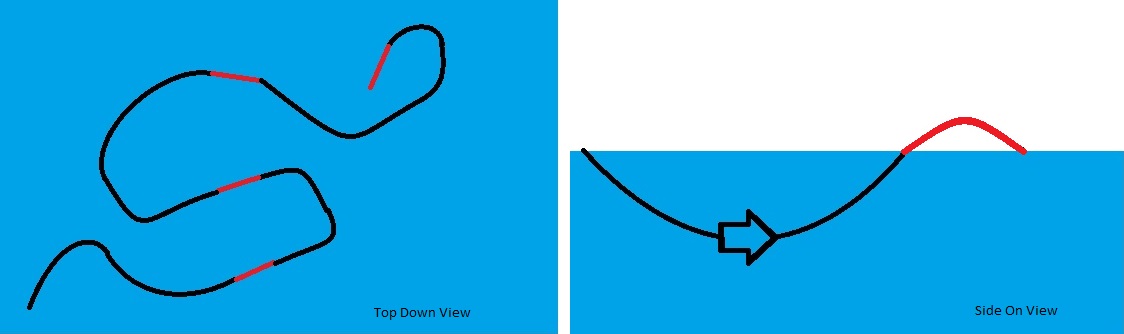
What the script is trying to accomplish isn't your average swimming. I'm intending to make it like dolphins, as in how they crest above the water and back in. Having control of direction with rotation while in water, but no control over forward momentum. Using unity character controller, I partially succeeded by using the water collider to invert gravity. The player will not always be in water so a basic movement has been attached for land walking.

Aims:

  • to have increased speed underwater

  • using rotation only to move

  • having a constant forward motion once entering water

  • a sinusoidal swim arc and once out of water you lose rotation control of direction (but keep player with camera rotation) - retaining forward momentum

So I nearly had it working with a slight problem of cresting out of the water, the momentum was aimed at global +Z. After tinkering with it, I broke it, didn't save the original. Trying to replicate the event but not quite getting it. I once had to it working so every time you entered the water collider, you pushed under at a fixed distance and emerged for a small fixed distance. Right now, the amplitude of the swim arc is too exaggerated. The below code is where I'm tinkering from.

From my little scripting experience this was the only way I could imaging how to do it, any help would be vastly appreciated.

Top down and Side on example : alt text
   using UnityEngine;
   using System.Collections;

     public class MoveThePlayer : MonoBehaviour {
 private float speed = 60.0F;
 private float swimSpeed = 1.5F;
 private float gravity = 20.0F;
 private Vector3 moveDirection = Vector3.zero;
 private Vector3 swimDirection = Vector3.zero;


 void OnTriggerEnter(Collider other)
 {
     
     if (other.gameObject.layer == LayerMask.NameToLayer ("Water"))

         gravity = -100F;

 }

 void OnTriggerStay(Collider other)
 {
     CharacterController controller = GetComponent<CharacterController>();
     if (other.gameObject.layer == LayerMask.NameToLayer ("Water"))

         controller.Move(swimDirection * Time.deltaTime);
         swimDirection = new Vector3(0, 0, Input.GetAxis("Vertical"));
         swimDirection = transform.TransformDirection(moveDirection);
         swimDirection *= swimSpeed;
         swimDirection.y -= gravity * Time.deltaTime;
 }


 void OnTriggerExit(Collider other)
 {
     if (other.gameObject.layer == LayerMask.NameToLayer ("Water")) 
         
         gravity = 20F; 

 }


 void FixedUpdate() 
 {
     CharacterController controller = GetComponent<CharacterController>();
     if (controller.isGrounded) 
     {
         moveDirection = new Vector3(0, 0, Input.GetAxis("Vertical"));
         moveDirection = transform.TransformDirection(moveDirection);
         moveDirection *= speed;
     }


     if(Input.GetKey("a"))
     {
                 transform.Rotate( 0,-2,0, Space.World);
     }
         
     if (Input.GetKey ("d")) 
     {
         transform.Rotate (0, 2, 0, Space.World);
     }

     moveDirection.y -= gravity * Time.deltaTime;
     controller.Move(moveDirection * Time.deltaTime);
 }

}

both-swimming-picture.jpg (40.9 kB)
Comment
Add comment
10 |3000 characters needed characters left characters exceeded
▼
  • Viewable by all users
  • Viewable by moderators
  • Viewable by moderators and the original poster
  • Advanced visibility
Viewable by all users

0 Replies

· Add your reply
  • Sort: 

Your answer

Hint: You can notify a user about this post by typing @username

Up to 2 attachments (including images) can be used with a maximum of 524.3 kB each and 1.0 MB total.

Follow this Question

Answers Answers and Comments

3 People are following this question.

avatar image avatar image avatar image

Related Questions

A graph to render sine wave with custom resolution 0 Answers

Character's jumping mechanism stuck into something invisible 1 Answer

Best way to simplify this code 1 Answer

Game object not enabled after SetActive(true). 1 Answer

[C#]How to save a list of items to use in another script and it's not a player prefs type of list? 0 Answers


Enterprise
Social Q&A

Social
Subscribe on YouTube social-youtube Follow on LinkedIn social-linkedin Follow on Twitter social-twitter Follow on Facebook social-facebook Follow on Instagram social-instagram

Footer

  • Purchase
    • Products
    • Subscription
    • Asset Store
    • Unity Gear
    • Resellers
  • Education
    • Students
    • Educators
    • Certification
    • Learn
    • Center of Excellence
  • Download
    • Unity
    • Beta Program
  • Unity Labs
    • Labs
    • Publications
  • Resources
    • Learn platform
    • Community
    • Documentation
    • Unity QA
    • FAQ
    • Services Status
    • Connect
  • About Unity
    • About Us
    • Blog
    • Events
    • Careers
    • Contact
    • Press
    • Partners
    • Affiliates
    • Security
Copyright © 2020 Unity Technologies
  • Legal
  • Privacy Policy
  • Cookies
  • Do Not Sell My Personal Information
  • Cookies Settings
"Unity", Unity logos, and other Unity trademarks are trademarks or registered trademarks of Unity Technologies or its affiliates in the U.S. and elsewhere (more info here). Other names or brands are trademarks of their respective owners.
  • Anonymous
  • Sign in
  • Create
  • Ask a question
  • Spaces
  • Default
  • Help Room
  • META
  • Moderators
  • Explore
  • Topics
  • Questions
  • Users
  • Badges
