
Wayback Machinekoobas.hobune.stream
May JUN Jul
Previous capture 13 Next capture
2021 2022 2023
1 capture
13 Jun 22 - 13 Jun 22
sparklines
Close Help
  • Products
  • Solutions
  • Made with Unity
  • Learning
  • Support & Services
  • Community
  • Asset Store
  • Get Unity

UNITY ACCOUNT

You need a Unity Account to shop in the Online and Asset Stores, participate in the Unity Community and manage your license portfolio. Login Create account
  • Blog
  • Forums
  • Answers
  • Evangelists
  • User Groups
  • Beta Program
  • Advisory Panel

Navigation

  • Home
  • Products
  • Solutions
  • Made with Unity
  • Learning
  • Support & Services
  • Community
    • Blog
    • Forums
    • Answers
    • Evangelists
    • User Groups
    • Beta Program
    • Advisory Panel

Unity account

You need a Unity Account to shop in the Online and Asset Stores, participate in the Unity Community and manage your license portfolio. Login Create account

Language

  • Chinese
  • Spanish
  • Japanese
  • Korean
  • Portuguese
  • Ask a question
  • Spaces
    • Default
    • Help Room
    • META
    • Moderators
    • Topics
    • Questions
    • Users
    • Badges
  • Home /
avatar image
1
Question by DimitriUK · Jan 11, 2014 at 05:16 AM · animationaudiosounddoors

Can you fix my code? (Audio for doors)

Hello, as you know I have really poor skills in JavaScripting and such, although I have learned several things, but this I have spent hours on.. I'm basically trying to make it play an open sound, when the OPEN animation begins, and the same for the CLOSE animation. All I simply want is two sound variables which I have done and want them to play when the doors do their job.

Please let me know if you can solve this code. Thank you.

pragma strict

 var doorObj:GameObject;
 var isOpen = false;
 var delay : float = 0.3;
 var openSound : AudioClip;
 var closeSound : AudioClip;
 
 
 function OnMouseDown(){
    Debug.Log("Mouse is down");
       
    if(!this.isOpen){
        doorObj.animation.Play("NewOpen");
        this.isOpen = true;
        if (openSound)
         audio.PlayOneShot(openSound);
            
       }else{
          doorObj.animation.Play("NewClose");
          this.isOpen = false;
          if (closeSound)
         audio.PlayOneShot(closeSound);
       }
 }
       
       function Start() {
       }
       function Update() {
       }
Comment
Add comment · Show 6
10 |3000 characters needed characters left characters exceeded
▼
  • Viewable by all users
  • Viewable by moderators
  • Viewable by moderators and the original poster
  • Advanced visibility
Viewable by all users
avatar image KellyThomas · Jan 11, 2014 at 05:20 AM 0
Share

What happens when you run this?

avatar image DaveA · Jan 11, 2014 at 05:20 AM 0
Share

What's not working? You do have a Collider on the door object, right?

avatar image DimitriUK · Jan 11, 2014 at 01:50 PM 0
Share

Everything is working, just I can't get the sounds to play when the animations play.

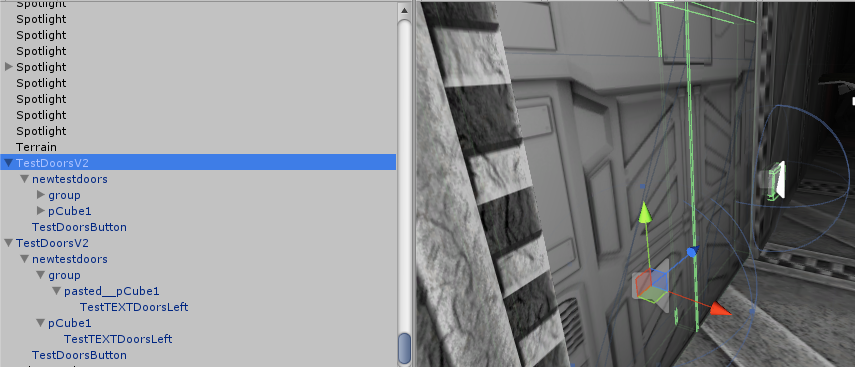
You can see in this image below, I have the parent and then the doors below which contains the two animations to be played: NewOpen and NewClose.

alt text

unityq1.png (169 B)
avatar image DimitriUK · Jan 11, 2014 at 01:50 PM 0
Share

alt text

unityq1.png (300.8 kB)
avatar image KellyThomas · Jan 11, 2014 at 02:09 PM 0
Share

Have you double checked that openSound and closeSound have clips assigned in the inspector?

Show more comments

2 Replies

· Add your reply
  • Sort: 
avatar image
0
Best Answer

Answer by KellyThomas · Jan 11, 2014 at 02:31 PM

From the screenshots it looks like you are missing the AudioSource component on those doors.

Comment
Add comment · Show 3 · Share
10 |3000 characters needed characters left characters exceeded
▼
  • Viewable by all users
  • Viewable by moderators
  • Viewable by moderators and the original poster
  • Advanced visibility
Viewable by all users
avatar image Sericet1 · Jan 11, 2014 at 02:43 PM 0
Share

Your code looks correct. Here is what I think is going wrong but I could be incorrect.

You have the script on the parent door which calls for the animations. However the animations don't exit on the parent, they exist on the newtestdoors.

So what I think might work is to call the animations on the newtestdoors ins$$anonymous$$d. something like this (I did not try it but its better than nothing)

 var doorObj : GameObject;
 var isOpen = false;
 var delay = 0.3;
 var openSound : AudioClip;
 var closeSound : AudioClip;
 var Animation : anim; //declares this variable to be of type Animation
  
 fuction Awake()
 {
 anim = GameObject.Find("newtestdoors").GetComponent(Animation);
 } 
 
 function On$$anonymous$$ouseDown(){
    Debug.Log("$$anonymous$$ouse is down");
  
    if(!isOpen){
 anim.Play("NewOpen");
        isOpen = true;
        audio.PlayOneShot(openSound);
  
      }else{
         anim.Play("NewClose");
         isOpen = false;
         audio.PlayOneShot(closeSound);
      }
 }
avatar image DimitriUK · Jan 11, 2014 at 03:13 PM 0
Share

Your script looks correct buddy, although I'm getting Assets/Scripts/door.js(6,17): BCE0018: The name 'anim' does not denote a valid type ('not found'). And I'm too bad at scripting to figure out what that even means! Hahaha! Thanks for trying though!

NEW UPDATE: You fixed it! I forgot to put AudioSource components in the game objects! Thank you man, brilliant!!

avatar image DimitriUK · Jan 11, 2014 at 04:03 PM 0
Share

Looks like "From the screenshots it looks like you are missing the AudioSource component on those doors."

That was indeed the correct problem, I didn't even put any AudioSource components in my GameObjects!

avatar image
0

Answer by Psycho8Vegemite · Jan 11, 2014 at 11:43 AM

This should work, personally I've never used 'this' in any of my scripting so I'm not sure what it does but this will defiantly work if its attached to the door with animations on it.

 var doorObj : GameObject;
 var isOpen = false;
 var delay = 0.3;
 var openSound : AudioClip;
 var closeSound : AudioClip;
  
  
 function OnMouseDown(){
    Debug.Log("Mouse is down");
  
    if(!isOpen){
        animation.Play("NewOpen");
        isOpen = true;
        audio.PlayOneShot(openSound);
  
      }else{
         animation.Play("NewClose");
         isOpen = false;
         audio.PlayOneShot(closeSound);
      }
 }

Also you can't ask if("AudioClip"), unless you were trying to see if its null (vars filled in) just put if("Variable" == null){ then if you don't have an audio clip in it, it won't turn up as a error, or if your seeing if it's playing put if(audio.isPlaying){.

Comment
Add comment · Show 1 · Share
10 |3000 characters needed characters left characters exceeded
▼
  • Viewable by all users
  • Viewable by moderators
  • Viewable by moderators and the original poster
  • Advanced visibility
Viewable by all users
avatar image DimitriUK · Jan 11, 2014 at 02:05 PM 0
Share

I wish I could say it work, but I'm afraid I couldn't get it to work. It asked me for an animation on my main parent object, when the animations are supposed to be on the object "newtestdoors"

I tried putting the animations on the parent object, but then that didn't work.

Your answer

Hint: You can notify a user about this post by typing @username

Up to 2 attachments (including images) can be used with a maximum of 524.3 kB each and 1.0 MB total.

Follow this Question

Answers Answers and Comments

22 People are following this question.

avatar image avatar image avatar image avatar image avatar image avatar image avatar image avatar image avatar image avatar image avatar image avatar image avatar image avatar image avatar image avatar image avatar image avatar image avatar image avatar image avatar image avatar image

Related Questions

Play from a variety of sounds? 1 Answer

Can you make this work? (Click Collider = Make Sound) 2 Answers

Play sound on animation event? 3 Answers

Sprinting Audio Problem 1 Answer

GameObject reacts to audio source 1 Answer


Enterprise
Social Q&A

Social
Subscribe on YouTube social-youtube Follow on LinkedIn social-linkedin Follow on Twitter social-twitter Follow on Facebook social-facebook Follow on Instagram social-instagram

Footer

  • Purchase
    • Products
    • Subscription
    • Asset Store
    • Unity Gear
    • Resellers
  • Education
    • Students
    • Educators
    • Certification
    • Learn
    • Center of Excellence
  • Download
    • Unity
    • Beta Program
  • Unity Labs
    • Labs
    • Publications
  • Resources
    • Learn platform
    • Community
    • Documentation
    • Unity QA
    • FAQ
    • Services Status
    • Connect
  • About Unity
    • About Us
    • Blog
    • Events
    • Careers
    • Contact
    • Press
    • Partners
    • Affiliates
    • Security
Copyright © 2020 Unity Technologies
  • Legal
  • Privacy Policy
  • Cookies
  • Do Not Sell My Personal Information
  • Cookies Settings
"Unity", Unity logos, and other Unity trademarks are trademarks or registered trademarks of Unity Technologies or its affiliates in the U.S. and elsewhere (more info here). Other names or brands are trademarks of their respective owners.
  • Anonymous
  • Sign in
  • Create
  • Ask a question
  • Spaces
  • Default
  • Help Room
  • META
  • Moderators
  • Explore
  • Topics
  • Questions
  • Users
  • Badges
