
Wayback Machinekoobas.hobune.stream
May JUN Jul
Previous capture 12 Next capture
2021 2022 2023
1 capture
12 Jun 22 - 12 Jun 22
sparklines
Close Help
  • Products
  • Solutions
  • Made with Unity
  • Learning
  • Support & Services
  • Community
  • Asset Store
  • Get Unity

UNITY ACCOUNT

You need a Unity Account to shop in the Online and Asset Stores, participate in the Unity Community and manage your license portfolio. Login Create account
  • Blog
  • Forums
  • Answers
  • Evangelists
  • User Groups
  • Beta Program
  • Advisory Panel

Navigation

  • Home
  • Products
  • Solutions
  • Made with Unity
  • Learning
  • Support & Services
  • Community
    • Blog
    • Forums
    • Answers
    • Evangelists
    • User Groups
    • Beta Program
    • Advisory Panel

Unity account

You need a Unity Account to shop in the Online and Asset Stores, participate in the Unity Community and manage your license portfolio. Login Create account

Language

  • Chinese
  • Spanish
  • Japanese
  • Korean
  • Portuguese
  • Ask a question
  • Spaces
    • Default
    • Help Room
    • META
    • Moderators
    • Topics
    • Questions
    • Users
    • Badges
  • Home /
avatar image
0
Question by Ray-Koopa · Jan 07, 2016 at 10:12 PM · collisionphysicsboxcolliderfalling-through-floor

Quickly moving cubes fall through quad floor

I was playing around with physics in Unity, and ran into my first problem.

I have a very big quad (100x100 units) rotated to become a floor, on which I want cubes to fall. These cubes are randomly spawned 100 to 2500 units above the floor, and speed towards it at intense speed.

While some cubes correctly bounce of the quad, many cubes fall right through it. It is even seen how some crash intersectingly into the quad and then fall through. Cubes falling through floor
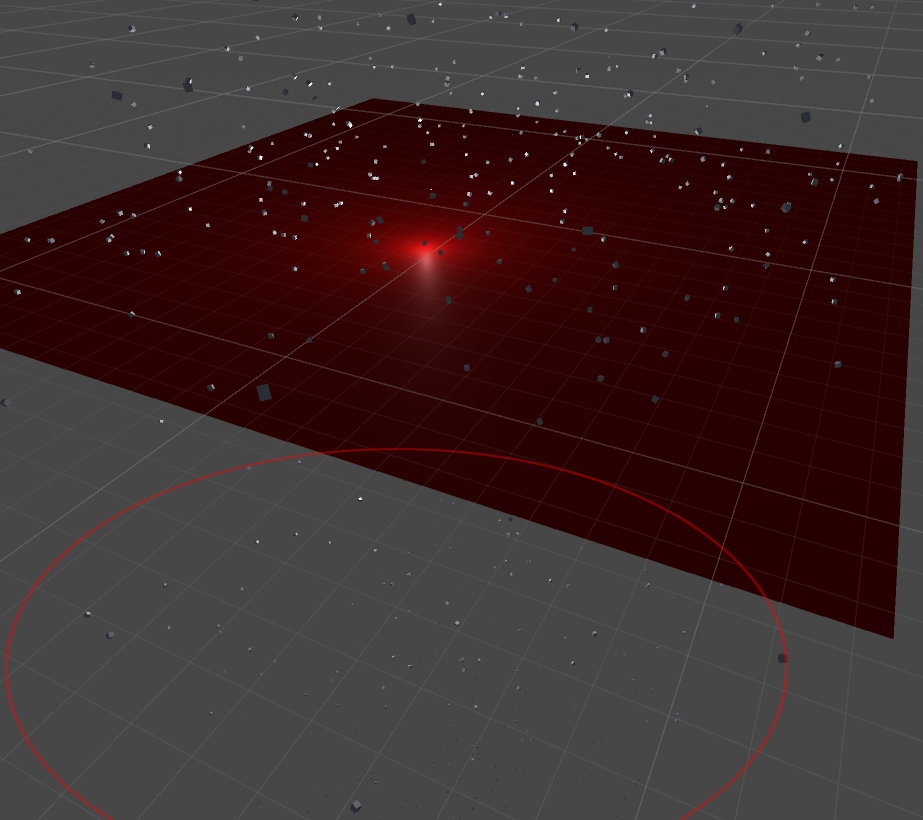
Both the cubes and the quad use box colliders, fitted tightly around the meshes (I tried mesh colliders before, but they had the same issue).

My theory is that the higher-spawned cubes rush towards the quad in such an intense speed that the collision is not detected anymore. However, I'd expect from physics that the way from one frame to the next is correctly checked for intersecting objects and that even infinitely fast objects would bounce back.

If any more information is required, I uploaded the playground project here.

The script creating the cubes is as follows:

 private void Start()
 {
     for (int i = 0; i < 2500; i++)
     {
         GameObject cube = GameObject.CreatePrimitive(PrimitiveType.Cube);
         cube.transform.position = new Vector3(Random.Range(-100, 100), Random.Range(100, 2500),
             Random.Range(-100, 100));
         cube.transform.rotation = Random.rotationUniform;
         cube.AddComponent<Rigidbody>();
         cube.AddComponent<BoxCollider>();
     }
 }

untitled-1.png (134.6 kB)
testproject.zip (33.1 kB)
Comment
Add comment
10 |3000 characters needed characters left characters exceeded
▼
  • Viewable by all users
  • Viewable by moderators
  • Viewable by moderators and the original poster
  • Advanced visibility
Viewable by all users

3 Replies

· Add your reply
  • Sort: 
avatar image
2
Best Answer

Answer by TSRajesh · Jan 07, 2016 at 10:20 PM

Rigidbody collision detection will be "discrete" by default.. And you may not want to up it to continuous for performance reasons.. Yor best bet would be to increase the colider thickness on the floor.

Comment
Add comment · Show 1 · Share
10 |3000 characters needed characters left characters exceeded
▼
  • Viewable by all users
  • Viewable by moderators
  • Viewable by moderators and the original poster
  • Advanced visibility
Viewable by all users
avatar image Ray-Koopa · Jan 17, 2016 at 12:32 PM 0
Share

While I understand that this shouldn't be used in real-life projects, it did well for this quick feature test. For a real game, I would think about thicker colliders as said.

avatar image
0

Answer by LessThanEpic · Jan 07, 2016 at 10:20 PM

Unfortunately Unity's physics don't currently handle this. If you have objects moving fast enough then the collision will be missed. You can decrease the time-step for physics calculations, but even that won't handle everything. You usually end up having to implement your own solution or use something like this.

http://wiki.unity3d.com/index.php/DontGoThroughThings

Comment
Add comment · Share
10 |3000 characters needed characters left characters exceeded
▼
  • Viewable by all users
  • Viewable by moderators
  • Viewable by moderators and the original poster
  • Advanced visibility
Viewable by all users
avatar image
0

Answer by Dudicus · Jan 18, 2016 at 12:56 PM

If a fast moving object goes through the collider between frames nothing will happen as if the collider wan't there at all!

Comment
Add comment · Share
10 |3000 characters needed characters left characters exceeded
▼
  • Viewable by all users
  • Viewable by moderators
  • Viewable by moderators and the original poster
  • Advanced visibility
Viewable by all users

Your answer

Hint: You can notify a user about this post by typing @username

Up to 2 attachments (including images) can be used with a maximum of 524.3 kB each and 1.0 MB total.

Follow this Question

Answers Answers and Comments

5 People are following this question.

avatar image avatar image avatar image avatar image avatar image

Related Questions

Big issue with colliders 1 Answer

Bump when crossing box colliders 1 Answer

Moving Object with a Rigidbody and Capsule Collider falls from the crack between two Box Colliders. 0 Answers

Collision Detection for Kinematic Rigidbodies 0 Answers

I want collision boxes to be precise without overlapping each other 1 Answer


Enterprise
Social Q&A

Social
Subscribe on YouTube social-youtube Follow on LinkedIn social-linkedin Follow on Twitter social-twitter Follow on Facebook social-facebook Follow on Instagram social-instagram

Footer

  • Purchase
    • Products
    • Subscription
    • Asset Store
    • Unity Gear
    • Resellers
  • Education
    • Students
    • Educators
    • Certification
    • Learn
    • Center of Excellence
  • Download
    • Unity
    • Beta Program
  • Unity Labs
    • Labs
    • Publications
  • Resources
    • Learn platform
    • Community
    • Documentation
    • Unity QA
    • FAQ
    • Services Status
    • Connect
  • About Unity
    • About Us
    • Blog
    • Events
    • Careers
    • Contact
    • Press
    • Partners
    • Affiliates
    • Security
Copyright © 2020 Unity Technologies
  • Legal
  • Privacy Policy
  • Cookies
  • Do Not Sell My Personal Information
  • Cookies Settings
"Unity", Unity logos, and other Unity trademarks are trademarks or registered trademarks of Unity Technologies or its affiliates in the U.S. and elsewhere (more info here). Other names or brands are trademarks of their respective owners.
  • Anonymous
  • Sign in
  • Create
  • Ask a question
  • Spaces
  • Default
  • Help Room
  • META
  • Moderators
  • Explore
  • Topics
  • Questions
  • Users
  • Badges
