
Wayback Machinekoobas.hobune.stream
May JUN Jul
Previous capture 13 Next capture
2021 2022 2023
1 capture
13 Jun 22 - 13 Jun 22
sparklines
Close Help
  • Products
  • Solutions
  • Made with Unity
  • Learning
  • Support & Services
  • Community
  • Asset Store
  • Get Unity

UNITY ACCOUNT

You need a Unity Account to shop in the Online and Asset Stores, participate in the Unity Community and manage your license portfolio. Login Create account
  • Blog
  • Forums
  • Answers
  • Evangelists
  • User Groups
  • Beta Program
  • Advisory Panel

Navigation

  • Home
  • Products
  • Solutions
  • Made with Unity
  • Learning
  • Support & Services
  • Community
    • Blog
    • Forums
    • Answers
    • Evangelists
    • User Groups
    • Beta Program
    • Advisory Panel

Unity account

You need a Unity Account to shop in the Online and Asset Stores, participate in the Unity Community and manage your license portfolio. Login Create account

Language

  • Chinese
  • Spanish
  • Japanese
  • Korean
  • Portuguese
  • Ask a question
  • Spaces
    • Default
    • Help Room
    • META
    • Moderators
    • Topics
    • Questions
    • Users
    • Badges
  • Home /
avatar image
0
Question by khoatic · Dec 15, 2013 at 10:21 PM · move an objectrotatearoundobject follow pathmouse orbit

Following Mouse Motion

In my 3D game, I have three main components to this mechanic: The Player which is pretty much acting as the pivot point, the object which rotates around the Player dictated by the mouse position, the mouse which can move anywhere on the screen but has the object follow it in its orbital circle around the player. Below is simply storyboard to display the effect im looking for in my 3D game. thanks in advance for any insight.
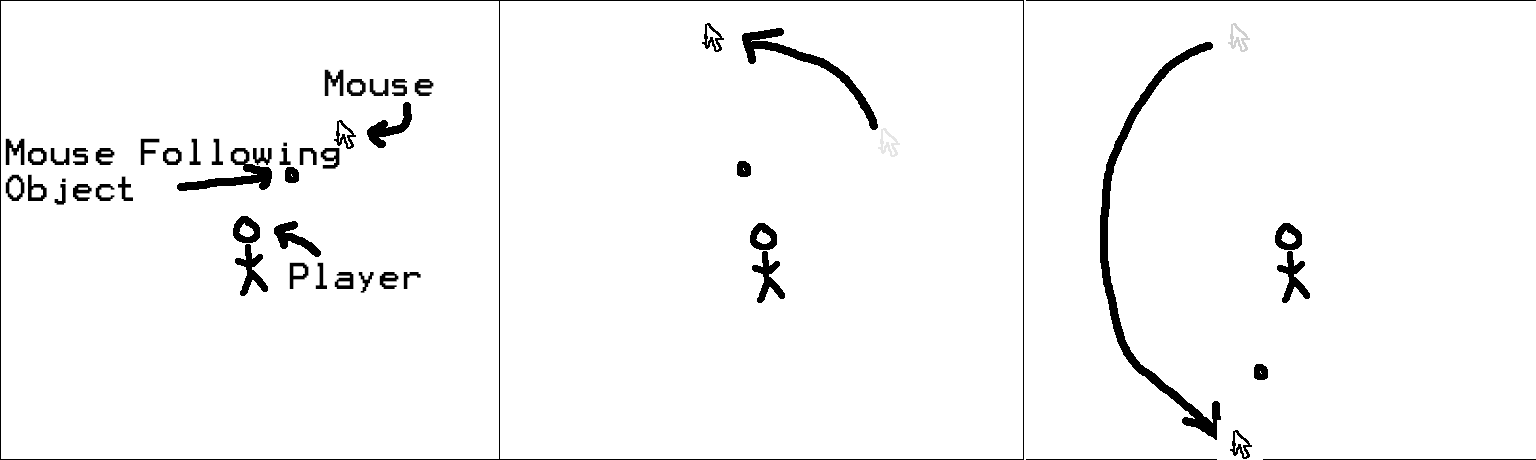
alt text

untitled-1.png (14.6 kB)
Comment
Add comment · Show 2
10 |3000 characters needed characters left characters exceeded
▼
  • Viewable by all users
  • Viewable by moderators
  • Viewable by moderators and the original poster
  • Advanced visibility
Viewable by all users
avatar image robertbu · Dec 15, 2013 at 10:55 PM 0
Share
  • Is this a 2D or 3D game?

  • Does the camera angle vary with respect to the player?

  • Is the camera aligned with the axes?

  • Does the distance between the player and the object change?

  • Is the object's rotation fixed, or does it need to rotate to match the various angles with respect to the player?

  • What defines the orbit of the 'object'?

  • Is the following to be smoothed or immediate?

avatar image khoatic · Dec 15, 2013 at 10:58 PM 0
Share
  • 3D

  • camera is centered on player

  • no, its at an angle

  • no

  • it is fixed

  • the distance from the player to this object must remain the same

  • it needs to happen in real time and have no delay

1 Reply

· Add your reply
  • Sort: 
avatar image
1
Best Answer

Answer by robertbu · Dec 15, 2013 at 11:50 PM

Here is a solution given the criteria that you've outlined. Since the camera is not axes aligned, the code uses Unity's mathematical Plane object and does a Plane.Raycast() to figure out a hit point. This script goes on the 'object' and you need to initialize 'target' in the inspector by dragging and dropping your 'Player' object onto the variable. The distance is calculated from the original distance the 'object' is from the 'Player'.

 #pragma strict
 
 var target : Transform;
 var dist : float;
 
 function Start() {
     dist = (target.position - transform.position).magnitude;
 }
 
 function Update() {
     var plane = Plane(Camera.main.transform.forward, target.transform.position);
     var ray = Camera.main.ScreenPointToRay(Input.mousePosition);
     
     var rayDist : float;
     plane.Raycast(ray, rayDist);
     var point = ray.GetPoint(rayDist);
     
     transform.position = target.position + (point - target.position).normalized * dist;
 }

This code creates a new plane each Update(). That's not very expensive, but it is unnecessary if the camera and the player do not move or rotate. If nothing moves or rotates, it could be done once in Start().

Comment
Add comment · Show 11 · Share
10 |3000 characters needed characters left characters exceeded
▼
  • Viewable by all users
  • Viewable by moderators
  • Viewable by moderators and the original poster
  • Advanced visibility
Viewable by all users
avatar image khoatic · Dec 16, 2013 at 11:13 AM 0
Share

it looks like its working just like i was looking for, Only thing im looking to change is the axis on which its orbiting around.

avatar image robertbu · Dec 16, 2013 at 02:55 PM 0
Share

The axis rotation is the normal of the plane. So to use a different axis, use a different vector as the first parameter when creating the plane. Note if there is an chance that the normal will be orthogonal to the camera, then you will also have to add logic to handle the case that the Raycast() fails. That is, the code should be restructured to:

 if (plane.Raycast(ray, rayDist)) {
     var point = ray.GetPoint(rayDist);
  
     transform.position = target.position + (point - target.position).normalized * dist;
 }
avatar image khoatic · Dec 16, 2013 at 09:19 PM 0
Share

Ok So the last thing I feel that will bring it home, is how do i make it rotate along this new axis, in global coordinates? Right now its rotating correcting along the correct axis, but its slanted cus its in local coords. Also I appreciate your help thus far, you trully have been a huge help.

avatar image robertbu · Dec 16, 2013 at 09:48 PM 0
Share

Its slanted because the axes of rotation is not aligned with the camera. It is not a local/global coordinate issue. Imagine you are holding a coin in your hand with and looking at the face. Now begin to flip that coin along any axis. As it rotates you get an angled ellipse and finally you are edge on to the coin. That is what happens if you select an axis other than Camera.forward for the plane. The circle (and it will be a circle since you specified that the the object distance remain the same), becomes angled with respect to the camera so that it appears as an ellipse.

You are looking for something specific here that I think I'm missing. There are so many different ways to view this problem, which is why I tried to be so specific with my comments/questions up front.

avatar image khoatic · Dec 16, 2013 at 10:04 PM 0
Share

Im looking to have this rotation go around it in 3D space. I changed the axis to Camera.up, so it should rotate it parallel to the ground in the scene. right now since the camera is at an angle its rotating as if its going through the ground, not along it.

Show more comments

Your answer

Hint: You can notify a user about this post by typing @username

Up to 2 attachments (including images) can be used with a maximum of 524.3 kB each and 1.0 MB total.

Follow this Question

Answers Answers and Comments

16 People are following this question.

avatar image avatar image avatar image avatar image avatar image avatar image avatar image avatar image avatar image avatar image avatar image avatar image avatar image avatar image avatar image avatar image

Related Questions

Object Rotating around center from Mouse Movement 1 Answer

Character movement on the other Object which is moving ? 0 Answers

Physics2D and curved movement 1 Answer

Moving the camera? 2 Answers

I need a box to move from a to b to a and loop it 0 Answers


Enterprise
Social Q&A

Social
Subscribe on YouTube social-youtube Follow on LinkedIn social-linkedin Follow on Twitter social-twitter Follow on Facebook social-facebook Follow on Instagram social-instagram

Footer

  • Purchase
    • Products
    • Subscription
    • Asset Store
    • Unity Gear
    • Resellers
  • Education
    • Students
    • Educators
    • Certification
    • Learn
    • Center of Excellence
  • Download
    • Unity
    • Beta Program
  • Unity Labs
    • Labs
    • Publications
  • Resources
    • Learn platform
    • Community
    • Documentation
    • Unity QA
    • FAQ
    • Services Status
    • Connect
  • About Unity
    • About Us
    • Blog
    • Events
    • Careers
    • Contact
    • Press
    • Partners
    • Affiliates
    • Security
Copyright © 2020 Unity Technologies
  • Legal
  • Privacy Policy
  • Cookies
  • Do Not Sell My Personal Information
  • Cookies Settings
"Unity", Unity logos, and other Unity trademarks are trademarks or registered trademarks of Unity Technologies or its affiliates in the U.S. and elsewhere (more info here). Other names or brands are trademarks of their respective owners.
  • Anonymous
  • Sign in
  • Create
  • Ask a question
  • Spaces
  • Default
  • Help Room
  • META
  • Moderators
  • Explore
  • Topics
  • Questions
  • Users
  • Badges
