
Wayback Machinekoobas.hobune.stream
May JUN Jul
Previous capture 13 Next capture
2021 2022 2023
1 capture
13 Jun 22 - 13 Jun 22
sparklines
Close Help
  • Products
  • Solutions
  • Made with Unity
  • Learning
  • Support & Services
  • Community
  • Asset Store
  • Get Unity

UNITY ACCOUNT

You need a Unity Account to shop in the Online and Asset Stores, participate in the Unity Community and manage your license portfolio. Login Create account
  • Blog
  • Forums
  • Answers
  • Evangelists
  • User Groups
  • Beta Program
  • Advisory Panel

Navigation

  • Home
  • Products
  • Solutions
  • Made with Unity
  • Learning
  • Support & Services
  • Community
    • Blog
    • Forums
    • Answers
    • Evangelists
    • User Groups
    • Beta Program
    • Advisory Panel

Unity account

You need a Unity Account to shop in the Online and Asset Stores, participate in the Unity Community and manage your license portfolio. Login Create account

Language

  • Chinese
  • Spanish
  • Japanese
  • Korean
  • Portuguese
  • Ask a question
  • Spaces
    • Default
    • Help Room
    • META
    • Moderators
    • Topics
    • Questions
    • Users
    • Badges
  • Home /
avatar image
8
Question by zcoldrick · Jan 29, 2014 at 07:22 PM · blendshapeslimits

Blendshapes values < 0 or > 100

I have several imported morphs (blendshapes) from an FBX character. These work but only between values of 0 and 100.

Which isn't very useful because many of the morphs require over morphing or under morphing for example open and close eyes requires negative morph numbers.

Am I missing an option to turn limits off and allow over-morphing?

Comment
Add comment · Show 5
10 |3000 characters needed characters left characters exceeded
▼
  • Viewable by all users
  • Viewable by moderators
  • Viewable by moderators and the original poster
  • Advanced visibility
Viewable by all users
avatar image bastianLstrube · Mar 11, 2014 at 04:54 PM 0
Share

I would really like an answer to this as well!

reputation to low to vote right now, I'll come back with an upvote later

avatar image zaneev10 · May 21, 2014 at 09:50 PM 0
Share

I am also very interested in this!

avatar image Metatronic · Jan 26, 2015 at 03:59 AM 0
Share

I have several morphs that require the use of negative values also.

avatar image embeh · Feb 12, 2015 at 01:37 PM 0
Share

Yeah, would make live a lot easier of blendshape weights could go beyond 0-100

Actually it is interesting that the Script Reference says "At weight 0 BlendShape has no influence, at weight 1 BlendShape is fully active, but weight is not limited to [0; 1] range." - but there is no effect outside that range (which actually should be [0;100])...

avatar image tobemayr · Feb 04, 2019 at 10:55 AM 0
Share

2019, this is still a valid request

co$$anonymous$$g from all other animation packages I have experience with, they allow both over and negative blends

2 Replies

· Add your reply
  • Sort: 
avatar image
0

Answer by Bunny83 · Feb 04, 2019 at 12:22 PM

This isn't possible and can't be implemented that easy. The blendshapes are called "morph targets". Since a single morph can have several intermediate frames, extrapolating the delta of the last frame / first frame would most likely result in a total mess. The blendshape weigths just control how far the blendshape has been "played". It's literally just a percentage / normalized time. If you need some sort of over / undershooting you have to create them as seperate frames in the blendshape animation.


Keep in mind that Unity is not an animation tool. It just interpolates the given animation data. See AddBlendShapeFrame for more insight. So if you want a blendshape animation that first undershoots and then blends towards the target frame and overshoots at the end before it settles at the target, you have to use at least 4 frames

   0 - Initial position
  10 - undershoot position
  90 - overshoot position
 100 - target position

Now when you "play" this animation it first undershoots and at the target it overshoots. Just like bone animations they never extrapolate over the defined animations. If you need an over / undershoot in your animation it need to be animated like this. Unity only controls the "time" of the animation and only interpolates between the animation data.

Comment
Add comment · Share
10 |3000 characters needed characters left characters exceeded
▼
  • Viewable by all users
  • Viewable by moderators
  • Viewable by moderators and the original poster
  • Advanced visibility
Viewable by all users
avatar image
0

Answer by tobemayr · Feb 04, 2019 at 01:08 PM

Hi,

Thanks for your answer. Obviously I have no understanding of the technical implementations, so most of your elaborate answer goes over my head.

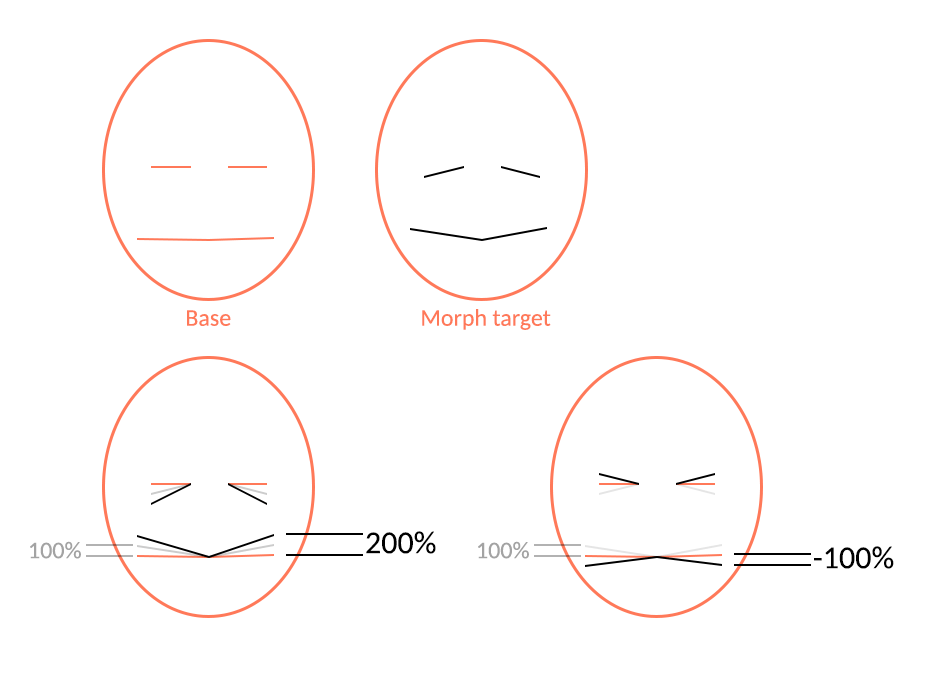
I was hoping that morph targets are represented by individual deltas of XYZ position per vertex, and that the blendshape value simply takes a 0-100 fraction of the delta and applies it to each vertex postion.

Hence my assumption this delta could be high than 100% and negative, as it would 'simply' increase the positional delta.
alt text


overmorph.gif (21.7 kB)
Comment
Add comment · Share
10 |3000 characters needed characters left characters exceeded
▼
  • Viewable by all users
  • Viewable by moderators
  • Viewable by moderators and the original poster
  • Advanced visibility
Viewable by all users

Your answer

Hint: You can notify a user about this post by typing @username

Up to 2 attachments (including images) can be used with a maximum of 524.3 kB each and 1.0 MB total.

Follow this Question

Answers Answers and Comments

25 People are following this question.

avatar image avatar image avatar image avatar image avatar image avatar image avatar image avatar image avatar image avatar image avatar image avatar image avatar image avatar image avatar image avatar image avatar image avatar image avatar image avatar image avatar image avatar image avatar image avatar image avatar image

Related Questions

Playing blend shape animations from blender!! 1 Answer

Mecanim 'Locking' my facial blendshapes 2 Answers

Import FBX from 3Dsmax (2017) with Skin AND Morph modifier to use with Animator (Unity 5). 2 Answers

Animation for fat and slim character that is done by blendshape. 0 Answers

How can I set limits to camera pan on X and Y axis 1 Answer


Enterprise
Social Q&A

Social
Subscribe on YouTube social-youtube Follow on LinkedIn social-linkedin Follow on Twitter social-twitter Follow on Facebook social-facebook Follow on Instagram social-instagram

Footer

  • Purchase
    • Products
    • Subscription
    • Asset Store
    • Unity Gear
    • Resellers
  • Education
    • Students
    • Educators
    • Certification
    • Learn
    • Center of Excellence
  • Download
    • Unity
    • Beta Program
  • Unity Labs
    • Labs
    • Publications
  • Resources
    • Learn platform
    • Community
    • Documentation
    • Unity QA
    • FAQ
    • Services Status
    • Connect
  • About Unity
    • About Us
    • Blog
    • Events
    • Careers
    • Contact
    • Press
    • Partners
    • Affiliates
    • Security
Copyright © 2020 Unity Technologies
  • Legal
  • Privacy Policy
  • Cookies
  • Do Not Sell My Personal Information
  • Cookies Settings
"Unity", Unity logos, and other Unity trademarks are trademarks or registered trademarks of Unity Technologies or its affiliates in the U.S. and elsewhere (more info here). Other names or brands are trademarks of their respective owners.
  • Anonymous
  • Sign in
  • Create
  • Ask a question
  • Spaces
  • Default
  • Help Room
  • META
  • Moderators
  • Explore
  • Topics
  • Questions
  • Users
  • Badges
