
Wayback Machinekoobas.hobune.stream
May JUN Jul
Previous capture 12 Next capture
2021 2022 2023
1 capture
12 Jun 22 - 12 Jun 22
sparklines
Close Help
  • Products
  • Solutions
  • Made with Unity
  • Learning
  • Support & Services
  • Community
  • Asset Store
  • Get Unity

UNITY ACCOUNT

You need a Unity Account to shop in the Online and Asset Stores, participate in the Unity Community and manage your license portfolio. Login Create account
  • Blog
  • Forums
  • Answers
  • Evangelists
  • User Groups
  • Beta Program
  • Advisory Panel

Navigation

  • Home
  • Products
  • Solutions
  • Made with Unity
  • Learning
  • Support & Services
  • Community
    • Blog
    • Forums
    • Answers
    • Evangelists
    • User Groups
    • Beta Program
    • Advisory Panel

Unity account

You need a Unity Account to shop in the Online and Asset Stores, participate in the Unity Community and manage your license portfolio. Login Create account

Language

  • Chinese
  • Spanish
  • Japanese
  • Korean
  • Portuguese
  • Ask a question
  • Spaces
    • Default
    • Help Room
    • META
    • Moderators
    • Topics
    • Questions
    • Users
    • Badges
  • Home /
avatar image
0
Question by UniteCrafty · Aug 19, 2017 at 08:16 PM · transformpositioninherited-memberssphere raycast

Looking for a solution as to why my collider array isn't registering any objects.

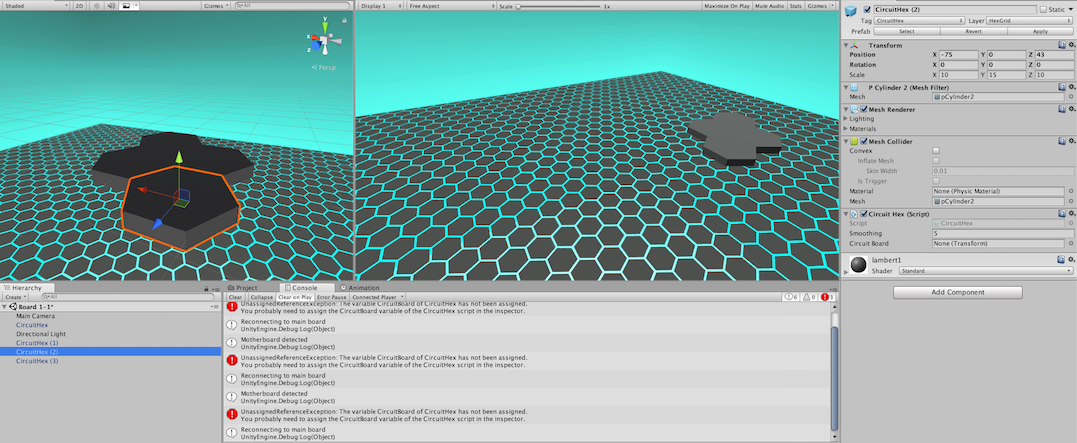
I'll see what I can do to explain this in code and screenshots. I have a prefab mesh which I'm after some code on.
alt text

That hexagonal tile you can see is the one: the CircuitHex. You'll notice there are a few others too, flush fit together. That script that it has includes a function call which I hopefully want to get working.

I want an array to be made, which identifies the hexe's neighboring tiles, i.e the six possible spaces a tile can fit in next to it.

Currently it's doing it like so.

 public class Hex : MonoBehaviour {
 
     public virtual void RegisterHexes()
     {
      Collider[] adjacentHexes = Physics.OverlapSphere(position: gameObject.transform.position, radius: 86.0f, layerMask:8);
         foreach (Collider hex in adjacentHexes)
         {
             print("Neighbor Found");
         }
     }
 }

That's a parent class by the way, and I had a look around at various ways of detecting the objects, opting for a sphere check. If you know of any better ways of checking for the surrounding hexes do tell me.

That RegisterHexes should, unless I've got my syntax muddled, print out a message for each of the objects that the sphere check picks up (Should print twice for this hex, since there are two next to it.)

And this function is currently being called in the child class, inside a function of its own, called Activated, which I've just set to fire on a standard mouse click on the object.

 public class CircuitHex : Hex
  {
  void Activated()
     {
         RegisterHexes();
 
         if (OnActivation != null)
         {
             OnActivation();
         }
     }
 }

Unfortunately this code isn't working properly. I checked the debug and RegisterHexes is indeed being called when I click the hex, but no message is being printed, meaning no neiboring hexes are being found. The radius and layermask should be fine. I have a sneaking suspicion it's because there's no gameobject attached to the parent class, since the CircuitHex child script is the one attached to the gameobject.

Is there a way to get around this problem? Ideally I don't want to move that check function down into the child, since other scripts will need it, and I'd sooner pass it to them through inheritance than using an instance or a delegate.

Any help is greatly appreciated. Hope my question is understandable.

screen-shot-2017-08-19-at-203554.png (521.7 kB)
Comment
Add comment · Show 2
10 |3000 characters needed characters left characters exceeded
▼
  • Viewable by all users
  • Viewable by moderators
  • Viewable by moderators and the original poster
  • Advanced visibility
Viewable by all users
avatar image Welgum · Aug 19, 2017 at 08:26 PM 0
Share

I'm not sure, but try adding a rigitbody component

avatar image UniteCrafty Welgum · Aug 19, 2017 at 08:39 PM 0
Share

Was hoping to avoid physics where I could, since these tiles won't be moving, except through a coroutine. The Rigidbody doesn't seem to have changed anything unfortunately.

0 Replies

· Add your reply
  • Sort: 

Your answer

Hint: You can notify a user about this post by typing @username

Up to 2 attachments (including images) can be used with a maximum of 524.3 kB each and 1.0 MB total.

Follow this Question

Answers Answers and Comments

88 People are following this question.

avatar image avatar image avatar image avatar image avatar image avatar image avatar image avatar image avatar image avatar image avatar image avatar image avatar image avatar image avatar image avatar image avatar image avatar image avatar image avatar image avatar image avatar image avatar image avatar image avatar image avatar image avatar image avatar image avatar image avatar image avatar image avatar image avatar image avatar image avatar image avatar image avatar image avatar image avatar image avatar image avatar image avatar image avatar image avatar image avatar image avatar image avatar image avatar image avatar image avatar image avatar image avatar image avatar image avatar image avatar image avatar image avatar image avatar image avatar image avatar image avatar image avatar image avatar image avatar image avatar image avatar image avatar image avatar image avatar image avatar image avatar image avatar image avatar image avatar image avatar image avatar image avatar image avatar image avatar image avatar image avatar image avatar image avatar image avatar image avatar image avatar image avatar image avatar image

Related Questions

Removing Vector3 Decimal for Position 2 Answers

does not work check if dead 1 Answer

Help around an approach to a "Virtual Motion Table" in Unity 0 Answers

Instantiated prefab position 5 Answers

Setting Position of Spawned Prefab 2 Answers


Enterprise
Social Q&A

Social
Subscribe on YouTube social-youtube Follow on LinkedIn social-linkedin Follow on Twitter social-twitter Follow on Facebook social-facebook Follow on Instagram social-instagram

Footer

  • Purchase
    • Products
    • Subscription
    • Asset Store
    • Unity Gear
    • Resellers
  • Education
    • Students
    • Educators
    • Certification
    • Learn
    • Center of Excellence
  • Download
    • Unity
    • Beta Program
  • Unity Labs
    • Labs
    • Publications
  • Resources
    • Learn platform
    • Community
    • Documentation
    • Unity QA
    • FAQ
    • Services Status
    • Connect
  • About Unity
    • About Us
    • Blog
    • Events
    • Careers
    • Contact
    • Press
    • Partners
    • Affiliates
    • Security
Copyright © 2020 Unity Technologies
  • Legal
  • Privacy Policy
  • Cookies
  • Do Not Sell My Personal Information
  • Cookies Settings
"Unity", Unity logos, and other Unity trademarks are trademarks or registered trademarks of Unity Technologies or its affiliates in the U.S. and elsewhere (more info here). Other names or brands are trademarks of their respective owners.
  • Anonymous
  • Sign in
  • Create
  • Ask a question
  • Spaces
  • Default
  • Help Room
  • META
  • Moderators
  • Explore
  • Topics
  • Questions
  • Users
  • Badges
