 koobas.hobune.stream


Too subjective and argumentative

If statement executes, even when its false again
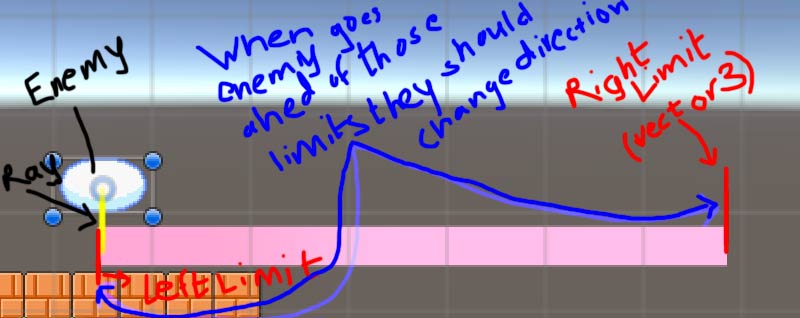 I am making a 2D game were in when a enemy prefab is instantiated enemy should be able to move around the specific floor on which he has been instantiated . For example if he is instantiated and falls on a floor which holds the layer named platform then he should calculate the limits to which extent he would move over that floor
     public class Temp : MonoBehaviour {

         struct Values
         {
             public GameObject LandingPlatform ;
             public BoxCollider2D _boxCollider ;
             public Bounds platformBound ;
             public Vector3 LeftLimit ;
             public Vector3 RightLimit ;

         }

         //-------------- Just for checking the wether the limits are working correctly
             public Vector3 LeftLimit ;
             public Vector3 RightLimit ;
         //--------------

         Values _values ;
         RaycastHit2D _raycastHit ;
         RaycastHit2D previousRaycastHit ;
         public LayerMask platform ;

         void Update ()
         {
             EnemyPlatformLimit();
             LeftLimit = _values.LeftLimit ;
             RightLimit = _values.RightLimit ;
         }

         void EnemyPlatformLimit()
         {
             DrawRay (gameObject.transform.position , -Vector2.up * 1.5f , Color.yellow ) ;
             previousRaycastHit = _raycastHit ;
             _raycastHit = Physics2D.Raycast ( gameObject.transform.position , -Vector2.up , 1.5f , platform) ;

             if(_raycastHit && _raycastHit != previousRaycastHit)
                 {
                     _values.LandingPlatform = _raycastHit.transform.gameObject ;
                     _values._boxCollider = _values.LandingPlatform.GetComponent<BoxCollider2D>() ;
                     _values.platformBound = _values._boxCollider.bounds ;
                     _values.LeftLimit = _values.platformBound.center - _values.platformBound.extents ;
                     _values.RightLimit = _values.platformBound.center + _values.platformBound.extents ;
                 }
             if ((_raycastHit))
             {
                 //both statements execute even though technically they should not
                 if(transform.position.x > _values.RightLimit.x)
                 {

                     Debug.Log(transform.position.x) ;
                     ChangeDirection();
                 }
                 else if (transform.position.x < _values.LeftLimit.x)
                 {
                     Debug.Log(transform.position.x) ;
                     ChangeDirection();
                 }
             }

         }

         void DrawRay(Vector3 origin , Vector2 dir , Color color)
         {
             Debug.DrawRay(origin , dir , color ) ;
         }
         void ChangeDirection()
         {}
     }

That code shouldn't even compile since it's syntax is wrong:
float leftlimit 2.3 ;
Should be:
float leftlimit = 2.3f;
...

You should format the text in your question correctly so it is easy to read for others.
It is an ordeal to read your code because it is all in one single line.The question title dosn't describe your problem in any way, it is also misleading. It can mean you have a problem with doing basic math in Unity, for example. But you don't. You have a problem with if statements. A more fitting question title would have been "If statement executes, even when its false again".
Your question text contains nothing that is of any information to us. There is no
if(2.3 > 10)condition. It's just a code snippet containing two if() statements that compare transform.position.x with some float value. You don't specify whatsomething()does.Additionally,
float leftlimit 2.3 ; float rightlimit 10;will immediately throw syntax errors. Consider viewing the Tutorial "Variables and Functions" in the Scripting section of in the Tutorial Page.
http://unity3d.com/learn/tutorials
I suggest you have a very extended look at the Scripting tutorials.
Your problem is that the conditions stay true once they were true at one point.
This is a very basic scripting topic.
You should read the FAQ before you post questions or comments in the future. http://answers.unity3d.com/page/faq.html

Sorry, but that question doesn't make any sense, be more clear.

Alright wait i will edit question in the way it was in my script :) sry for trouble
I don't believe you understand me correctly. Watch the beginner scripting tutorials here. This should clear many things for you.
I made a simple example script you can try it out in your scene. Just create a new Script called Zoelovezle and paste this into it and play with the Position variable in the inspector:
 using UnityEngine;
 using System.Collections;

 public class Zoelovezle : $$anonymous$$onoBehaviour {

 public float RightLimit = 3, LeftLimit = -3, Position = 0;
 public bool Do;

     void Update () {

         if((Do))//don't need a RayCast to show example, if(RayCastHit) returns a bool
         {
             if(Position > RightLimit)//don't need a transform because position.x is a float
             {
                 print("Bigger");
             }
             else
             {
                 if (Position < LeftLimit)
                 {
                     print("Smaller");
                 }
             }
         }
     }
 }
This works as intended. Your problem is what you do when the conditions are true.
Check if your transform.position.x is really bigger than the limit. Or if its really lower than the other limit.
$$anonymous$$aybe your are the wrong way around?
Again, watch the tutorials and read other articles in the documentation, this should makes things clear, this forum is not for online lessons. If you still have trouble, visit the Forums

Hi, have you tried to do this ? just adding a float format to "rightlimit" value ?
float leftlimit 2.3; float rightlimit 10.0;
xD
Please don't post non-serious comments or answers here.
Generally, please check your answer for errors and accuracy before you post it.
float leftlimit 2.3; float rightlimit 10.0;
This is still wrong code because there is no = between declaration and initialisation.
Have a look at Variables and Functions.
Like u said , i will check my compilation once again is using class better there instead a struct?
Again, read the FAQ before you continue to use the forum.
Don't comment now, read the FAQ page now and be sure you understand it please.
The reason why I say this: You are still not following the guide lines:
Don't post comments as new answers to your question.
I know that some forums are different, but Unity Answers is meant to be an organized source of help for everyone who uses Unity. So let's try to keep it that way. ;)
Struct: I don't know why you want a different class holding some variables anyway.
Why don't you declare all those variables inside the class like the others?
Then you wouldn't have to use _values.xxx = yyy all the time you could just write xxx = yyy.
It just makes no sense to me at the moment.
If you want to know about the difference between struct and class, google it.
I advise you one more time:
Please follow the forum guide lines if you want to use the forum.



