 koobas.hobune.stream


Streched texture only on x axis of procedural generated mesh
I followed the Unity Tutorial of creating a procedural cave. The map generates nicly but on the "walls" the texture is streched on the x axis. 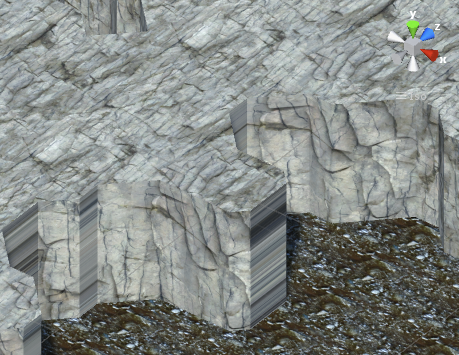 I had this on the y axis, too but was able to fix it with just switching the axis for the uvs (x, z). When i try this on the walls the streched side just switches from x to z. I guess i have to dynamicaly switch the axsis, but i don't know how.
EDIT: Fixed it somehow but it's still not perfect. See end of post.
Here the code of the wall generation with streched textures:
 void CreateWallMesh(int[,] map, float squareSize)
 {
     CalculateMeshOutlines();

     List<Vector3> wallVertices = new List<Vector3>();
     List<int> wallTriangles = new List<int>();
     Mesh wallMesh = new Mesh();

     float wallHeight = 5;

     foreach (List<int> outline in outlines)
     {
         for (int i = 0; i < outline.Count -1; i++)
         {
             int startIndex = wallVertices.Count;
             wallVertices.Add(vertices[outline[i]]);     // TopLeft Vertex
             wallVertices.Add(vertices[outline[i + 1]]); // TopRight Vertex
             wallVertices.Add(vertices[outline[i]] - Vector3.up * wallHeight);     // BottomLeft Vertex
             wallVertices.Add(vertices[outline[i + 1]] - Vector3.up * wallHeight); // BottomRight Vertex

             // 0 - 2
             // | / |
             // 1 - 3

             // 1. Triangle
             wallTriangles.Add(startIndex + 0); // 0
             wallTriangles.Add(startIndex + 2); // 2
             wallTriangles.Add(startIndex + 1); // 3

             // 2. Triangle
             wallTriangles.Add(startIndex + 2); // 3
             wallTriangles.Add(startIndex + 3); // 1
             wallTriangles.Add(startIndex + 1); // 0
         }
     }
     wallMesh.vertices = wallVertices.ToArray();
     wallMesh.triangles = wallTriangles.ToArray();
     wallMesh.RecalculateNormals ();

     // set uvs
     float tileAmount = 0.25f;
     Vector2[] uvs = new Vector2[wallVertices.Count];
     for (int i = 0; i < wallVertices.Count; i++) {
         float percentX = Mathf.InverseLerp (-map.GetLength (0) / 2 * squareSize, map.GetLength (0) / 2 * squareSize, wallVertices [i].x * tileAmount);
         float percentY = Mathf.InverseLerp (-map.GetLength (0) / 2 * squareSize, map.GetLength (0) / 2 * squareSize, wallVertices [i].y * tileAmount); // Side-View (Y),  Top-View (Z)
         uvs [i] = new Vector2 (percentX, percentY);
         wallMesh.uv = uvs;
     }

     walls.mesh = wallMesh;


     // Kill potentially existing WallCollider before creating new one
     Destroy (walls.GetComponent<MeshCollider> ());
     MeshCollider wallCollider = walls.gameObject.AddComponent<MeshCollider> ();
     wallCollider.sharedMesh = wallMesh;
 }
And here my two fixes. Both with the same result. The texture is no longer streched, but is no longer seamless to the others. My math is to bad to solve this on my own, please help.
Fix 1 (short version):
 // set uvs to be able to receive textures
 float tileAmount = 0.25f;
 float mapRangeA = -map.GetLength (0) / 2 * squareSize;
 float mapRangeB = map.GetLength (0) / 2 * squareSize;
 Vector2[] uvs = new Vector2[wallVertices.Count];
 for (int i = 0; i < wallVertices.Count; i++) {
     if (i > 0) {
         if (wallVertices [i].x == wallVertices [i - 1].x && wallVertices [i].z != wallVertices [i - 1].z) {
             percentZ = Mathf.InverseLerp (mapRangeA, mapRangeB, wallVertices [i-1].z * tileAmount);
             percentY = Mathf.InverseLerp (mapRangeA, mapRangeB, wallVertices [i-1].y * tileAmount);
             uvs [i-1] = new Vector2 (percentZ, percentY);

             percentZ = Mathf.InverseLerp (mapRangeA, mapRangeB, wallVertices [i].z * tileAmount);
             percentY = Mathf.InverseLerp (mapRangeA, mapRangeB, wallVertices [i].y * tileAmount);
             uvs [i] = new Vector2 (percentZ, percentY);
         } else {
             percentX = Mathf.InverseLerp (mapRangeA, mapRangeB, wallVertices [i].x * tileAmount);
             percentY = Mathf.InverseLerp (mapRangeA, mapRangeB, wallVertices [i].y * tileAmount);
             uvs[i] = new Vector2 (percentX, percentY);
         }
     } else {
         percentX = Mathf.InverseLerp (mapRangeA, mapRangeB, wallVertices [i].x * tileAmount);
         percentY = Mathf.InverseLerp (mapRangeA, mapRangeB, wallVertices [i].y * tileAmount);
         uvs[i] = new Vector2 (percentX, percentY);
     }
     wallMesh.uv = uvs;
 }
Fix 2 (long):
 // set uvs to be able to receive textures
 float tileAmount = 0.25f;
 float mapRangeA = -map.GetLength (0) / 2 * squareSize;
 float mapRangeB = map.GetLength (0) / 2 * squareSize;
 Vector2[] uvs = new Vector2[wallVertices.Count];
 for (int i = 0; i < wallVertices.Count; i++) {
     if (i > 0) {
         if (wallVertices [i].x == wallVertices [i - 1].x && wallVertices [i].z != wallVertices [i - 1].z) {
             // bottom left
             percentZ = Mathf.InverseLerp (mapRangeA, mapRangeB, wallVertices [i+2].z * tileAmount);
             percentY = Mathf.InverseLerp (mapRangeA, mapRangeB, wallVertices [i+2].y * tileAmount);
             uvs [i+2] = new Vector2 (percentZ, percentY);
             // top left
             percentZ = Mathf.InverseLerp (mapRangeA, mapRangeB, wallVertices [i-1].z * tileAmount);
             percentY = Mathf.InverseLerp (mapRangeA, mapRangeB, wallVertices [i-1].y * tileAmount);
             uvs [i-1] = new Vector2 (percentZ, percentY);
             // bottom right
             percentZ = Mathf.InverseLerp (mapRangeA, mapRangeB, wallVertices [i].z * tileAmount);
             percentY = Mathf.InverseLerp (mapRangeA, mapRangeB, wallVertices [i].y * tileAmount);
             uvs [i] = new Vector2 (percentZ, percentY);
             // top right
             percentZ = Mathf.InverseLerp (mapRangeA, mapRangeB, wallVertices [i+1].z * tileAmount);
             percentY = Mathf.InverseLerp (mapRangeA, mapRangeB, wallVertices [i+1].y * tileAmount);
             uvs [i+1] = new Vector2 (percentZ, percentY);
             i = i+2;
         } else {
             percentX = Mathf.InverseLerp (mapRangeA, mapRangeB, wallVertices [i].x * tileAmount);
             percentY = Mathf.InverseLerp (mapRangeA, mapRangeB, wallVertices [i].y * tileAmount);
             uvs[i] = new Vector2 (percentX, percentY);
         }
     } else {
         percentX = Mathf.InverseLerp (mapRangeA, mapRangeB, wallVertices [i].x * tileAmount);
         percentY = Mathf.InverseLerp (mapRangeA, mapRangeB, wallVertices [i].y * tileAmount);
         uvs[i] = new Vector2 (percentX, percentY);
     }
     wallMesh.uv = uvs;
 }



