 koobas.hobune.stream


C# Weapon overheat Buildup/Cooldown
Hallo dear community. I have a value that increases with 2 different type of shots (small/big) filling my overheat. The code ads those values and decreases them just as they are supposed. However because I use Time.time (same problem with Time.deltaTime) the subtracted intervals are not even. This is important because see awesome art work =P. 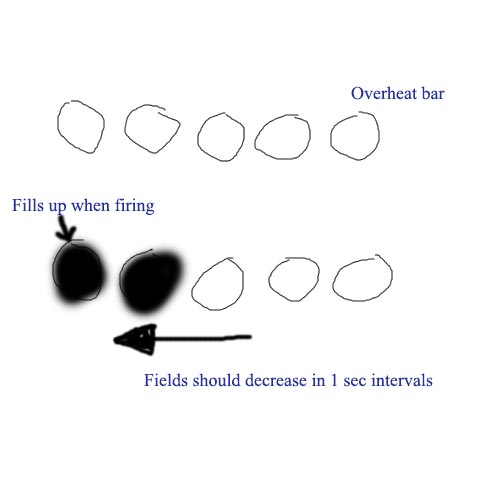
How can I fix this problem or what method could I use else to achieve the subtract 1 every second.
This is how far I got myself:
using UnityEngine; using System.Collections;
public class FirePlayerCanon : MonoBehaviour
{
 public GameObject smallLaser;
 public GameObject bigLaser;
 public float smallShot = 2.1f;
 public float bigShot = 4f;
 public float overheat;


 public bool heating =false;
 public float subtractionDelay = 1f;
 public float timeTillNextSubtraction;
 private float minOverheat = 0f;
 private float maxOverheat = 7f;


 // Update is called once per frame
 void Update ()


 {
     //fire normal with out delay.

     var wasAltHit = Input.GetKeyDown(KeyCode.LeftAlt);

     var wasCtrlHit = Input.GetKeyDown(KeyCode.LeftControl);


     // instatiate smallShot.
     if (wasCtrlHit && heating == true)

     {
         Instantiate(smallLaser,transform.position,Quaternion.identity);

         //add smallShot valeu to overheat.
         overheat = overheat += smallShot;
     }

     // instatiate bigShot.
     if (wasAltHit && heating == true)

     {
         Instantiate (bigLaser, transform.position, Quaternion.identity);

         //add smallShot valeu to overheat.
         overheat = overheat += bigShot;
     }

     //Set max overheated value witch shall not be passed
     if (overheat >= maxOverheat)

     {
         overheat = maxOverheat;
         heating = false;
     }


     //Set min overheated value witch shall not be passed
     if (overheat <= minOverheat)

     {
         overheat = minOverheat;
         heating = true;

     }


     if (Time.time > timeTillNextSubtraction)
     {
         overheat = overheat -= 1f;
         timeTillNextSubtraction = Time.time + subtractionDelay;
     }


 }
}
I am an absolute beginner in terms of coding and would appreciate an answer with an example on how to use. Unity Documentation is not always a 100% clear to me in terms of usage in combination with other code. Any help at all is much appreciated.
Regards
Chris

The docs are most useful (and essential) but really you need to know how to get the most out of google.
Set your floats to 0.0f rather than 0. You will always get some error from floating-point blah blah but an Update frame takes so much time so you can never make a timer as accurate to test for the times between frame.

This is just computer code. It takes a while to learn how to use combinations of IFs to get what you want. Just hand-trace your code, practice writing other stuff and see if you can find a good Intro to Program$$anonymous$$g book/guide.
Also, please no double-Qs. UA isn't really for individual tutoring. Better for things other people will use later, and one Q per Q really helps them. You should be able to up something like "C# round to nearest integer" for your second Q.
RE: 0 and 0.0f. The computer won't mess up straight-up whole numbers, so either is fine. It messes-up math that should give whole numbers, like (1.0f/3.0f)*3.0f won't be exactly one -- the division will round. the nearest 10th base-2 decimal place.

@meat5000 yeah i look a lot at google for answers but diden't help me resolve my problem in this case. However thank you for pointing out the jumpiness of the time float. It simply skipped the numbers I was asking for in my code. It is now much clearer to me!
@Owen Reynolds I already heave followed quiet a number of Introduction tutorials to C# and follow along with tutorials to make simple games. In this instance I was working on something on my without a tutorial. So if I say absolute beginner I try to say that I am not familiar jet with all the different functions, and that my approach seems very noob. And that my code probably has some dump mistakes include.
I heave adjusted my question so that it covers only 1 question.
And I am sorry but I was under the impression that this was the place to ask questions around unity because of the introduction video of Unity answers that says "if you heave Unity related questions this is the place (beginner or pro)".
So if you can point me somewhere where I can ask this type of question I will go there =/.

Hello agito1987
to make the 2 second delay you can make a bool variable that indicates that the "weapon" is overheating and the overheat should not go down, lets call it Heating. now set it to true everytime you overheat. then you can create a coroutine and check if Heating is set to true and if it is wait for 2 seconds and set it back to false and gradually decrease the heat amount
if you think i am not clear or want more help, i'll be happy to help
PS: there are some errors in your code.
<[---EDIT---]> Heres a "Demo" script if i was not clear enough :)
 public class Demo
 {
     int shot, check, value, overheat, minHeat, maxHeat, decVal, incVal;
     bool heating;
     void Update()
     {
         // instatiate Shot
         if (shot == check)//here
         {
             //shooting code here
             overheat += incVal; //increment heat
             heating = true; //heat check
         }

         //heat clamps
         if (overheat >= maxHeat)
         {
             overheat = maxHeat;
             heating = false;
         }
         else if (overheat <= minHeat)
         {
             overheat = minHeat;
             heating = true;
         }


         //now here we decrement
         if (heating)
         {
             StartCoroutine("decHeat");
         }
     }

     IEnumerator decHeat()
     {
         //wait for 1 sec
         yield return new WaitForSeconds(1);
         overheat -= decVal;// decrease the value from overheat

     }
 }
Regards Faizan
thank you! Using bool to block fire. But could not figure out how to let it use the delay. (updated script)

i didn't test this but i think it'll work. tell me if it doesnt, good luck :D
Delay works great! however if I use it with my subtraction method of Time.time, my subtraction function breaks. So working it in has not worked for me. I tried to do my subtraction with a second coroutine but than the problem is that the coroutine subtracts everything in 1 go till 0. But mayby this is what I will use. In that case i don't heave continuing cooldown but a set nr of shots till reload and reload will be the delay you gave me.
Anyway I really want to thank you for your time and help, REALLY apriciate it!



