
Wayback Machinekoobas.hobune.stream
May JUN Jul
Previous capture 13 Next capture
2021 2022 2023
1 capture
13 Jun 22 - 13 Jun 22
sparklines
Close Help
  • Products
  • Solutions
  • Made with Unity
  • Learning
  • Support & Services
  • Community
  • Asset Store
  • Get Unity

UNITY ACCOUNT

You need a Unity Account to shop in the Online and Asset Stores, participate in the Unity Community and manage your license portfolio. Login Create account
  • Blog
  • Forums
  • Answers
  • Evangelists
  • User Groups
  • Beta Program
  • Advisory Panel

Navigation

  • Home
  • Products
  • Solutions
  • Made with Unity
  • Learning
  • Support & Services
  • Community
    • Blog
    • Forums
    • Answers
    • Evangelists
    • User Groups
    • Beta Program
    • Advisory Panel

Unity account

You need a Unity Account to shop in the Online and Asset Stores, participate in the Unity Community and manage your license portfolio. Login Create account

Language

  • Chinese
  • Spanish
  • Japanese
  • Korean
  • Portuguese
  • Ask a question
  • Spaces
    • Default
    • Help Room
    • META
    • Moderators
    • Topics
    • Questions
    • Users
    • Badges
  • Home /
avatar image
0
Question by Section-One · Apr 11, 2015 at 11:12 AM · addrelativetorque

rigidbody + mesh collider + addRelativeTorque

Hi,

I'm using a helicopter controller script that works fine when i have a box collider on my model. When i switched to a mesh collider, everything started to go wrong.
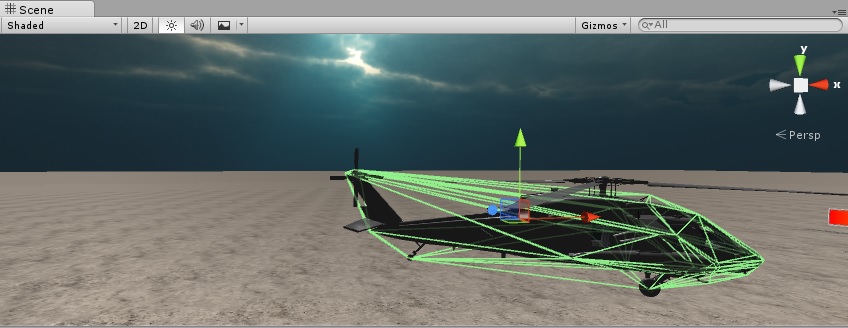
alt text

I was able to fix the forward/backward movement by setting the CenterOfMass manually to (0,0,0), But i can't seem to be able to fix the rotation controls. Its spinning along all the axes instead of just the Y axis, and this also causes it to change position.

The way i'm rotating my model is this:

torqueValue -= (Vector3.up x max_tail_Rotor_Force x tail_Rotor_Velocity);
rb.AddRelativeTorque(torqueValue);

And ofcourse when i switch back to the box collider everything works fine.

Is there a way to fix this or should i also keep my box collider, and make all of the other colliders in my scene ignore it using Physics.IgnoreCollision?

Thanks

helicopter.jpg (76.3 kB)
Comment
Add comment · Show 4
10 |3000 characters needed characters left characters exceeded
▼
  • Viewable by all users
  • Viewable by moderators
  • Viewable by moderators and the original poster
  • Advanced visibility
Viewable by all users
avatar image KalleH · Apr 11, 2015 at 01:12 PM 0
Share

I would recommend using box collider(s) over mesh collider because mesh colliders are quite inefficient (even though this is just one game object) and as seen in the picture it doesn't really do a great job covering the helicopter. From my experience mesh colliders are just so much more difficult to work with.

avatar image Section-One · Apr 11, 2015 at 01:41 PM 0
Share

I need a mesh collider in order to mark exact hits (when the object is being fired on). so i will have a mesh collider anyway. But efficiency aside, it's just a question of do i still need the box collider on top of that so that AddRelativeTorque will work properly or is there a way to fix that.

avatar image ozturkcompany · Apr 11, 2015 at 02:55 PM 0
Share

WOW! That mesh collider is pretty messed up! I recommend you creating your own mesh collider inside any modelling program, though it will much much more accurate than what i see here. For your question we neef to see the script.

avatar image Section-One · Apr 11, 2015 at 03:19 PM 0
Share

thats because its around the whole model and not just the hull. once i seperate that into an object of it's own i'll put the mesh collider on it and it will be fine. i'm just playing around now.

as for the script, even if i have just a line saying addRelativeTorque and i add a value for the Y axis only, it will start spining diagonally because of the shape of the mesh.

1 Reply

· Add your reply
  • Sort: 
avatar image
0

Answer by reihe0 · Apr 11, 2015 at 03:03 PM

Why don't you use a box collider for the movement and the mesh collider on another object to check for collisions?

Comment
Add comment · Show 1 · Share
10 |3000 characters needed characters left characters exceeded
▼
  • Viewable by all users
  • Viewable by moderators
  • Viewable by moderators and the original poster
  • Advanced visibility
Viewable by all users
avatar image Section-One · Apr 11, 2015 at 03:22 PM 0
Share

I can use both on my object, i just prefer to know if there's a way to fix it so i can use only mesh collider.

I had the same problem with addRelativeTorque for going forward and backwards and i fixed that by zeroing the CenterOf$$anonymous$$ass, but this didn't solve rotating the helicopter. and i guess I have to find the currect spot to for the center of mass to fit all directions of torque, I just don't know how.

Your answer

Hint: You can notify a user about this post by typing @username

Up to 2 attachments (including images) can be used with a maximum of 524.3 kB each and 1.0 MB total.

Follow this Question

Answers Answers and Comments

21 People are following this question.

avatar image avatar image avatar image avatar image avatar image avatar image avatar image avatar image avatar image avatar image avatar image avatar image avatar image avatar image avatar image avatar image avatar image avatar image avatar image avatar image avatar image

Related Questions

LookAt but using physics AddRelativeTorque 1 Answer

Vector3 and AddRelativeTorque 1 Answer

Sphere movement very erratic and uncontrollable. 1 Answer

Keep a rolling balls momentum 1 Answer

Physics-based Homing Missile 2 Answers


Enterprise
Social Q&A

Social
Subscribe on YouTube social-youtube Follow on LinkedIn social-linkedin Follow on Twitter social-twitter Follow on Facebook social-facebook Follow on Instagram social-instagram

Footer

  • Purchase
    • Products
    • Subscription
    • Asset Store
    • Unity Gear
    • Resellers
  • Education
    • Students
    • Educators
    • Certification
    • Learn
    • Center of Excellence
  • Download
    • Unity
    • Beta Program
  • Unity Labs
    • Labs
    • Publications
  • Resources
    • Learn platform
    • Community
    • Documentation
    • Unity QA
    • FAQ
    • Services Status
    • Connect
  • About Unity
    • About Us
    • Blog
    • Events
    • Careers
    • Contact
    • Press
    • Partners
    • Affiliates
    • Security
Copyright © 2020 Unity Technologies
  • Legal
  • Privacy Policy
  • Cookies
  • Do Not Sell My Personal Information
  • Cookies Settings
"Unity", Unity logos, and other Unity trademarks are trademarks or registered trademarks of Unity Technologies or its affiliates in the U.S. and elsewhere (more info here). Other names or brands are trademarks of their respective owners.
  • Anonymous
  • Sign in
  • Create
  • Ask a question
  • Spaces
  • Default
  • Help Room
  • META
  • Moderators
  • Explore
  • Topics
  • Questions
  • Users
  • Badges
