 koobas.hobune.stream


When instantiating an object inside of something, how can I move it to the outside of the object?
Alright, to be more specific I've been writing a formations system for a party of players. The problem arises when I click too close to an obstacle, and one of the markers for the formation clips inside of an object like so:
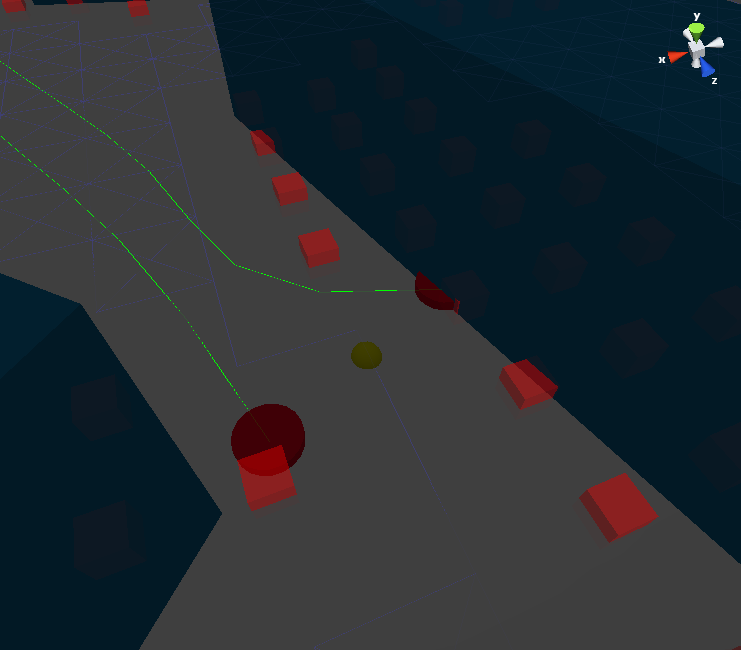
So basically what I need to happen is if these markers clip into an object, I need them to adjust themselves so they're outside the object. I've wrote several scripts myself, using raycasts to detect collisions, and then adjusting them each frame based on which rays are touching the object. However these don't work within one frame. Ideally i'd like to be able to make this happen within one frame so that as soon as I click, my characters get the updated locations of the markers, rather than their original locations. Any suggestions on where I should start?

I'm no pro, so I'm posting as a comment ins$$anonymous$$d of an answer. I'm sure there's a more elegant solution out there, but maybe this will be a good starting point.
$$anonymous$$y first thought is to use meshcolliders to detect intersections. If an object is intersecting/clipping, you could move the marker an arbitrary distance and direction through code.

Thats actually similar to what I did. I used several mesh markers corresponding to 'north', 'south', 'east', and 'west'. And then moved the markers in the appropriate direction based on what was touching the object.
The problem is theres no way (as far as I know) to tell how far inside the object the marker might be. Which is why I incremented the position a small amount in each frame. I'd like to be able to do that in one frame if possible, I'm not sure how though.
You could use mesh.bounds.size (Vector3 size.x size.y, size.z) to deter$$anonymous$$e the $$anonymous$$imal distance to move. $$anonymous$$ight end up having to double that distance to make sure the marker doesn't continue to clip in a different spot, but probably not if you've figured out which direction you need to move the marker.
http://docs.unity3d.com/Documentation/ScriptReference/Bounds.html
$$anonymous$$aybe there's something in there that you can use. Sorry for not being more helpful.

Does it help any to use a Physics.SphereCast at the target location first? Then use one of the contact points to determine the direction and length that we must move the target location before restarting the process until we find a clear spot?
If you assign a very large radius to the sphere you can define a quiet a bit of clearance, but it will probably take longer to find a clear spot.



