
Wayback Machinekoobas.hobune.stream
May JUN Jul
Previous capture 12 Next capture
2021 2022 2023
1 capture
12 Jun 22 - 12 Jun 22
sparklines
Close Help
  • Products
  • Solutions
  • Made with Unity
  • Learning
  • Support & Services
  • Community
  • Asset Store
  • Get Unity

UNITY ACCOUNT

You need a Unity Account to shop in the Online and Asset Stores, participate in the Unity Community and manage your license portfolio. Login Create account
  • Blog
  • Forums
  • Answers
  • Evangelists
  • User Groups
  • Beta Program
  • Advisory Panel

Navigation

  • Home
  • Products
  • Solutions
  • Made with Unity
  • Learning
  • Support & Services
  • Community
    • Blog
    • Forums
    • Answers
    • Evangelists
    • User Groups
    • Beta Program
    • Advisory Panel

Unity account

You need a Unity Account to shop in the Online and Asset Stores, participate in the Unity Community and manage your license portfolio. Login Create account

Language

  • Chinese
  • Spanish
  • Japanese
  • Korean
  • Portuguese
  • Ask a question
  • Spaces
    • Default
    • Help Room
    • META
    • Moderators
    • Topics
    • Questions
    • Users
    • Badges
  • Home /
  • Help Room /
avatar image
0
Question by vfontoura · Sep 06, 2016 at 02:25 AM · cameraraycastcolission

Raycast hitting air

Hello everyone, im having a problem with raycast returning true hitting the air, i have a game object down my UFO and the camera is aiming at it. im raycasting from the game object to the camera position to detect any walls between them, if the recast find a wall it reposition the camera to not block the players vision of the "abduction point". the problem is that it is returning true just by getting close to the wall and not actually hitting it, and it bugs the player view witch gets kind of jumping in the corners, as my game involve a little labyrinth its impossible to avoid the corners, here is the camera code and some screenshots of the problem. thx for the attention ppl.
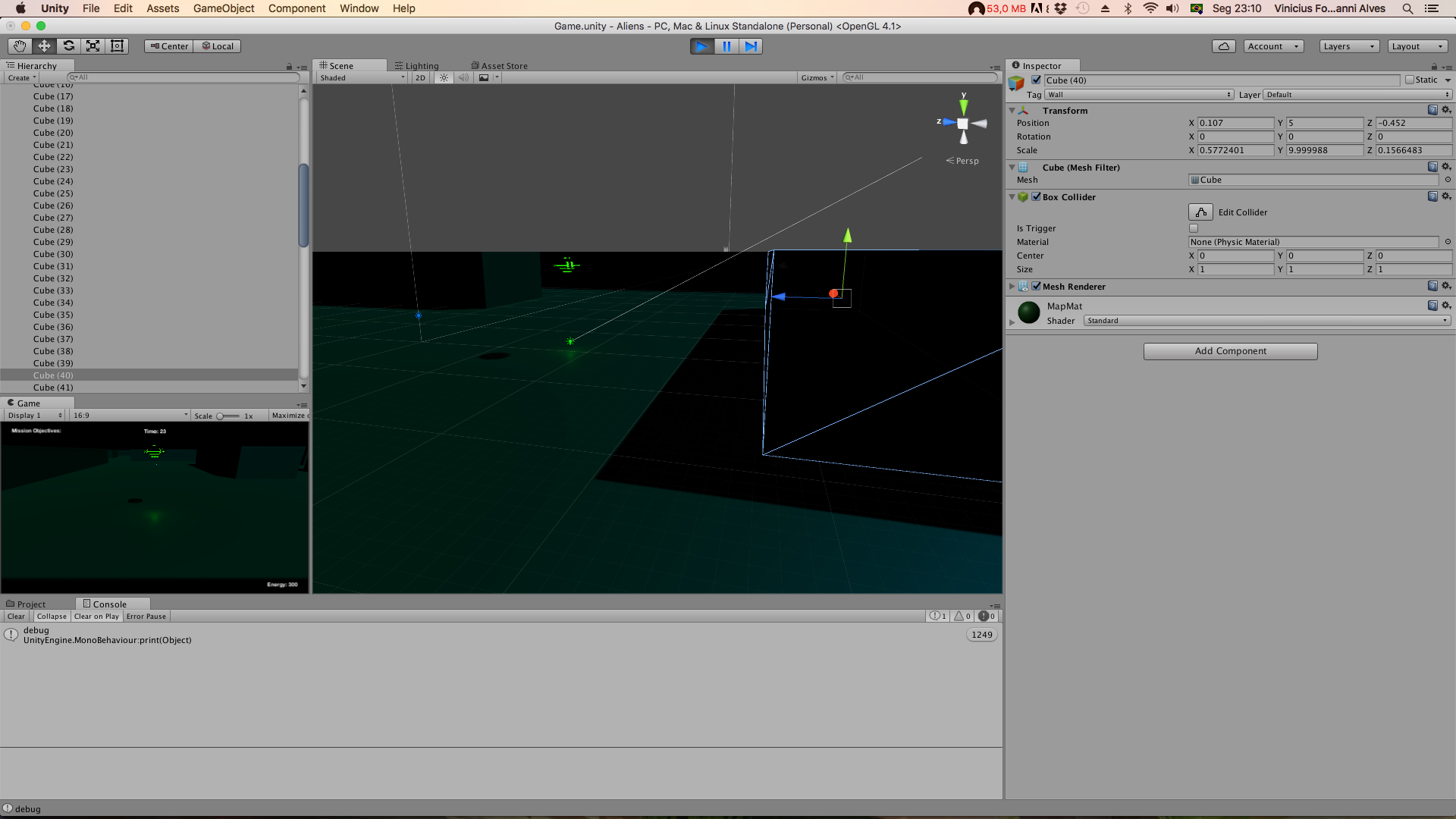
alt text using UnityEngine; using System.Collections;

public class ShipCameraController : MonoBehaviour {

 public GameObject follow;
 private Vector3 camPosition;
 
 public float distanceAway = 5.0f;
 public float distanceUp = 1.0f;
 public float smooth = 15.0f;

 void Start(){
 }
 
 void LateUpdate(){
     SmoothFollow();

 }
 
 void SmoothFollow(){
     //Follow player smoothly
     camPosition = follow.transform.position + follow.transform.up * distanceUp - follow.transform.forward * distanceAway;
     CompensateForWalls();
     transform.position = Vector3.Lerp (transform.position, camPosition, Time.deltaTime * smooth);
     transform.rotation = Quaternion.Slerp (transform.rotation, follow.transform.rotation, 1);

     transform.LookAt(follow.transform);
 }

 void CompensateForWalls(){
     Vector3 correctionVector = follow.transform.position + follow.transform.up * distanceUp - follow.transform.forward * distanceAway;

     RaycastHit hit;
     //this is the line being drawn
     Debug.DrawLine(follow.transform.position,correctionVector);
     //this is the bugged raycast!!!
     if(Physics.Raycast(follow.transform.position, correctionVector, out hit)){
         print("debug");
         camPosition = follow.transform.position + follow.transform.up * hit.point.y - follow.transform.forward * hit.distance;
     }
 }

}

captura-de-tela-2016-09-05-as-231023.png (377.6 kB)
captura-de-tela-2016-09-05-as-231003.png (411.0 kB)
Comment
Add comment · Show 2
10 |3000 characters needed characters left characters exceeded
▼
  • Viewable by all users
  • Viewable by moderators
  • Viewable by moderators and the original poster
  • Advanced visibility
Viewable by all users
avatar image doublemax · Sep 06, 2016 at 12:51 PM 0
Share

Let's just say that Raycasts usually don't hit air :) Print the name of the object that gets hit with hit.transform.name. $$anonymous$$aybe that alone helps you already to find a solution. $$anonymous$$aybe you can move some objects that should never get hit to a separate layer and exclude that layer from the raycast.

avatar image vfontoura doublemax · Mar 10, 2017 at 05:16 PM 0
Share

hey thx for the answer, I've found the problem, i was using ray cast on the function and draw line for the debug, they are little different ;).

0 Replies

· Add your reply
  • Sort: 

Your answer

Hint: You can notify a user about this post by typing @username

Up to 2 attachments (including images) can be used with a maximum of 524.3 kB each and 1.0 MB total.

Follow this Question

Answers Answers and Comments

100 People are following this question.

avatar image avatar image avatar image avatar image avatar image avatar image avatar image avatar image avatar image avatar image avatar image avatar image avatar image avatar image avatar image avatar image avatar image avatar image avatar image avatar image avatar image avatar image avatar image avatar image avatar image avatar image avatar image avatar image avatar image avatar image avatar image avatar image avatar image avatar image avatar image avatar image avatar image avatar image avatar image avatar image avatar image avatar image avatar image avatar image avatar image avatar image avatar image avatar image avatar image avatar image avatar image avatar image avatar image avatar image avatar image avatar image avatar image avatar image avatar image avatar image avatar image avatar image avatar image avatar image avatar image avatar image avatar image avatar image avatar image avatar image avatar image avatar image avatar image avatar image avatar image avatar image avatar image avatar image avatar image avatar image avatar image avatar image avatar image avatar image avatar image avatar image avatar image avatar image avatar image avatar image avatar image avatar image avatar image avatar image avatar image avatar image avatar image avatar image avatar image avatar image

Related Questions

How to tell if a looked at object has a text mesh. 0 Answers

How can I make a third person camera collision script? 2 Answers

OnMouseDown raycast doesnt match UI crosshair 1 Answer

Please help can't find what is causing this error 1 Answer

Problem with Rotating Object not as child 0 Answers


Enterprise
Social Q&A

Social
Subscribe on YouTube social-youtube Follow on LinkedIn social-linkedin Follow on Twitter social-twitter Follow on Facebook social-facebook Follow on Instagram social-instagram

Footer

  • Purchase
    • Products
    • Subscription
    • Asset Store
    • Unity Gear
    • Resellers
  • Education
    • Students
    • Educators
    • Certification
    • Learn
    • Center of Excellence
  • Download
    • Unity
    • Beta Program
  • Unity Labs
    • Labs
    • Publications
  • Resources
    • Learn platform
    • Community
    • Documentation
    • Unity QA
    • FAQ
    • Services Status
    • Connect
  • About Unity
    • About Us
    • Blog
    • Events
    • Careers
    • Contact
    • Press
    • Partners
    • Affiliates
    • Security
Copyright © 2020 Unity Technologies
  • Legal
  • Privacy Policy
  • Cookies
  • Do Not Sell My Personal Information
  • Cookies Settings
"Unity", Unity logos, and other Unity trademarks are trademarks or registered trademarks of Unity Technologies or its affiliates in the U.S. and elsewhere (more info here). Other names or brands are trademarks of their respective owners.
  • Anonymous
  • Sign in
  • Create
  • Ask a question
  • Spaces
  • Default
  • Help Room
  • META
  • Moderators
  • Explore
  • Topics
  • Questions
  • Users
  • Badges