
Wayback Machinekoobas.hobune.stream
May JUN Jul
Previous capture 13 Next capture
2021 2022 2023
1 capture
13 Jun 22 - 13 Jun 22
sparklines
Close Help
  • Products
  • Solutions
  • Made with Unity
  • Learning
  • Support & Services
  • Community
  • Asset Store
  • Get Unity

UNITY ACCOUNT

You need a Unity Account to shop in the Online and Asset Stores, participate in the Unity Community and manage your license portfolio. Login Create account
  • Blog
  • Forums
  • Answers
  • Evangelists
  • User Groups
  • Beta Program
  • Advisory Panel

Navigation

  • Home
  • Products
  • Solutions
  • Made with Unity
  • Learning
  • Support & Services
  • Community
    • Blog
    • Forums
    • Answers
    • Evangelists
    • User Groups
    • Beta Program
    • Advisory Panel

Unity account

You need a Unity Account to shop in the Online and Asset Stores, participate in the Unity Community and manage your license portfolio. Login Create account

Language

  • Chinese
  • Spanish
  • Japanese
  • Korean
  • Portuguese
  • Ask a question
  • Spaces
    • Default
    • Help Room
    • META
    • Moderators
    • Topics
    • Questions
    • Users
    • Badges
  • Home /
avatar image
1
Question by Yarden-Raveh · Dec 02, 2013 at 06:58 PM · navmeshnavmeshagentnavigation

Agent won't traverse auto generated offmeshlinks

So i have this scene set up in order to test NavMesh features: alt text
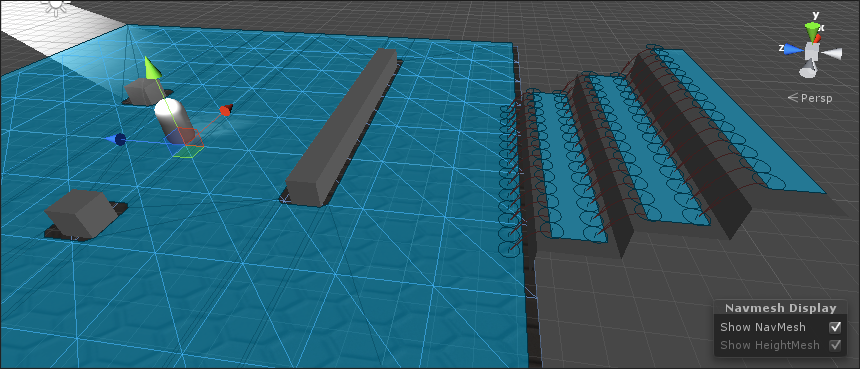
The capsule has a NavMeshAgent component. A empty GameObject is set as the destination at the top of the stairs. The agent travels to the bottom of the stairs and then stops. Regardless of how i set the agent's attributes it won't traverse the off mesh links.

Any ideas?

example.png (217.5 kB)
Comment
Add comment
10 |3000 characters needed characters left characters exceeded
▼
  • Viewable by all users
  • Viewable by moderators
  • Viewable by moderators and the original poster
  • Advanced visibility
Viewable by all users

2 Replies

· Add your reply
  • Sort: 
avatar image
0
Best Answer

Answer by Yarden-Raveh · Dec 03, 2013 at 09:01 PM

I have tried several things but i am still stumped. When i am going through the documentation it looks like it is assumed to just work. I get this nagging feeling i forgot something but i have no idea what.

Comment
Add comment · Show 1 · Share
10 |3000 characters needed characters left characters exceeded
▼
  • Viewable by all users
  • Viewable by moderators
  • Viewable by moderators and the original poster
  • Advanced visibility
Viewable by all users
avatar image Yarden-Raveh · Dec 03, 2013 at 09:24 PM 0
Share

I have found a solution and i feel stupid after discovering it. Auto generated off mesh links are not bi directional in regards to height. Creating manual ones solved the problem. In my defence it was not obviously stated in the manual. Atleast it was not obvious to me.

avatar image
1

Answer by Ash-Blue · Apr 07, 2016 at 02:55 AM

NavMesh baking will only generate fall links automatically. If you want a link to jump up you'll have to generate it manually. I know it's slightly annoying that Unity doesn't provide this out of the box, but jump physics can vary widely between games. I would love to see built-in support for optional jump links in a future Unity NavMesh version. That said, you might create your own jump links through a process like this.

  1. Get all BoxColliders corresponding to a "Platform" layer (or whatever you want to name in)

  2. Raycast to the ground and all visible ledges from an offset corner to try and detect a clear jump

  3. On success generate an OffMeshLink component on a GameObject and set the proper start and end points

Hopefully that helps and best of luck ^_^

Comment
Add comment · Share
10 |3000 characters needed characters left characters exceeded
▼
  • Viewable by all users
  • Viewable by moderators
  • Viewable by moderators and the original poster
  • Advanced visibility
Viewable by all users

Your answer

Hint: You can notify a user about this post by typing @username

Up to 2 attachments (including images) can be used with a maximum of 524.3 kB each and 1.0 MB total.

Follow this Question

Answers Answers and Comments

17 People are following this question.

avatar image avatar image avatar image avatar image avatar image avatar image avatar image avatar image avatar image avatar image avatar image avatar image avatar image avatar image avatar image avatar image avatar image

Related Questions

NavMeshAgent falling through on the floor below after Carve. 1 Answer

Instantiating a prefab with navmeshagent 1 Answer

OffMesh Link and NavMesh Obstacle 1 Answer

How to queue NavMeshAgents on entering a tile in Unity (based on path distance to tile)? 0 Answers

"Nav Mesh Agent" messes up simple prototype player-gameobject. What's up with that? 0 Answers


Enterprise
Social Q&A

Social
Subscribe on YouTube social-youtube Follow on LinkedIn social-linkedin Follow on Twitter social-twitter Follow on Facebook social-facebook Follow on Instagram social-instagram

Footer

  • Purchase
    • Products
    • Subscription
    • Asset Store
    • Unity Gear
    • Resellers
  • Education
    • Students
    • Educators
    • Certification
    • Learn
    • Center of Excellence
  • Download
    • Unity
    • Beta Program
  • Unity Labs
    • Labs
    • Publications
  • Resources
    • Learn platform
    • Community
    • Documentation
    • Unity QA
    • FAQ
    • Services Status
    • Connect
  • About Unity
    • About Us
    • Blog
    • Events
    • Careers
    • Contact
    • Press
    • Partners
    • Affiliates
    • Security
Copyright © 2020 Unity Technologies
  • Legal
  • Privacy Policy
  • Cookies
  • Do Not Sell My Personal Information
  • Cookies Settings
"Unity", Unity logos, and other Unity trademarks are trademarks or registered trademarks of Unity Technologies or its affiliates in the U.S. and elsewhere (more info here). Other names or brands are trademarks of their respective owners.
  • Anonymous
  • Sign in
  • Create
  • Ask a question
  • Spaces
  • Default
  • Help Room
  • META
  • Moderators
  • Explore
  • Topics
  • Questions
  • Users
  • Badges
