
Wayback Machinekoobas.hobune.stream
May JUN Jul
Previous capture 12 Next capture
2021 2022 2023
1 capture
12 Jun 22 - 12 Jun 22
sparklines
Close Help
  • Products
  • Solutions
  • Made with Unity
  • Learning
  • Support & Services
  • Community
  • Asset Store
  • Get Unity

UNITY ACCOUNT

You need a Unity Account to shop in the Online and Asset Stores, participate in the Unity Community and manage your license portfolio. Login Create account
  • Blog
  • Forums
  • Answers
  • Evangelists
  • User Groups
  • Beta Program
  • Advisory Panel

Navigation

  • Home
  • Products
  • Solutions
  • Made with Unity
  • Learning
  • Support & Services
  • Community
    • Blog
    • Forums
    • Answers
    • Evangelists
    • User Groups
    • Beta Program
    • Advisory Panel

Unity account

You need a Unity Account to shop in the Online and Asset Stores, participate in the Unity Community and manage your license portfolio. Login Create account

Language

  • Chinese
  • Spanish
  • Japanese
  • Korean
  • Portuguese
  • Ask a question
  • Spaces
    • Default
    • Help Room
    • META
    • Moderators
    • Topics
    • Questions
    • Users
    • Badges
  • Home /
avatar image
0
Question by augusthemback · Sep 09, 2017 at 09:44 PM · resolutionbuild settingsaspect-ratio

Only allowing windowed mode and 1:1 aspect ratio in my game?

I've been trying to build my game without any fullscreen capabilities. I want this game to only be played in the 1:1 aspect ratio.

When I build my game the game suggests resolutions that are not 1:1. How can I fix this?

Thanks in advance!

Comment
Add comment
10 |3000 characters needed characters left characters exceeded
▼
  • Viewable by all users
  • Viewable by moderators
  • Viewable by moderators and the original poster
  • Advanced visibility
Viewable by all users

2 Replies

· Add your reply
  • Sort: 
avatar image
0

Answer by IsaiahKelly · Sep 10, 2017 at 01:12 AM

Change Your Player Settings

Navigate to Edit > Project Settings > Player and just uncheck everything you don't want.
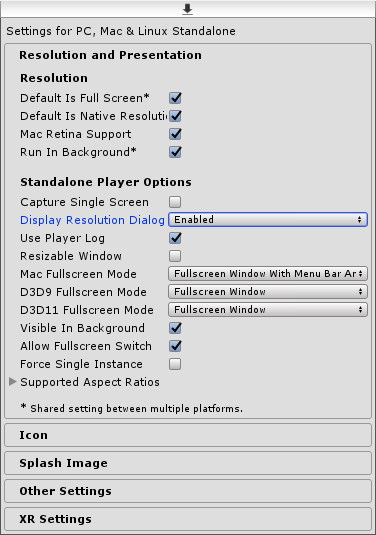
Player Settings


player-settings.png (24.4 kB)
Comment
Add comment · Show 1 · Share
10 |3000 characters needed characters left characters exceeded
▼
  • Viewable by all users
  • Viewable by moderators
  • Viewable by moderators and the original poster
  • Advanced visibility
Viewable by all users
avatar image augusthemback · Sep 10, 2017 at 02:36 PM 0
Share

Thank you for the answer but this does not help me.

avatar image
0

Answer by Bunny83 · Sep 10, 2017 at 01:54 AM

It's actually better if you do not restrict the different resolutions too much. It might result in worse device support if you try to enforce a certain window mode. It's better to allow any resolution and just "letterbox" your camera so it has a 1:1 ratio.

You can use a simple script like this:

 // CameraLetterBox.cs
 using UnityEngine;
 
 public class CameraLetterBox : MonoBehaviour
 {
     public Camera backgroundCam;
     public Camera mainCam;
     public float targetAspectRatio = 1f;
 
     private void Start()
     {
         if (mainCam == null)
         {
             mainCam = Camera.main;
             if (mainCam == null)
                 mainCam = GetComponent<Camera>();
         }
         if (backgroundCam == null)
         {
             foreach (var cam in Camera.allCameras)
             {
                 if (cam != mainCam)
                 {
                     backgroundCam = cam;
                     break;
                 }
             }
             if (backgroundCam == null)
             {
                 backgroundCam = new GameObject("BackgroundCam").AddComponent<Camera>();
             }
             backgroundCam.depth = mainCam.depth - 1;
         }
     }
     private void Update()
     {
         float w = Screen.width;
         float h = Screen.height;
         float a = w / h;
         Rect r;
         if (a > targetAspectRatio)
         {
             float tw = h * targetAspectRatio;
             float o = (w - tw) * 0.5f;
             r = new Rect(o,0,tw,h);
         }
         else
         {
             float th = w / targetAspectRatio;
             float o = (h - th) * 0.5f;
             r = new Rect(0, o, w, th);
         }
         mainCam.pixelRect = r;
     }
 }


This script allows you to specify a desired aspect ratio for the main cam. It will center the main camera rect on the screen and if the screen is too wide it will put a letterbox on both sides. If the screen is too high it will letterbox above and below the cam rect.

Of course when a letterbox is required there will be unused space. That's why there should be another "background" camera which just clears the whole screen before the main cam so the letterbox area get either cleared with a color or an image / texture.

I would allow to resize the window. I personally hate games which force you to a certain resolution or fullscreen setting. That's something the user should decide. Also restricting the display resolution dialog wouldn't be enough. The Unity player supports command line parameters to force certain settings. So if your game requires a certain aspect ratio it's better to inset the desired aspect ratio inside the available space. That way you can ensure to have the correct ratio, no matter the resolution.

Comment
Add comment · Show 2 · Share
10 |3000 characters needed characters left characters exceeded
▼
  • Viewable by all users
  • Viewable by moderators
  • Viewable by moderators and the original poster
  • Advanced visibility
Viewable by all users
avatar image augusthemback · Sep 10, 2017 at 02:41 PM 0
Share

Thank you! How would I set up the background camera and main camera?

avatar image Bunny83 augusthemback · Sep 10, 2017 at 03:44 PM 0
Share

Well, your main camera is just your usual camera. The background camera probably should have a culling mask of "Nothing" if you just want to clear with a solid color or just render a fullscreen background image.

To draw a background image you can use a script like this on the background camera:

 using UnityEngine;
 
 public class BackgroundImage : $$anonymous$$onoBehaviour
 {
     public Texture2D texture;
     void OnPostRender()
     {
         GL.LoadPixel$$anonymous$$atrix(0, Screen.width, Screen.height, 0);
         Graphics.DrawTexture(new Rect(0, 0, Screen.width, Screen.height), texture);
     }
 }

It will stretch the given texture across the whole screen. It's drawn after the camera it's attached to has finished rendering.

Your answer

Hint: You can notify a user about this post by typing @username

Up to 2 attachments (including images) can be used with a maximum of 524.3 kB each and 1.0 MB total.

Follow this Question

Answers Answers and Comments

71 People are following this question.

avatar image avatar image avatar image avatar image avatar image avatar image avatar image avatar image avatar image avatar image avatar image avatar image avatar image avatar image avatar image avatar image avatar image avatar image avatar image avatar image avatar image avatar image avatar image avatar image avatar image avatar image avatar image avatar image avatar image avatar image avatar image avatar image avatar image avatar image avatar image avatar image avatar image avatar image avatar image avatar image avatar image avatar image avatar image avatar image avatar image avatar image avatar image avatar image avatar image avatar image avatar image avatar image avatar image avatar image avatar image avatar image avatar image avatar image avatar image avatar image avatar image avatar image avatar image avatar image avatar image avatar image avatar image avatar image avatar image avatar image avatar image

Related Questions

Aspect Ration For 2D Sprites and Canvas 0 Answers

Pixel Perfect in different resolutions 0 Answers

How to build android game with 18.5:9 ratio? 1 Answer

Unity Mobile - Lazy way to scale resolution/aspect-ratio? 0 Answers

Build stuck in 4:3? 0 Answers


Enterprise
Social Q&A

Social
Subscribe on YouTube social-youtube Follow on LinkedIn social-linkedin Follow on Twitter social-twitter Follow on Facebook social-facebook Follow on Instagram social-instagram

Footer

  • Purchase
    • Products
    • Subscription
    • Asset Store
    • Unity Gear
    • Resellers
  • Education
    • Students
    • Educators
    • Certification
    • Learn
    • Center of Excellence
  • Download
    • Unity
    • Beta Program
  • Unity Labs
    • Labs
    • Publications
  • Resources
    • Learn platform
    • Community
    • Documentation
    • Unity QA
    • FAQ
    • Services Status
    • Connect
  • About Unity
    • About Us
    • Blog
    • Events
    • Careers
    • Contact
    • Press
    • Partners
    • Affiliates
    • Security
Copyright © 2020 Unity Technologies
  • Legal
  • Privacy Policy
  • Cookies
  • Do Not Sell My Personal Information
  • Cookies Settings
"Unity", Unity logos, and other Unity trademarks are trademarks or registered trademarks of Unity Technologies or its affiliates in the U.S. and elsewhere (more info here). Other names or brands are trademarks of their respective owners.
  • Anonymous
  • Sign in
  • Create
  • Ask a question
  • Spaces
  • Default
  • Help Room
  • META
  • Moderators
  • Explore
  • Topics
  • Questions
  • Users
  • Badges
