 koobas.hobune.stream


2D UFO Game: How to Make Remaining Negative Pickups (Green) Disappear After All Positive Pickups (Yellow) Have Been Collected by the Player
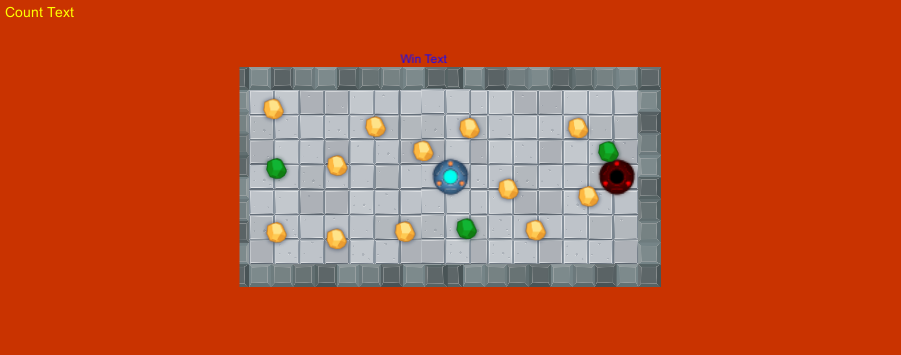
Hey video game designers! I have another important question. I am working on an expansion of my 2D UFO Game for my Digital Arts class. This picture is a screenshot of my 2nd level I'm working on for this current exercise. Unfortunately, my teacher, who rarely verbally teaches us, has never taught us how to do code for gaming/players and just had us watch tutorials on unity3d.com to make the games for our past 3 assignments. However, there are no tutorials that I could find that mention how to make remaining objects that will sabotage the player in the game to disappear once the player has collected all of the positive pickups, because collecting all the positive pickups is the goal of each round. After all 12 yellow pickups are collected, I would like the red UFO in the picture and all the green pickups to disappear from the gameplay screen. It doesn't make sense for the player to collect all 12 yellow pickups, and then lose the level because he/she collided with the red UFO or because he/she collected 1+ green pickups. Please show me the accurate C Sharp code to write so all remaining objects that will affect the player negatively will disappear from the screen. Also, please leave any helpful comments or suggestions if you have any. Thank you and enjoy your spectacular summer!

When you generate these pickups you add them all to a list
Then everytime you touch one of the pickups it will find it in the list and you can then remove it from the list and set the object to inactive or possibly destroy it you can then do a quick LINQ statement over the list if there are still any gameobjects that have a tag 'positive' for example, if not (meaning u just removed the last one) then you can get all remaining values with tag 'negative' and remove these aswel (and put the gameobjects to inactive or destroy them).
Here is an example
 using System;
 using System.Collections.Generic;
 using System.Linq;
 using UnityEngine;

     //Put on empty gameobject with tag manager
     public class PickupHandler : MonoBehaviour
     {
         public List<GameObject> Pickups = new List<GameObject>();
         public GameObject NegativePickup;
         public GameObject PositivePickup;

         //generate pickups
         void Start()
         {
             for (int i = 0; i < 10; i++)
             {
                 var isEven = i % 2 == 0;
                 GameObject pickup;

                 if (isEven)
                 {
                     pickup = Instantiate(PositivePickup, new Vector3(i, i, 0), Quaternion.identity);
                     pickup.tag = "positive";
                 }
                 else
                 {
                     pickup = Instantiate(NegativePickup, new Vector3(i, i, 0), Quaternion.identity);
                     pickup.tag = "negative";
                 }

                 Pickups.Add(pickup);
             }
         }
     }
This will be another script called CollisionHandler (which you put on the ufo)
  using System;
  using System.Collections.Generic;
  using System.Linq;
  using UnityEngine;

 //put on the pickup gameobject
     public class CollisionHandler : MonoBehaviour
     {
         PickupHandler handler;

         void Start()
         {

             //Get the pickup handler script from the empty gameobject with tag 'manager'
             handler = GameObject.FindWithTag("manager").GetComponent<PickupHandler>();
         }

         //Some other class  that handles collision
         void OnTriggerEnter(Collider other)
         {
             if (other.gameObject.tag.Equals("positive", StringComparison.OrdinalIgnoreCase))
             {
                 other.gameObject.SetActive(false); // disable the object

                 if (handler.Pickups.Any(f => f.Equals(other.gameObject)))
                 {
                     //remove from the list
                     handler.Pickups.Remove(other.gameObject);
                 }

                 //do a quick check if we still have any 'positives left'
                 if (!handler.Pickups.Any(f => f.tag.Equals("positive", StringComparison.OrdinalIgnoreCase)))
                 {
                     //if we don't then remove all the negatives
                     foreach (var obj in handler.Pickups)
                     {
                         if (obj.tag.Equals("negative", StringComparison.OrdinalIgnoreCase))
                         {
                             handler.Pickups.Remove(obj); //remove it from the dictionary
                             obj.SetActive(false); //disable the gameobject
                         }
                     }
                 }
             }
         }
     }



