
Wayback Machinekoobas.hobune.stream
May JUN Jul
Previous capture 12 Next capture
2021 2022 2023
1 capture
12 Jun 22 - 12 Jun 22
sparklines
Close Help
  • Products
  • Solutions
  • Made with Unity
  • Learning
  • Support & Services
  • Community
  • Asset Store
  • Get Unity

UNITY ACCOUNT

You need a Unity Account to shop in the Online and Asset Stores, participate in the Unity Community and manage your license portfolio. Login Create account
  • Blog
  • Forums
  • Answers
  • Evangelists
  • User Groups
  • Beta Program
  • Advisory Panel

Navigation

  • Home
  • Products
  • Solutions
  • Made with Unity
  • Learning
  • Support & Services
  • Community
    • Blog
    • Forums
    • Answers
    • Evangelists
    • User Groups
    • Beta Program
    • Advisory Panel

Unity account

You need a Unity Account to shop in the Online and Asset Stores, participate in the Unity Community and manage your license portfolio. Login Create account

Language

  • Chinese
  • Spanish
  • Japanese
  • Korean
  • Portuguese
  • Ask a question
  • Spaces
    • Default
    • Help Room
    • META
    • Moderators
    • Topics
    • Questions
    • Users
    • Badges
  • Home /
avatar image
0
Question by sitnduck · May 10, 2019 at 02:05 PM · collaborationmerging

m_PrefabInternal, m_PrefabInstance & m_PrefabAsset vs Source Control

Hello! I think we are not the only ones running into this but I could not find an answer anywhere online.

Pretty often when working on our Unity project, asset files seem to change their values for "m_PrefabInternal", "m_PrefabInstance" and "m_PrefabAsset" for no discernible reason. For example: alt text This is causing a lot of merging work and grief. So our questions are:
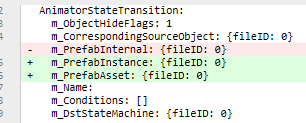
  1. Does anyone know what this is caused by?

  2. Can we discard these changes when committing and otherwise ignore these? If not what are the consequences, and how can we work around this?

If anyone has any information I think it will be very welcome not just by us but many people who are running into this!

capture.png (6.7 kB)
Comment
Add comment · Show 2
10 |3000 characters needed characters left characters exceeded
▼
  • Viewable by all users
  • Viewable by moderators
  • Viewable by moderators and the original poster
  • Advanced visibility
Viewable by all users
avatar image Bonfire-Boy · May 10, 2019 at 03:46 PM 0
Share

This looks like the consequences of a Unity version update. The new fields are those used by the new prefab system. We had a lot of changes that looked like this when we upgraded to 2018.3, and just checked them in to source control. It wasn't a problem. So... why can't you do that? How is it causing you grief?

avatar image sitnduck · May 10, 2019 at 05:28 PM 0
Share

@Bonfire-Boy This is really good to know! The grief is caused by a lot of file differences that have unknown effects. The last we need on a large project is starting to get unexplained failures due to some internal IDs changing. $$anonymous$$oving forward blindly and "hoping for the best" would be a recipe for disaster. $$anonymous$$nowing these are transparent is great, and the whole $$anonymous$$m can move forward without wondering if we are setting ourselves up for incompatibilities or corruption.

1 Reply

· Add your reply
  • Sort: 
avatar image
0

Answer by stechmann · Jun 20, 2019 at 01:54 PM

I think this could perhaps occur because different members of your team are using different versions of Unity. The syntax of .prefab and .unity YAML files has changed between Unity versions.

Comment
Add comment · Share
10 |3000 characters needed characters left characters exceeded
▼
  • Viewable by all users
  • Viewable by moderators
  • Viewable by moderators and the original poster
  • Advanced visibility
Viewable by all users

Your answer

Hint: You can notify a user about this post by typing @username

Up to 2 attachments (including images) can be used with a maximum of 524.3 kB each and 1.0 MB total.

Follow this Question

Answers Answers and Comments

107 People are following this question.

avatar image avatar image avatar image avatar image avatar image avatar image avatar image avatar image avatar image avatar image avatar image avatar image avatar image avatar image avatar image avatar image avatar image avatar image avatar image avatar image avatar image avatar image avatar image avatar image avatar image avatar image avatar image avatar image avatar image avatar image avatar image avatar image avatar image avatar image avatar image avatar image avatar image avatar image avatar image avatar image avatar image avatar image avatar image avatar image avatar image avatar image avatar image avatar image avatar image avatar image avatar image avatar image avatar image avatar image avatar image avatar image avatar image avatar image avatar image avatar image avatar image avatar image avatar image avatar image avatar image avatar image avatar image avatar image avatar image avatar image avatar image avatar image avatar image avatar image avatar image avatar image avatar image avatar image avatar image avatar image avatar image avatar image avatar image avatar image avatar image avatar image avatar image avatar image avatar image avatar image avatar image avatar image avatar image avatar image avatar image avatar image avatar image avatar image avatar image avatar image avatar image avatar image avatar image avatar image avatar image avatar image avatar image

Related Questions

solve merge conflict in unity collab 1 Answer

How two people can work on project simultaneously 2 Answers

Mark scenes as 'in modification' or as 'modified' or make a scene unselectable? 0 Answers

Skip revisions on Collaborate 0 Answers

I have Unity Pro, can i use Unity Collaborate with someone who have Unity Personnal ? 0 Answers


Enterprise
Social Q&A

Social
Subscribe on YouTube social-youtube Follow on LinkedIn social-linkedin Follow on Twitter social-twitter Follow on Facebook social-facebook Follow on Instagram social-instagram

Footer

  • Purchase
    • Products
    • Subscription
    • Asset Store
    • Unity Gear
    • Resellers
  • Education
    • Students
    • Educators
    • Certification
    • Learn
    • Center of Excellence
  • Download
    • Unity
    • Beta Program
  • Unity Labs
    • Labs
    • Publications
  • Resources
    • Learn platform
    • Community
    • Documentation
    • Unity QA
    • FAQ
    • Services Status
    • Connect
  • About Unity
    • About Us
    • Blog
    • Events
    • Careers
    • Contact
    • Press
    • Partners
    • Affiliates
    • Security
Copyright © 2020 Unity Technologies
  • Legal
  • Privacy Policy
  • Cookies
  • Do Not Sell My Personal Information
  • Cookies Settings
"Unity", Unity logos, and other Unity trademarks are trademarks or registered trademarks of Unity Technologies or its affiliates in the U.S. and elsewhere (more info here). Other names or brands are trademarks of their respective owners.
  • Anonymous
  • Sign in
  • Create
  • Ask a question
  • Spaces
  • Default
  • Help Room
  • META
  • Moderators
  • Explore
  • Topics
  • Questions
  • Users
  • Badges
