 koobas.hobune.stream


Enemys Health
I have a small issue here, that is driving me mad. I have read dozens of posts and tried each technique, but to no end.
The problem is, when my turret ability triggers the function, damage is done to all enemies like so:
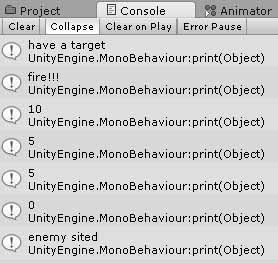
So let me try to go through this step by step. BTW, I don't have any errors at all in any of the code I will post, it just doesn't function correctly.
Goal: Instantiate 10 enemies, each with their own unique stats. Enemy is destroyed when health reaches zero.
Code that spawns my enemies (InGameManager.cs):
 IEnumerator wave01 ()
     {
         while (true)
         {
                 for (int i = 0; i < totalEnemy; i++)
                 {
                     Vector3 spawnPosition = new Vector3 (InGameManagerPOS.x, InGameManagerPOS.y, InGameManagerPOS.z);
                     Instantiate (Frog, spawnPosition, Quaternion.identity);
                     yield return new WaitForSeconds (2);
                 }
             enemyWave = EnemyWaves.wave02;
             return false;
         }
     }
Code that controls the ability which can collide with enemies (TowerAbility.cs)(attached to my ability prefab):
 void Start ()
     {
         //transform.position += temp;
         my_current_enemy = GameObject.FindGameObjectWithTag ("Enemy");
     }

     // Update is called once per frame+
     void Update ()
     {
         if (my_current_enemy)
         {
             transform.position = Vector3.Lerp (transform.position, my_current_enemy.transform.position, ability_velocity);
         }

             abilityDistance += Time.deltaTime * abilitySpeed;
         if (abilityDistance >= abilityRange)
         {
             Destroy (gameObject);
         }
         if (my_current_enemy == null)
         {
             Destroy (gameObject);
         }
     }
 }
Code that controls the damage done by the ability (WaveAI.cs)(attached to the enemy prefab):
 public int enemyHealth = 10;
     public int damage = 5;

     void OnTriggerEnter (Collider theObject)
     {
         if(theObject.gameObject.tag=="tower_ability")
         {
             print (enemyHealth);
             enemyHealth -= damage;
             print (enemyHealth);
             if (enemyHealth <= 0)
             {
                 Destroy(gameObject);
             }
             else return;
         }
     }
Now, just to give some background I have tried SEVERAL methods, I am clearly missing something because they all seem to work the same way. Damage is done to all enemies.
I would like to get to the bottom of this so I can actually have a challenge in my game, instead of all 100 waves dying in 1 shot a piece, lol.
Thanks!!!

The debug has some output that's not shown here, which makes me wonder if there's other things at play like a static variable somewhere in all this.
Well,
After about two days of trial and error, and I do mean error, I have come up with what I think is a simple, and elegant solution.
I have completely removed the need for triggers in my tower based code. By doing that, I have solved many issues, including collision problems.
Here is my "generic" tower code. If you want to use it simply attach it to a tower in your scene, and in the inspector, make sure to attach your tower ability. This code will check to see if any enemies are present on the map, and spawn your ability at the towers location. You can easily modify it to check for range of target, etc.
 using UnityEngine;
 using System.Collections;

 public class towers : MonoBehaviour {
     public GameObject my_ability;
     public bool attack;
     GameObject enemyObject;
     GameObject enemyObject2;


     void Start ()
     {
         attack = true;  //initial state of attack
     }

     void Update ()
     {
         enemyObject = GameObject.FindGameObjectWithTag("Enemy");
         if (enemyObject)
         {
             enemyObject2 = enemyObject;
             if (attack == true)
             {
                 attack = false;
                 StartCoroutine ("checkMapForTargets");
             }
             else return;
         }
         else return;
     }

     IEnumerator checkMapForTargets()
     {
         while (true)
         {
             for (bool canAttack = false; canAttack == attack;)
             {
                 yield return new WaitForSeconds (2);
                 if (enemyObject2 == null){attack = true;}
                 Vector3 spawnPosition = new Vector3 (transform.position.x, transform.position.y, transform.position.z);
                 Instantiate (my_ability, spawnPosition, Quaternion.identity);
             }
             print ("routine is over");
             return true;
         }

     }
 }
Now in your tower ability you could do this:
 using UnityEngine;
 using System.Collections;

 public class test_tower_ability : MonoBehaviour
 {
     public float abilitySpeed = 8f;
     public float ability_velocity = .08f;
     public float abilityRange = 9f;
     private float abilityDistance;
     public GameObject closest;
     public float distanceValid;
     GameObject FindClosestEnemy()
     {
         GameObject[] myEnemy;
         myEnemy = GameObject.FindGameObjectsWithTag("Enemy");
         float distance = Mathf.Infinity;
         Vector3 position = transform.position;
         foreach (GameObject theEnemy in myEnemy)
         {
             Vector3 diff = theEnemy.transform.position - position;
             float curDistance = diff.sqrMagnitude;
             if (curDistance < distance)
             {
                 closest = theEnemy;
                 distance = curDistance;
             }
         }
         return closest;
     }

     void Start()
     {
         FindClosestEnemy ();
     }

     void Update ()
     {
         if (closest)
         {
             abilityDistance += Time.deltaTime * abilitySpeed;
             transform.position = Vector3.Lerp (transform.position, closest.transform.position, ability_velocity);
             distanceValid = Vector3.Distance (closest.transform.position, gameObject.transform.position);
             if (distanceValid < .5)
             {
                 Destroy (gameObject);
                 FindClosestEnemy ();
             }
         }
         if (abilityDistance >= abilityRange)
         {
             Destroy (gameObject);
             FindClosestEnemy ();

         }
         if (closest == null)
         {
             Destroy (gameObject);
             FindClosestEnemy ();
         }
     }
 }
And of course, to destroy your enemy in question, you would add something like this to your enemy AI: (which btw is the only trigger I am using)
 public int enemyHealth = 10;
     public int damage = 5;
     void OnTriggerEnter (Collider theObject)
     {
         if(theObject.gameObject.tag=="tower_ability")
         {
             Destroy (theObject);
             enemyHealth -= damage;

             if (enemyHealth <= 0)
             {
                 Destroy(gameObject);
             }
             else return;
         }
     }



