
Wayback Machinekoobas.hobune.stream
May JUN Jul
Previous capture 13 Next capture
2021 2022 2023
1 capture
13 Jun 22 - 13 Jun 22
sparklines
Close Help
  • Products
  • Solutions
  • Made with Unity
  • Learning
  • Support & Services
  • Community
  • Asset Store
  • Get Unity

UNITY ACCOUNT

You need a Unity Account to shop in the Online and Asset Stores, participate in the Unity Community and manage your license portfolio. Login Create account
  • Blog
  • Forums
  • Answers
  • Evangelists
  • User Groups
  • Beta Program
  • Advisory Panel

Navigation

  • Home
  • Products
  • Solutions
  • Made with Unity
  • Learning
  • Support & Services
  • Community
    • Blog
    • Forums
    • Answers
    • Evangelists
    • User Groups
    • Beta Program
    • Advisory Panel

Unity account

You need a Unity Account to shop in the Online and Asset Stores, participate in the Unity Community and manage your license portfolio. Login Create account

Language

  • Chinese
  • Spanish
  • Japanese
  • Korean
  • Portuguese
  • Ask a question
  • Spaces
    • Default
    • Help Room
    • META
    • Moderators
    • Topics
    • Questions
    • Users
    • Badges
  • Home /
avatar image
0
Question by rseye · Jul 24, 2013 at 08:22 PM · c#spritemanager

Removing "old" sprites in spritemanager?

I'm currently working on a 2d sprite based game where I use a sprite sheet for my animations, for instance walking left and right. For this I use SpriteManager and it works pretty well, except for one thing:

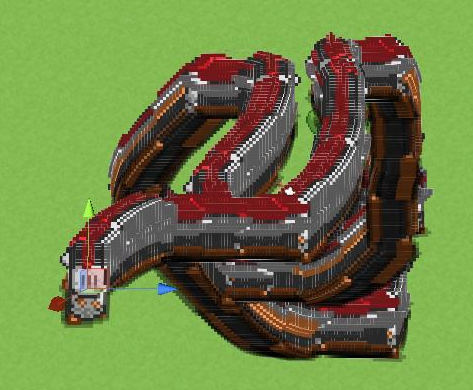
When I'm walking, say, right, it doesn't clear my old sprites from where I have been, creating a snake/tail behind my character, like the picture below. I've looked a lot through the forum and I haven't found anyone talking about this exact thing, the videos I have looked through does not cover this and I can't seem to find it on the wiki for SpriteManager either.
alt text

I'm probably overlooking something pretty basic and obvious, but could someone direct me in the right direction as to how to solve this problem? As I said, it is probably something as basic as to clear it somehow, but I haven't been able to find the way.

Hope you guys can help. Thanks!

Comment
Add comment
10 |3000 characters needed characters left characters exceeded
▼
  • Viewable by all users
  • Viewable by moderators
  • Viewable by moderators and the original poster
  • Advanced visibility
Viewable by all users

1 Reply

· Add your reply
  • Sort: 
avatar image
0

Answer by ScottYann · Aug 04, 2013 at 12:43 AM

Might have to do with your current camera's clear flag?

http://docs.unity3d.com/Documentation/ScriptReference/Camera-clearFlags.html

Comment
Add comment · Show 1 · Share
10 |3000 characters needed characters left characters exceeded
▼
  • Viewable by all users
  • Viewable by moderators
  • Viewable by moderators and the original poster
  • Advanced visibility
Viewable by all users
avatar image rseye · Aug 06, 2013 at 09:58 AM 0
Share

Unfortunately that is not the case, although I can produce the same result by changing the clear flag. I think it has to do with whether I'm using the LinkedSprite$$anonymous$$anager or Sprite$$anonymous$$anager class. The above result is Sprite$$anonymous$$anager, where it creates a snake/tail. If I change it to LinkedSprite$$anonymous$$anager it doesn't create the tail but ins$$anonymous$$d repeats itself on top of itself. So somewhat of the same error, but displayed differently :(

Your answer

Hint: You can notify a user about this post by typing @username

Up to 2 attachments (including images) can be used with a maximum of 524.3 kB each and 1.0 MB total.

Follow this Question

Answers Answers and Comments

16 People are following this question.

avatar image avatar image avatar image avatar image avatar image avatar image avatar image avatar image avatar image avatar image avatar image avatar image avatar image avatar image avatar image avatar image

Related Questions

Multiple Cars not working 1 Answer

Distribute terrain in zones 3 Answers

SpriteManager 1, Set animation to single frame 0 Answers

Illuminating a 3D object's edges OnMouseOver (script in c#)? 1 Answer

Renderer on object disabled after level reload 1 Answer


Enterprise
Social Q&A

Social
Subscribe on YouTube social-youtube Follow on LinkedIn social-linkedin Follow on Twitter social-twitter Follow on Facebook social-facebook Follow on Instagram social-instagram

Footer

  • Purchase
    • Products
    • Subscription
    • Asset Store
    • Unity Gear
    • Resellers
  • Education
    • Students
    • Educators
    • Certification
    • Learn
    • Center of Excellence
  • Download
    • Unity
    • Beta Program
  • Unity Labs
    • Labs
    • Publications
  • Resources
    • Learn platform
    • Community
    • Documentation
    • Unity QA
    • FAQ
    • Services Status
    • Connect
  • About Unity
    • About Us
    • Blog
    • Events
    • Careers
    • Contact
    • Press
    • Partners
    • Affiliates
    • Security
Copyright © 2020 Unity Technologies
  • Legal
  • Privacy Policy
  • Cookies
  • Do Not Sell My Personal Information
  • Cookies Settings
"Unity", Unity logos, and other Unity trademarks are trademarks or registered trademarks of Unity Technologies or its affiliates in the U.S. and elsewhere (more info here). Other names or brands are trademarks of their respective owners.
  • Anonymous
  • Sign in
  • Create
  • Ask a question
  • Spaces
  • Default
  • Help Room
  • META
  • Moderators
  • Explore
  • Topics
  • Questions
  • Users
  • Badges
