Wayback Machinekoobas.hobune.stream
May JUN Jul
Previous capture 13 Next capture
2021 2022 2023
1 capture
13 Jun 22 - 13 Jun 22
sparklines
Close Help
  • Products
  • Solutions
  • Made with Unity
  • Learning
  • Support & Services
  • Community
  • Asset Store
  • Get Unity

UNITY ACCOUNT

You need a Unity Account to shop in the Online and Asset Stores, participate in the Unity Community and manage your license portfolio. Login Create account
  • Blog
  • Forums
  • Answers
  • Evangelists
  • User Groups
  • Beta Program
  • Advisory Panel

Navigation

  • Home
  • Products
  • Solutions
  • Made with Unity
  • Learning
  • Support & Services
  • Community
    • Blog
    • Forums
    • Answers
    • Evangelists
    • User Groups
    • Beta Program
    • Advisory Panel

Unity account

You need a Unity Account to shop in the Online and Asset Stores, participate in the Unity Community and manage your license portfolio. Login Create account

Language

  • Chinese
  • Spanish
  • Japanese
  • Korean
  • Portuguese
  • Ask a question
  • Spaces
    • Default
    • Help Room
    • META
    • Moderators
    • Topics
    • Questions
    • Users
    • Badges
  • Home /
avatar image
0
Question by aouniaouni · Feb 15, 2021 at 09:48 AM · 2dshader2d-platformershader writing

Cut out the black parts of a sprite in a shader

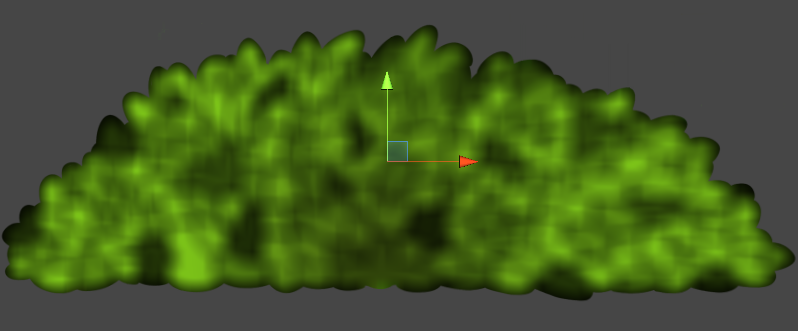
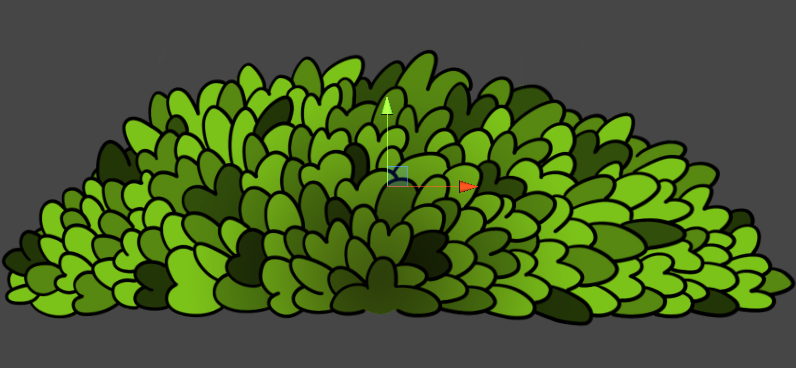
I'm currently making a 2d Platformer and I want the objects in the background to be blurred. I found a very nice shader online, but it's probably used to blur textures of 3d objects and not sprites. I don't know a lot about shaders, so I didn't understand everything, but I managed to cut out the black part and the weird lines that appear sometimes. Without blur With blur, I want smoother edges I'm just using the alpha value of the normal texture, and not the one of the "new" texture, since that is only a color variable. The edges aren't smooth because of that. Does someone know how to convert this new texture or how to change the code so that it fades with the alpha? Here is the shader code:
 Shader "Blurs/GaussianBlurSinglepass"
 {
     Properties
     {
         _MainTex ("Texture", 2D) = "white" {}
         _KernelSize("Kernel Size (N)", Range(0, 150)) = 21
         _Spread("St. dev. (sigma)", Float) = 5.0
         _Transparency("Transparency", Range(0.0, 0.5)) = 0.25
     }
 
     SubShader
     {
         Tags
         { 
             "Queue" = "Transparent" "RenderType"="Transparent"
         }
 
         Pass
         {
             Name "BlurPass"
 
             Blend SrcAlpha OneMinusSrcAlpha
 
             CGPROGRAM
             #pragma vertex vert_img
             #pragma fragment frag_horizontal
 
             #include "UnityCG.cginc"
 
             // Define the constants used in Gaussian calculation.
             static const float TWO_PI = 6.28319;
             static const float E = 2.71828;
 
             sampler2D _MainTex;
             float4 _MainTex_ST;
             float2 _MainTex_TexelSize;
             int    _KernelSize;
             float _Spread;
             float _Transparency;
 
             /*    Implement the Gaussian function in two dimensions.
             */
             float gaussian(int x, int y)
             {
                 float sigmaSqu = _Spread * _Spread;
                 return (1 / sqrt(TWO_PI * sigmaSqu)) * pow(E, -((x * x) + (y * y)) / (2 * sigmaSqu));
             }
 
             float4 frag_horizontal(v2f_img i) : SV_Target
             {
                 float3 col = float3(0.0, 0.0, 0.0);
                 float kernelSum = 0.0;
 
                 int upper = ((_KernelSize - 1) / 2);
                 int lower = -upper;
 
                 for (int x = lower; x <= upper; ++x)
                 {
                     for (int y = lower; y <= upper; ++y)
                     {
                         float gauss = gaussian(x, y);
                         kernelSum += gauss;
 
                         fixed2 offset = fixed2(_MainTex_TexelSize.x * x, _MainTex_TexelSize.y * y);
                         col += gauss * tex2D(_MainTex, i.uv + offset);
                     }
                 }
 
                 col /= kernelSum;
                 float transparency = tex2D (_MainTex, i.uv).a;
                 return float4(col, transparency);
             }
             ENDCG
         }
     }
 }

Thanks in advance!

bush-blurvariableon-notsmooth.png (200.9 kB)
bush-blurvariableoff.png (185.8 kB)
Comment
Add comment
10 |3000 characters needed characters left characters exceeded
▼
  • Viewable by all users
  • Viewable by moderators
  • Viewable by moderators and the original poster
  • Advanced visibility
Viewable by all users

1 Reply

· Add your reply
  • Sort: 
avatar image
1
Best Answer

Answer by Namey5 · Feb 15, 2021 at 08:56 PM

You just need to blur the alpha channel with the rest of the texture (which you are technically doing, just throwing it away);

 //Keep all 4 channels
 float4 col = 0;
 float kernelSum = 0.0;
  
 int upper = ((_KernelSize - 1) / 2);
 int lower = -upper;
  
 for (int x = lower; x <= upper; ++x)
 {
     for (int y = lower; y <= upper; ++y)
     {
         float gauss = gaussian(x, y);
         kernelSum += gauss;
  
         fixed2 offset = fixed2(_MainTex_TexelSize.x * x, _MainTex_TexelSize.y * y);
         col += gauss * tex2D(_MainTex, i.uv + offset);
     }
 }
 
 return col / kernelSum;

It also doesn't look like the gaussian kernel is having much of an impact on that image, I would probably suggest reducing the sigma.

Comment
Add comment · Show 4 · Share
10 |3000 characters needed characters left characters exceeded
▼
  • Viewable by all users
  • Viewable by moderators
  • Viewable by moderators and the original poster
  • Advanced visibility
Viewable by all users
avatar image aouniaouni · Feb 16, 2021 at 06:47 AM 0
Share

Thanks A LOT, I was searching for so long trying to find a solution!

avatar image aouniaouni · Feb 16, 2021 at 06:57 AM 0
Share

Almost forgot something: I tried reducing the sigma (The quality gets a lot better) but if I want to change the blur amount with the kernel size slider the maximal value is ca. 25 (when the sigma lies between 0 and 10), after that the amount of blur stays the same. If I set the sigma to something like 100, I can put it even higher, but then I lose quality. Why is it like this?

avatar image Namey5 aouniaouni · Feb 16, 2021 at 10:04 AM 1
Share

The 'kernel size' parameter increases the number of samples taken (and thus the "size" of the blur), whereas the sigma denotes how fast the filter decreases (irrespective of the kernel size). This means that if you have a kernel size that is larger than the sigma (filter falloff range) any samples outside that range no longer really contribute, so the blur appears to be the same size (despite being significantly more expensive). If you want a cheap way of increasing blur size (although I wouldn't set this too high as it is very much a hack) you can actually widen the distance between each sample;

  Shader "Blurs/GaussianBlurSinglepass"
  {
      Properties
      {
          ...
          _BlurSize ("Blur Size", Float) = 1.5
          ...
      }
  
      SubShader
      {
          Tags
          { 
              "Queue" = "Transparent" "RenderType"="Transparent"
          }
  
          Pass
          {
              Name "BlurPass"
  
              Blend SrcAlpha One$$anonymous$$inusSrcAlpha
  
              CGPROGRA$$anonymous$$
              #pragma vertex vert_img
              #pragma fragment frag_horizontal
  
              #include "UnityCG.cginc"
  
              ...
 
              int    _KernelSize;
              float _BlurSize;
              float _Spread;
 
              ...
  
              float4 frag_horizontal(v2f_img i) : SV_Target
              {
                  ...
                  //Increase the space between samples so the filter covers a larger region with no real change in cost (can look bad at high scales)
                  float2 scale = _$$anonymous$$ainTex_TexelSize.xy * _BlurSize; 
 
                  for (int x = lower; x <= upper; ++x)
                  {
                      for (int y = lower; y <= upper; ++y)
                      {
                          float gauss = gaussian(x, y);
                          kernelSum += gauss;
  
                          fixed2 offset = fixed2 (x, y) * scale;
                          col += gauss * tex2D(_$$anonymous$$ainTex, i.uv + offset);
                      }
                  }
  
                  ...
              }
              ENDCG
          }
      }
  }
avatar image aouniaouni Namey5 · Feb 16, 2021 at 10:51 AM 0
Share

Thanks again, now I understand. I really appreciate your help :)

Your answer

Hint: You can notify a user about this post by typing @username

Up to 2 attachments (including images) can be used with a maximum of 524.3 kB each and 1.0 MB total.

Follow this Question

Answers Answers and Comments

329 People are following this question.

avatar image avatar image avatar image avatar image avatar image avatar image avatar image avatar image avatar image avatar image avatar image avatar image avatar image avatar image avatar image avatar image avatar image avatar image avatar image avatar image avatar image avatar image avatar image avatar image avatar image avatar image avatar image avatar image avatar image avatar image avatar image avatar image avatar image avatar image avatar image avatar image avatar image avatar image avatar image avatar image avatar image avatar image avatar image avatar image avatar image avatar image avatar image avatar image avatar image avatar image avatar image avatar image avatar image avatar image avatar image avatar image avatar image avatar image avatar image avatar image avatar image avatar image avatar image avatar image avatar image avatar image avatar image avatar image avatar image avatar image avatar image avatar image avatar image avatar image avatar image avatar image avatar image avatar image avatar image avatar image avatar image avatar image avatar image avatar image avatar image avatar image avatar image avatar image avatar image avatar image avatar image avatar image avatar image avatar image avatar image avatar image avatar image avatar image avatar image avatar image avatar image avatar image avatar image avatar image avatar image avatar image avatar image avatar image avatar image avatar image avatar image avatar image avatar image avatar image avatar image avatar image avatar image avatar image avatar image avatar image avatar image avatar image avatar image avatar image avatar image avatar image avatar image avatar image avatar image avatar image avatar image avatar image avatar image avatar image avatar image avatar image avatar image avatar image avatar image avatar image avatar image avatar image avatar image avatar image avatar image avatar image avatar image avatar image avatar image avatar image avatar image avatar image avatar image avatar image avatar image avatar image avatar image avatar image avatar image avatar image avatar image avatar image avatar image avatar image avatar image avatar image avatar image avatar image avatar image avatar image avatar image avatar image avatar image avatar image avatar image avatar image avatar image avatar image avatar image avatar image avatar image avatar image avatar image avatar image avatar image avatar image avatar image avatar image avatar image avatar image avatar image avatar image avatar image avatar image avatar image avatar image avatar image avatar image avatar image avatar image avatar image avatar image avatar image avatar image avatar image avatar image avatar image avatar image avatar image avatar image avatar image avatar image avatar image avatar image avatar image avatar image avatar image avatar image avatar image avatar image avatar image avatar image avatar image avatar image avatar image avatar image avatar image avatar image avatar image avatar image avatar image avatar image avatar image avatar image avatar image avatar image avatar image avatar image avatar image avatar image avatar image avatar image avatar image avatar image avatar image avatar image avatar image avatar image avatar image avatar image avatar image avatar image avatar image avatar image avatar image avatar image avatar image avatar image avatar image avatar image avatar image avatar image avatar image avatar image avatar image avatar image avatar image avatar image avatar image avatar image avatar image avatar image avatar image avatar image avatar image avatar image avatar image avatar image avatar image avatar image avatar image avatar image avatar image avatar image avatar image avatar image avatar image avatar image avatar image avatar image avatar image avatar image avatar image avatar image avatar image avatar image avatar image avatar image avatar image avatar image avatar image avatar image avatar image avatar image avatar image avatar image avatar image avatar image avatar image avatar image avatar image avatar image avatar image avatar image avatar image avatar image avatar image avatar image avatar image avatar image avatar image avatar image avatar image avatar image avatar image avatar image avatar image avatar image avatar image

Related Questions

Why does this shader make my 2D sprites disappear if they are rotated 180 degrees? Also, pixel snap? 3 Answers

How to fix this kind of shader error? 0 Answers

Addressable texture2d 0 Answers

How to turn off a collider when I activate it (Basic Sword mechanic) [2D] 2 Answers

get UV coordinates on world position in fragment shader 0 Answers


Enterprise
Social Q&A

Social
Subscribe on YouTube social-youtube Follow on LinkedIn social-linkedin Follow on Twitter social-twitter Follow on Facebook social-facebook Follow on Instagram social-instagram

Footer

  • Purchase
    • Products
    • Subscription
    • Asset Store
    • Unity Gear
    • Resellers
  • Education
    • Students
    • Educators
    • Certification
    • Learn
    • Center of Excellence
  • Download
    • Unity
    • Beta Program
  • Unity Labs
    • Labs
    • Publications
  • Resources
    • Learn platform
    • Community
    • Documentation
    • Unity QA
    • FAQ
    • Services Status
    • Connect
  • About Unity
    • About Us
    • Blog
    • Events
    • Careers
    • Contact
    • Press
    • Partners
    • Affiliates
    • Security
Copyright © 2020 Unity Technologies
  • Legal
  • Privacy Policy
  • Cookies
  • Do Not Sell My Personal Information
  • Cookies Settings
"Unity", Unity logos, and other Unity trademarks are trademarks or registered trademarks of Unity Technologies or its affiliates in the U.S. and elsewhere (more info here). Other names or brands are trademarks of their respective owners.
  • Anonymous
  • Sign in
  • Create
  • Ask a question
  • Spaces
  • Default
  • Help Room
  • META
  • Moderators
  • Explore
  • Topics
  • Questions
  • Users
  • Badges