
Wayback Machinekoobas.hobune.stream
May JUN Jul
Previous capture 12 Next capture
2021 2022 2023
1 capture
12 Jun 22 - 12 Jun 22
sparklines
Close Help
  • Products
  • Solutions
  • Made with Unity
  • Learning
  • Support & Services
  • Community
  • Asset Store
  • Get Unity

UNITY ACCOUNT

You need a Unity Account to shop in the Online and Asset Stores, participate in the Unity Community and manage your license portfolio. Login Create account
  • Blog
  • Forums
  • Answers
  • Evangelists
  • User Groups
  • Beta Program
  • Advisory Panel

Navigation

  • Home
  • Products
  • Solutions
  • Made with Unity
  • Learning
  • Support & Services
  • Community
    • Blog
    • Forums
    • Answers
    • Evangelists
    • User Groups
    • Beta Program
    • Advisory Panel

Unity account

You need a Unity Account to shop in the Online and Asset Stores, participate in the Unity Community and manage your license portfolio. Login Create account

Language

  • Chinese
  • Spanish
  • Japanese
  • Korean
  • Portuguese
  • Ask a question
  • Spaces
    • Default
    • Help Room
    • META
    • Moderators
    • Topics
    • Questions
    • Users
    • Badges
  • Home /
  • Help Room /
This question was closed Oct 07, 2016 at 08:14 AM by RangerDog for the following reason:

The question is answered, right answer was accepted

avatar image
0
Question by RangerDog · Sep 27, 2016 at 10:42 AM · instantiating

Give a instantiated prefab a parent

I would like to make an instantiated object the child of the object it spawns on. The object it spawns on is an empty game object.

It keeps giving me an error "setting parent of a transform in a prefab is disabled to prevent data loss"

The ultimate goal is to have the object "container" spawn on the empty game object as its child. I am fairly sure i am doing something wrong with the transform, but i can't figure out what. :s

The containers are only spawned in once when the game starts.

 Instantiate(container, new Vector3(currentX, currentY, currentZ), Quaternion.Euler(-90, 0, 0));
                     container.transform.parent = transform;
Comment
Add comment
10 |3000 characters needed characters left characters exceeded
▼
  • Viewable by all users
  • Viewable by moderators
  • Viewable by moderators and the original poster
  • Advanced visibility
Viewable by all users

1 Reply

  • Sort: 
avatar image
0
Best Answer

Answer by OctoMan · Sep 27, 2016 at 10:50 AM

 public Transform yourParent;
 
 container.transform.SetParent(yourParent); // needs to be of type transform

Comment
Add comment · Show 6 · Share
10 |3000 characters needed characters left characters exceeded
▼
  • Viewable by all users
  • Viewable by moderators
  • Viewable by moderators and the original poster
  • Advanced visibility
Viewable by all users
avatar image RangerDog · Sep 27, 2016 at 11:42 AM 0
Share

Alright, so i did that, now my code is:

     public Transform containerStorer;
 
 container.transform.SetParent(containerStorer); // needs to be of type transform
                     containerID = containerID + 1;

Which produces the error:

Setting the parent of a transform which resides in a prefab is disabled to prevent data corruption.

At first i indeed had it at a prefab which was already in-game, then i set it on a empty game object, which is in no way a prefab, later on i also put the script on that empty game object, but i keep getting this error.

avatar image OctoMan RangerDog · Sep 27, 2016 at 04:32 PM 0
Share

Create any GameObject again.

Put the script piece anywhere on any other gameobject or prefab which instantiate the container.

In the inspector drag the new GameObject In the container slot. If that works, you had any mistake before.

If that doesn't work, restart Unity and $$anonymous$$onodevelop. You might encountered a bug.

avatar image RangerDog OctoMan · Sep 28, 2016 at 07:10 AM 0
Share

Still not, restarted computer so unity etc with it. Code:

 Instantiate(container, new Vector3(currentX, currentY, currentZ), Quaternion.Euler(-90, 0, 0));
                     container.transform.SetParent(containerStorer); // needs to be of type transform


Image 1 is of the script GameOobject, Image 2 is the emty object, they both arent prefabs. alt text
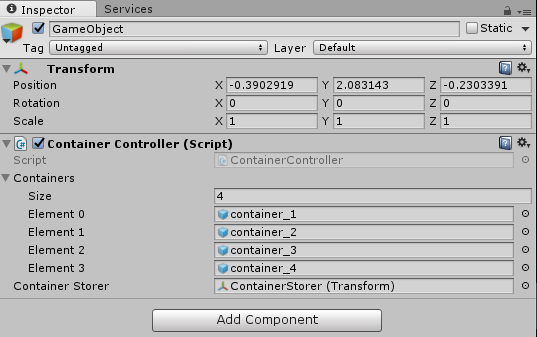
1.png (24.2 kB)
2.png (17.1 kB)
Show more comments
Show more comments
avatar image RangerDog · Sep 29, 2016 at 12:32 PM 0
Share

Well, still doesn't work but technically your answer is correct, Will see if/how i can change instantiating it.

Follow this Question

Answers Answers and Comments

72 People are following this question.

avatar image avatar image avatar image avatar image avatar image avatar image avatar image avatar image avatar image avatar image avatar image avatar image avatar image avatar image avatar image avatar image avatar image avatar image avatar image avatar image avatar image avatar image avatar image avatar image avatar image avatar image avatar image avatar image avatar image avatar image avatar image avatar image avatar image avatar image avatar image avatar image avatar image avatar image avatar image avatar image avatar image avatar image avatar image avatar image avatar image avatar image avatar image avatar image avatar image avatar image avatar image avatar image avatar image avatar image avatar image avatar image avatar image avatar image avatar image avatar image avatar image avatar image avatar image avatar image avatar image avatar image avatar image avatar image avatar image avatar image avatar image avatar image

Related Questions

Unity, C# and OOP 1 Answer

Instantiating prefab and assigning variable in Edit mode, persistancy 2 Answers

Component Image disabled after a spawn 1 Answer

How should I call my particle system (a small explosion) when my projectile hits enemy?,particle system not instantiating OnCollisionEnter 1 Answer

NetworkLobbyManager: How to spawn a lobbyprefab as the child of another GameObject. 1 Answer


Enterprise
Social Q&A

Social
Subscribe on YouTube social-youtube Follow on LinkedIn social-linkedin Follow on Twitter social-twitter Follow on Facebook social-facebook Follow on Instagram social-instagram

Footer

  • Purchase
    • Products
    • Subscription
    • Asset Store
    • Unity Gear
    • Resellers
  • Education
    • Students
    • Educators
    • Certification
    • Learn
    • Center of Excellence
  • Download
    • Unity
    • Beta Program
  • Unity Labs
    • Labs
    • Publications
  • Resources
    • Learn platform
    • Community
    • Documentation
    • Unity QA
    • FAQ
    • Services Status
    • Connect
  • About Unity
    • About Us
    • Blog
    • Events
    • Careers
    • Contact
    • Press
    • Partners
    • Affiliates
    • Security
Copyright © 2020 Unity Technologies
  • Legal
  • Privacy Policy
  • Cookies
  • Do Not Sell My Personal Information
  • Cookies Settings
"Unity", Unity logos, and other Unity trademarks are trademarks or registered trademarks of Unity Technologies or its affiliates in the U.S. and elsewhere (more info here). Other names or brands are trademarks of their respective owners.
  • Anonymous
  • Sign in
  • Create
  • Ask a question
  • Spaces
  • Default
  • Help Room
  • META
  • Moderators
  • Explore
  • Topics
  • Questions
  • Users
  • Badges
