
Wayback Machinekoobas.hobune.stream
May JUN Jul
Previous capture 12 Next capture
2021 2022 2023
1 capture
12 Jun 22 - 12 Jun 22
sparklines
Close Help
  • Products
  • Solutions
  • Made with Unity
  • Learning
  • Support & Services
  • Community
  • Asset Store
  • Get Unity

UNITY ACCOUNT

You need a Unity Account to shop in the Online and Asset Stores, participate in the Unity Community and manage your license portfolio. Login Create account
  • Blog
  • Forums
  • Answers
  • Evangelists
  • User Groups
  • Beta Program
  • Advisory Panel

Navigation

  • Home
  • Products
  • Solutions
  • Made with Unity
  • Learning
  • Support & Services
  • Community
    • Blog
    • Forums
    • Answers
    • Evangelists
    • User Groups
    • Beta Program
    • Advisory Panel

Unity account

You need a Unity Account to shop in the Online and Asset Stores, participate in the Unity Community and manage your license portfolio. Login Create account

Language

  • Chinese
  • Spanish
  • Japanese
  • Korean
  • Portuguese
  • Ask a question
  • Spaces
    • Default
    • Help Room
    • META
    • Moderators
    • Topics
    • Questions
    • Users
    • Badges
  • Home /
  • Help Room /
avatar image
0
Question by theunsigned · Jan 20, 2020 at 12:51 PM · raycastraycasthitvehiclestandard-assetstraffic

Raycasts and vehicle traffic

I've been working on a waypoint-based traffic system but am struggling with making sure the vehicles stop adequately for stop lights and other cars. I am using modified versions of the Unity Standard Assets code for carai and control.

I started with simple box triggers, which worked for the most part but I ran into issues with ontriggerstay, ontriggerexit, and the isdriving boolean I have that tells a car to brake or move.

I then looked into raycasts, which I have never used, and am finding it difficult to use them correctly. Sometimes they work and sometimes they don't.

I'm trying to send out a raycast, which detects triggers, then decides if the trigger is a "stop" trigger, and, if it's below the braking distance, tells the car to brake. Otherwise, I want the car to move.

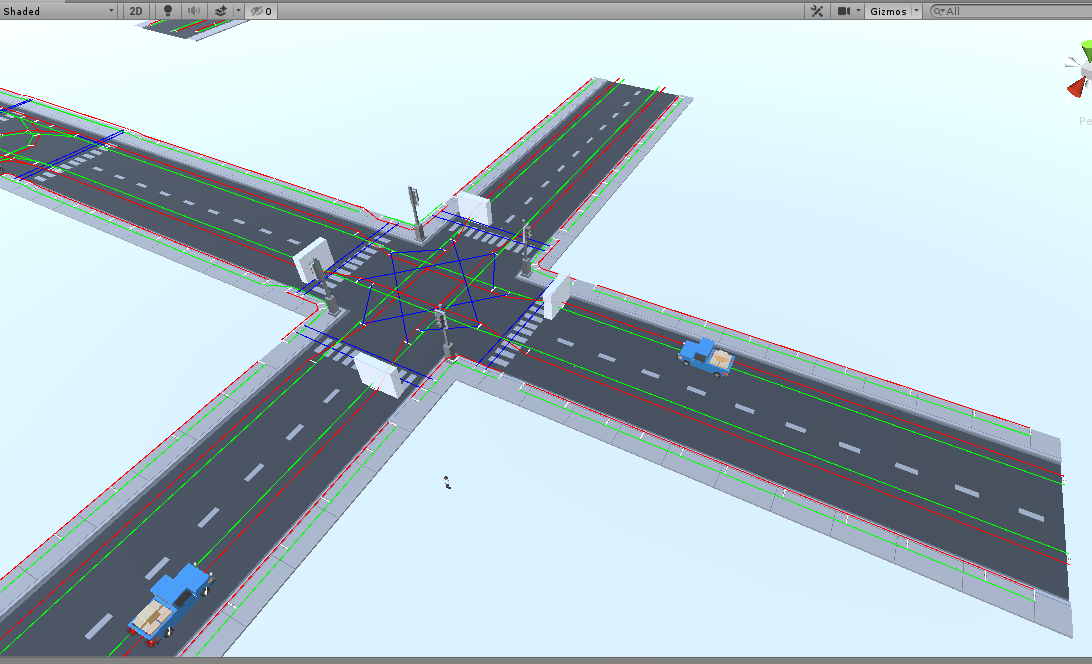
Here is a photo of two identical prefabs, instantiated at the very same time, traveling at two triggers with the same "stop" settings, but the one on the left is obeying the stop (slowing down) and the one on the right is not (charging ahead).
alt text


Here is my raycast code, which is called before the move function in fixedupdate:

     void RaycastFront()
     {
         RaycastHit TheHit;
         Ray ray = new Ray(transform.position, transform.forward);
         if (Physics.Raycast(ray, out TheHit))
         {
             TargetDistance = TheHit.distance;
         }
 
         if (TheHit.collider.isTrigger == true)
         {
             Debug.Log("ray hit a trigger");
             if (TheHit.collider.gameObject.GetComponent<environmentcontroller>()._triggertype == environmentcontroller.triggerType.carstopbox || TheHit.collider.gameObject.GetComponent<environmentcontroller>()._triggertype == environmentcontroller.triggerType.stopbox)
             {
                 Debug.Log("ray hit a collider:   " + TheHit.collider.gameObject.GetComponent<environmentcontroller>()._triggertype);
                 Debug.Log("Target distance:    " + TargetDistance + "     brakedistance:   " + brakedistance);
 
                 if (TargetDistance <= brakedistance)
                 {
                     Debug.Log("it's in range!    Target distance:    " + TargetDistance + "     brakedistance:   " + brakedistance);
                     m_Driving = false;
                     Debug.Log("car driving =  " + m_Driving);
                 }
                 else { m_Driving = true; Debug.Log("car driving went back to true"); }
             }
 }
 
         }
     }


I understand that I don't fully understand raycasting and appreciate any guidance.

screenshot-36.png (142.2 kB)
Comment
Add comment · Show 1
10 |3000 characters needed characters left characters exceeded
▼
  • Viewable by all users
  • Viewable by moderators
  • Viewable by moderators and the original poster
  • Advanced visibility
Viewable by all users
avatar image theunsigned · Jan 20, 2020 at 05:27 PM 0
Share

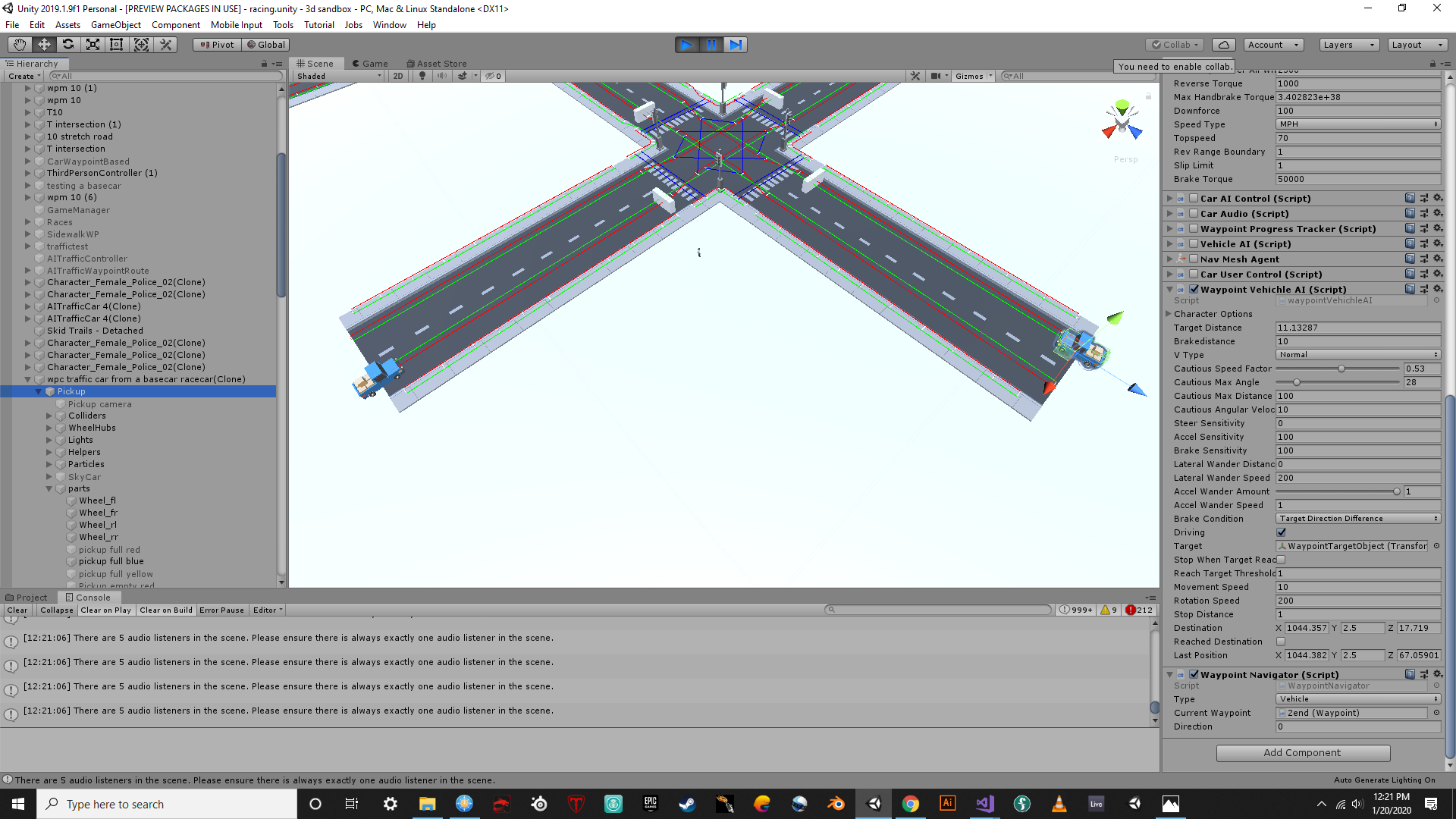
I realized through debugging that my transform.forward was going in one direction. These trucks are child objects of other gameobjects and I cannot figure out after four hours how to set the raycast to these child forwards so I tried using the destination vector3 from the waypoint system. It's still not working but I wanted to update the code for anyone able to help.

Also, now the target distance of the left vehicle says 0 and the right says 11, though they are basically the same distance from their destinations. I'm very confused
alt text

 void RaycastFront()
     {
         RaycastHit TheHit;
         Ray ray = new Ray(transform.position, destination);
 
         if (Physics.Raycast(ray, out TheHit))
         {
             TargetDistance = TheHit.distance;
             Debug.DrawLine(transform.position, destination, Color.white);
         
             if (TheHit.collider.isTrigger == true)
             {
                 Debug.Log("ray hit a trigger");
                 if (TheHit.collider.gameObject.GetComponent<environmentcontroller>()._triggertype == environmentcontroller.triggerType.carstopbox || TheHit.collider.gameObject.GetComponent<environmentcontroller>()._triggertype == environmentcontroller.triggerType.stopbox)
                 {
                     Debug.DrawLine(transform.position, destination, Color.yellow);
 
                     if (TargetDistance <= brakedistance)
                     {
                         Debug.DrawLine(transform.position, destination, Color.red);
                         //Debug.Log("it's in range!    Target distance:    " + TargetDistance + "     brakedistance:   " + brakedistance);
                         m_Driving = false;
                         //Debug.Log("car driving =  " + m_Driving);
                     }
 
                     else { m_Driving = true; Debug.Log("car driving went back to true"); }
                 }
             }
         }
     }


screenshot-37.png (393.8 kB)

0 Replies

· Add your reply
  • Sort: 

Your answer

Hint: You can notify a user about this post by typing @username

Up to 2 attachments (including images) can be used with a maximum of 524.3 kB each and 1.0 MB total.

Follow this Question

Answers Answers and Comments

242 People are following this question.

avatar image avatar image avatar image avatar image avatar image avatar image avatar image avatar image avatar image avatar image avatar image avatar image avatar image avatar image avatar image avatar image avatar image avatar image avatar image avatar image avatar image avatar image avatar image avatar image avatar image avatar image avatar image avatar image avatar image avatar image avatar image avatar image avatar image avatar image avatar image avatar image avatar image avatar image avatar image avatar image avatar image avatar image avatar image avatar image avatar image avatar image avatar image avatar image avatar image avatar image avatar image avatar image avatar image avatar image avatar image avatar image avatar image avatar image avatar image avatar image avatar image avatar image avatar image avatar image avatar image avatar image avatar image avatar image avatar image avatar image avatar image avatar image avatar image avatar image avatar image avatar image avatar image avatar image avatar image avatar image avatar image avatar image avatar image avatar image avatar image avatar image avatar image avatar image avatar image avatar image avatar image avatar image avatar image avatar image avatar image avatar image avatar image avatar image avatar image avatar image avatar image avatar image avatar image avatar image avatar image avatar image avatar image avatar image avatar image avatar image avatar image avatar image avatar image avatar image avatar image avatar image avatar image avatar image avatar image avatar image avatar image avatar image avatar image avatar image avatar image avatar image avatar image avatar image avatar image avatar image avatar image avatar image avatar image avatar image avatar image avatar image avatar image avatar image avatar image avatar image avatar image avatar image avatar image avatar image avatar image avatar image avatar image avatar image avatar image avatar image avatar image avatar image avatar image avatar image avatar image avatar image avatar image avatar image avatar image avatar image avatar image avatar image avatar image avatar image avatar image avatar image avatar image avatar image avatar image avatar image avatar image avatar image avatar image avatar image avatar image avatar image avatar image avatar image avatar image avatar image avatar image avatar image avatar image avatar image avatar image avatar image avatar image avatar image avatar image avatar image avatar image avatar image avatar image avatar image avatar image avatar image avatar image avatar image avatar image avatar image avatar image avatar image avatar image avatar image avatar image avatar image avatar image avatar image avatar image avatar image avatar image avatar image avatar image avatar image avatar image avatar image avatar image avatar image avatar image avatar image avatar image avatar image avatar image avatar image avatar image avatar image avatar image avatar image avatar image avatar image avatar image avatar image avatar image avatar image avatar image avatar image avatar image avatar image avatar image avatar image avatar image avatar image

Related Questions

Get component from parent of children hittet with raycast 1 Answer

Foreach working very strange 0 Answers

RayCastHit 2d with layerMask not workin 0 Answers

Help with Raycast Script 0 Answers

raycasthit.normal sometimes returns zero 1 Answer


Enterprise
Social Q&A

Social
Subscribe on YouTube social-youtube Follow on LinkedIn social-linkedin Follow on Twitter social-twitter Follow on Facebook social-facebook Follow on Instagram social-instagram

Footer

  • Purchase
    • Products
    • Subscription
    • Asset Store
    • Unity Gear
    • Resellers
  • Education
    • Students
    • Educators
    • Certification
    • Learn
    • Center of Excellence
  • Download
    • Unity
    • Beta Program
  • Unity Labs
    • Labs
    • Publications
  • Resources
    • Learn platform
    • Community
    • Documentation
    • Unity QA
    • FAQ
    • Services Status
    • Connect
  • About Unity
    • About Us
    • Blog
    • Events
    • Careers
    • Contact
    • Press
    • Partners
    • Affiliates
    • Security
Copyright © 2020 Unity Technologies
  • Legal
  • Privacy Policy
  • Cookies
  • Do Not Sell My Personal Information
  • Cookies Settings
"Unity", Unity logos, and other Unity trademarks are trademarks or registered trademarks of Unity Technologies or its affiliates in the U.S. and elsewhere (more info here). Other names or brands are trademarks of their respective owners.
  • Anonymous
  • Sign in
  • Create
  • Ask a question
  • Spaces
  • Default
  • Help Room
  • META
  • Moderators
  • Explore
  • Topics
  • Questions
  • Users
  • Badges
