
Wayback Machinekoobas.hobune.stream
May JUN Jul
Previous capture 13 Next capture
2021 2022 2023
1 capture
13 Jun 22 - 13 Jun 22
sparklines
Close Help
  • Products
  • Solutions
  • Made with Unity
  • Learning
  • Support & Services
  • Community
  • Asset Store
  • Get Unity

UNITY ACCOUNT

You need a Unity Account to shop in the Online and Asset Stores, participate in the Unity Community and manage your license portfolio. Login Create account
  • Blog
  • Forums
  • Answers
  • Evangelists
  • User Groups
  • Beta Program
  • Advisory Panel

Navigation

  • Home
  • Products
  • Solutions
  • Made with Unity
  • Learning
  • Support & Services
  • Community
    • Blog
    • Forums
    • Answers
    • Evangelists
    • User Groups
    • Beta Program
    • Advisory Panel

Unity account

You need a Unity Account to shop in the Online and Asset Stores, participate in the Unity Community and manage your license portfolio. Login Create account

Language

  • Chinese
  • Spanish
  • Japanese
  • Korean
  • Portuguese
  • Ask a question
  • Spaces
    • Default
    • Help Room
    • META
    • Moderators
    • Topics
    • Questions
    • Users
    • Badges
  • Home /
avatar image
0
Question by Fran-Martin · Feb 24, 2015 at 04:20 PM · raycastscreentoworldpointcustom inspector

Placing markers over SceneView by mouse-clicking

Hi all. Once I've set up a Custom Inspector, I want to grab left-clicks and place a marker there. I use the Top-Ortographic view, then I throw a raycast from the ScreenPoint(Vector2) downward and use the hit point of the raycast as the desired marker position. Unfortunately, it's not working.

It looks like the hit position is inverted.

 public void OnSceneGUI()
 {
 RaycastHit hit;
 Ray ray = SceneView.lastActiveSceneView.camera.ScreenPointToRay(Event.current.mousePosition);
 if (Physics.Raycast(ray, out hit))
 {
 GameObject cube =(GameObject) Instantiate(Resources.Load("Marker"));
 cube.transform.position = hit.point;
 }
 break;
 }

Thanks in advance.

Comment
Add comment
10 |3000 characters needed characters left characters exceeded
▼
  • Viewable by all users
  • Viewable by moderators
  • Viewable by moderators and the original poster
  • Advanced visibility
Viewable by all users

2 Replies

· Add your reply
  • Sort: 
avatar image
1
Best Answer

Answer by Fran-Martin · Feb 27, 2015 at 04:06 PM

Finally I did it by replacing the class SceneView with the HandleUtility one, which performs perfectly my purpose of extending the editor

 if (Event.current.type == EventType.MouseUp)
         {
             Ray worldRay = HandleUtility.GUIPointToWorldRay(Event.current.mousePosition);
             RaycastHit hitInfo;
             if (Physics.Raycast(worldRay, out hitInfo, 10000))
             {                    
                 myCity.AddMarker(hitInfo.point);
             }
         }    
         Event.current.Use();
Comment
Add comment · Share
10 |3000 characters needed characters left characters exceeded
▼
  • Viewable by all users
  • Viewable by moderators
  • Viewable by moderators and the original poster
  • Advanced visibility
Viewable by all users
avatar image
0

Answer by LaireonGames · Feb 24, 2015 at 09:14 PM

You probably want a groud for reference to make your results more reliable, or perhaps a distance to project into. Think of project a ray into space with nothing, there is no way to know how far into that space to stop and thats what I guess is causing your issues.

I usually setup a quad with the layer of ground for these sort of checks simply because its easier.

Otherwise if that doesnt help the explanation of your problem is a little vague so would be a good idea to elaborate on whats actually happening ;)

Comment
Add comment · Show 2 · Share
10 |3000 characters needed characters left characters exceeded
▼
  • Viewable by all users
  • Viewable by moderators
  • Viewable by moderators and the original poster
  • Advanced visibility
Viewable by all users
avatar image Fran-Martin · Feb 25, 2015 at 08:41 AM 0
Share

There is a terrain object below. The ray intersects, but not in the expected coordinates.

To sum up: I'm grabbing the click in the TOP2D-SceneView and launching a ray from this screenpoint to the 3D terrain.

I supose that the mistake is in this sentence:

Ray ray =SceneView.lastActiveSceneView.camera.ScreenPointToRay(Event.current.mousePosition);

The following image represents with GREEN TRIANGLES the screen coordinates where I made the click and the RED STARS where the markers were positionedalt text
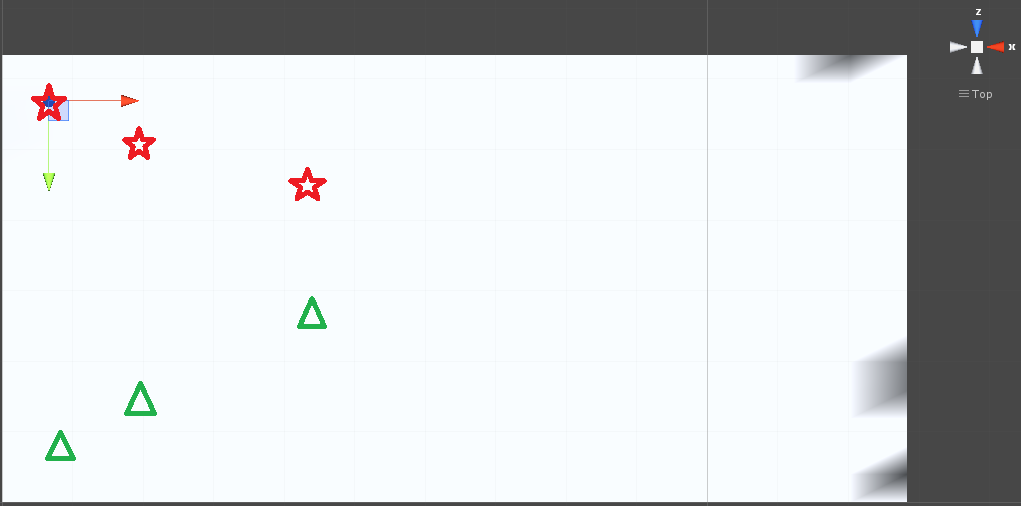
captura-error.png (14.6 kB)
avatar image LaireonGames · Feb 25, 2015 at 09:54 AM 0
Share

That line won't be your problem its what you do with it thats important. $$anonymous$$G that gives you the direction but not the distance.

After it you should do a standard Physic.RayCast and then make sure it looks at the right layers etc etc

Your answer

Hint: You can notify a user about this post by typing @username

Up to 2 attachments (including images) can be used with a maximum of 524.3 kB each and 1.0 MB total.

Follow this Question

Answers Answers and Comments

20 People are following this question.

avatar image avatar image avatar image avatar image avatar image avatar image avatar image avatar image avatar image avatar image avatar image avatar image avatar image avatar image avatar image avatar image avatar image avatar image avatar image avatar image

Related Questions

Find TextureCoordinates from plane with out raycast only using mouse position on plan 0 Answers

How to achieve a more accurate Mouse to WorldCoordinates & faster updating of object follow? 2 Answers

Raycast, ScreenToWorldPoint accuracy problem 4 Answers

Camera.main.ScreenToWorldPoint not outputting expected results. 1 Answer

Camera.ScreenToWorldPoint with Perspective camera 1 Answer


Enterprise
Social Q&A

Social
Subscribe on YouTube social-youtube Follow on LinkedIn social-linkedin Follow on Twitter social-twitter Follow on Facebook social-facebook Follow on Instagram social-instagram

Footer

  • Purchase
    • Products
    • Subscription
    • Asset Store
    • Unity Gear
    • Resellers
  • Education
    • Students
    • Educators
    • Certification
    • Learn
    • Center of Excellence
  • Download
    • Unity
    • Beta Program
  • Unity Labs
    • Labs
    • Publications
  • Resources
    • Learn platform
    • Community
    • Documentation
    • Unity QA
    • FAQ
    • Services Status
    • Connect
  • About Unity
    • About Us
    • Blog
    • Events
    • Careers
    • Contact
    • Press
    • Partners
    • Affiliates
    • Security
Copyright © 2020 Unity Technologies
  • Legal
  • Privacy Policy
  • Cookies
  • Do Not Sell My Personal Information
  • Cookies Settings
"Unity", Unity logos, and other Unity trademarks are trademarks or registered trademarks of Unity Technologies or its affiliates in the U.S. and elsewhere (more info here). Other names or brands are trademarks of their respective owners.
  • Anonymous
  • Sign in
  • Create
  • Ask a question
  • Spaces
  • Default
  • Help Room
  • META
  • Moderators
  • Explore
  • Topics
  • Questions
  • Users
  • Badges
