
Wayback Machinekoobas.hobune.stream
May JUN Jul
Previous capture 13 Next capture
2021 2022 2023
1 capture
13 Jun 22 - 13 Jun 22
sparklines
Close Help
  • Products
  • Solutions
  • Made with Unity
  • Learning
  • Support & Services
  • Community
  • Asset Store
  • Get Unity

UNITY ACCOUNT

You need a Unity Account to shop in the Online and Asset Stores, participate in the Unity Community and manage your license portfolio. Login Create account
  • Blog
  • Forums
  • Answers
  • Evangelists
  • User Groups
  • Beta Program
  • Advisory Panel

Navigation

  • Home
  • Products
  • Solutions
  • Made with Unity
  • Learning
  • Support & Services
  • Community
    • Blog
    • Forums
    • Answers
    • Evangelists
    • User Groups
    • Beta Program
    • Advisory Panel

Unity account

You need a Unity Account to shop in the Online and Asset Stores, participate in the Unity Community and manage your license portfolio. Login Create account

Language

  • Chinese
  • Spanish
  • Japanese
  • Korean
  • Portuguese
  • Ask a question
  • Spaces
    • Default
    • Help Room
    • META
    • Moderators
    • Topics
    • Questions
    • Users
    • Badges
  • Home /
avatar image
0
Question by MrProfessorTroll · Dec 01, 2013 at 01:55 AM · texturelookatonguidrawaim

Player Looking in Opposite Direction

Basically, if I move my reticle to the top of the screen, the player looks down and vice versa. This also applies horizontally. I am making a top down shooter. Take a look at what I mean: alt text
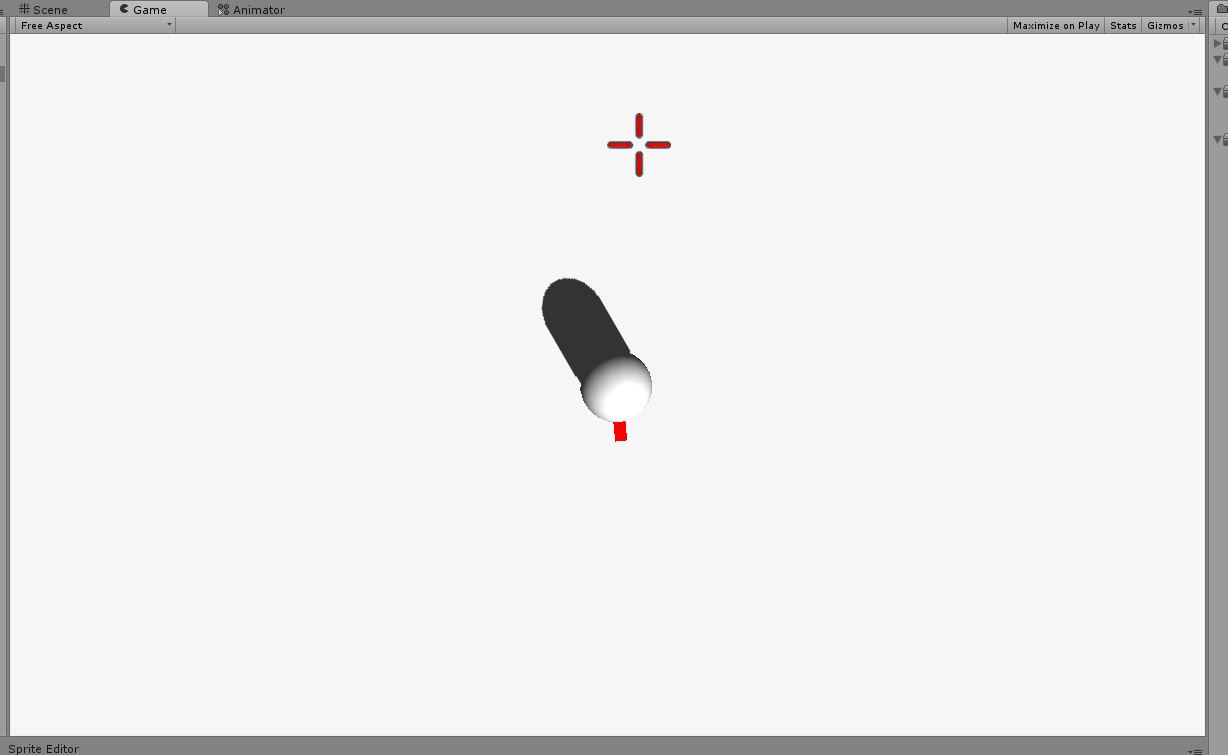
And here is my code. Very simple.

 using UnityEngine;
 using System.Collections;
 
 [RequireComponent(typeof(CharacterController))]
 public class PlayerController : MonoBehaviour 
 {
     public float speed;
     public Texture2D reticle;
     public float reticleSensitivity;
 
     private CharacterController player;
     private Vector3 moveDir;
     private Transform myTransform;
     private Camera mainCam;
     private Vector3 lookDir;
     private float camDif;
     private Vector2 reticlePos;
 
     void Awake()
     {
         mainCam = Camera.main;
         myTransform = transform;
         camDif = mainCam.transform.position.y - myTransform.transform.position.y;
         player = GetComponent<CharacterController>();
     }
 
     void Update()
     {
         movement();
     }
 
     void movement()
     {
         reticlePos += new Vector2(Input.GetAxisRaw("360_RightStickHorizontal") * reticleSensitivity * Time.deltaTime, Input.GetAxisRaw("360_RightStickVertical") * reticleSensitivity * Time.deltaTime);
         reticlePos = new Vector2(Mathf.Clamp(reticlePos.x, 0, Screen.width), Mathf.Clamp(reticlePos.y, 0, Screen.height));
 
         lookDir = new Vector3(reticlePos.x, reticlePos.y, camDif);
         lookDir = mainCam.ScreenToWorldPoint(lookDir);
         myTransform.LookAt(lookDir);
         
         moveDir = new Vector3(Input.GetAxis("Horizontal"), 0f, Input.GetAxis("Vertical"));
         moveDir *= speed;
         
         player.Move(moveDir * Time.deltaTime);
     }
 
     void OnGUI()
     {
         GUI.DrawTexture(new Rect(reticlePos.x - 32, reticlePos.y - 32, 64, 64), reticle);
     }
 
 }
 
capture.jpg (39.6 kB)
Comment
Add comment
10 |3000 characters needed characters left characters exceeded
▼
  • Viewable by all users
  • Viewable by moderators
  • Viewable by moderators and the original poster
  • Advanced visibility
Viewable by all users

1 Reply

· Add your reply
  • Sort: 
avatar image
1
Best Answer

Answer by tanoshimi · Dec 01, 2013 at 08:42 AM

"...I am making a top down shooter..." - so shouldn't you be considering x and z coordinates in all your calculations, not x and y?

You're getting mixed up between world, screen and GUI coordinate systems - and you could make this easier on yourself by commenting your code and using better variable names - lookDir changes its context from a screen space position to world space position, for example (and neither one being a "direction").

If you just want the answer given to you on a plate, change the line:

 lookDir = new Vector3(reticlePos.x, reticlePos.y, camDif);

to:

 lookDir = new Vector3(reticlePos.x, Screen.height - reticlePos.y, camDif);
Comment
Add comment · Show 2 · Share
10 |3000 characters needed characters left characters exceeded
▼
  • Viewable by all users
  • Viewable by moderators
  • Viewable by moderators and the original poster
  • Advanced visibility
Viewable by all users
avatar image MinerJohn · Dec 01, 2013 at 08:55 AM 0
Share

$$anonymous$$y thoughts exactly.

avatar image tanoshimi · Dec 01, 2013 at 09:41 PM 0
Share

Wow - you live up to your name, don't you?! I've updated my answer to point out the exact line you need to change, seeing as it seems you completely missed the point of my original reply. You're welcome.

Your answer

Hint: You can notify a user about this post by typing @username

Up to 2 attachments (including images) can be used with a maximum of 524.3 kB each and 1.0 MB total.

Follow this Question

Answers Answers and Comments

18 People are following this question.

avatar image avatar image avatar image avatar image avatar image avatar image avatar image avatar image avatar image avatar image avatar image avatar image avatar image avatar image avatar image avatar image avatar image avatar image

Related Questions

Replacing Gui.DrawTexture or gui textures in C#? 0 Answers

GUI text appears behind drawn texture. 0 Answers

Web player screen corruption 1 Answer

How to draw textures on a GameObject 2 Answers

How to merge two textures of different size? 1 Answer


Enterprise
Social Q&A

Social
Subscribe on YouTube social-youtube Follow on LinkedIn social-linkedin Follow on Twitter social-twitter Follow on Facebook social-facebook Follow on Instagram social-instagram

Footer

  • Purchase
    • Products
    • Subscription
    • Asset Store
    • Unity Gear
    • Resellers
  • Education
    • Students
    • Educators
    • Certification
    • Learn
    • Center of Excellence
  • Download
    • Unity
    • Beta Program
  • Unity Labs
    • Labs
    • Publications
  • Resources
    • Learn platform
    • Community
    • Documentation
    • Unity QA
    • FAQ
    • Services Status
    • Connect
  • About Unity
    • About Us
    • Blog
    • Events
    • Careers
    • Contact
    • Press
    • Partners
    • Affiliates
    • Security
Copyright © 2020 Unity Technologies
  • Legal
  • Privacy Policy
  • Cookies
  • Do Not Sell My Personal Information
  • Cookies Settings
"Unity", Unity logos, and other Unity trademarks are trademarks or registered trademarks of Unity Technologies or its affiliates in the U.S. and elsewhere (more info here). Other names or brands are trademarks of their respective owners.
  • Anonymous
  • Sign in
  • Create
  • Ask a question
  • Spaces
  • Default
  • Help Room
  • META
  • Moderators
  • Explore
  • Topics
  • Questions
  • Users
  • Badges