
Wayback Machinekoobas.hobune.stream
May JUN Jul
Previous capture 12 Next capture
2021 2022 2023
1 capture
12 Jun 22 - 12 Jun 22
sparklines
Close Help
  • Products
  • Solutions
  • Made with Unity
  • Learning
  • Support & Services
  • Community
  • Asset Store
  • Get Unity

UNITY ACCOUNT

You need a Unity Account to shop in the Online and Asset Stores, participate in the Unity Community and manage your license portfolio. Login Create account
  • Blog
  • Forums
  • Answers
  • Evangelists
  • User Groups
  • Beta Program
  • Advisory Panel

Navigation

  • Home
  • Products
  • Solutions
  • Made with Unity
  • Learning
  • Support & Services
  • Community
    • Blog
    • Forums
    • Answers
    • Evangelists
    • User Groups
    • Beta Program
    • Advisory Panel

Unity account

You need a Unity Account to shop in the Online and Asset Stores, participate in the Unity Community and manage your license portfolio. Login Create account

Language

  • Chinese
  • Spanish
  • Japanese
  • Korean
  • Portuguese
  • Ask a question
  • Spaces
    • Default
    • Help Room
    • META
    • Moderators
    • Topics
    • Questions
    • Users
    • Badges
  • Home /
  • Help Room /
avatar image
0
Question by sneakybig · May 29, 2018 at 09:49 PM · rotationslidernewbietiltyaw

Sliders (Tilt and Yaw Rotation)

Sliders (Tilt and Yaw Rotation) Hi guys, Im new to unity and I have been trying to create slider controllers to rotate my object... So I created two sliders, one for tilt (Z) and yaw (Y), Both works great on their own, my problem is when I try to use them together. If I move the Yaw half way and then I move the Tilt, the object returns to its original position instead of storing the current position and adjusting from then on. Hope this makes sense... I know my main problem is that I have no clue how to store the rotation coordinates or how to use them to make my sliders work correctly. Here is what I have so far:

   using System.Collections;
   using System.Collections.Generic;
   using UnityEngine;
   using UnityEngine.UI;
   
   public class ObjectControl : MonoBehaviour {
   
       public GameObject objectToRotate;
       public Slider rotateSlider;
       public Slider tiltSlider;
       public Slider scaleSlider;
   
   
       public void RotateMyObject(float sliderValueR)
       {
           sliderValueR = rotateSlider.value;
           objectToRotate.transform.rotation = Quaternion.Euler(0, sliderValueR * 360, 0);
       }
   
   
       public void TiltMyObject(float sliderValueT)
       {
           sliderValueT = tiltSlider.value;
           objectToRotate.transform.rotation = Quaternion.Euler(0, 0, sliderValueT * 360);
       }
   
       public void ScaleMyObject(float sliderValueS)
       {
           Vector3 scale = objectToRotate.transform.localScale;
           sliderValueS = scaleSlider.value;
   
   
           objectToRotate.transform.localScale = new Vector3(sliderValueS, sliderValueS, sliderValueS);
   
       }
   
   }

Thank you all for the help!! Fabio

Comment
Add comment
10 |3000 characters needed characters left characters exceeded
▼
  • Viewable by all users
  • Viewable by moderators
  • Viewable by moderators and the original poster
  • Advanced visibility
Viewable by all users

1 Reply

· Add your reply
  • Sort: 
avatar image
0

Answer by bakir-omarov · Jun 12, 2018 at 11:33 AM

Hey! When you are rotating one axis, you are returning to zero another two, see : Quaternion.Euler(0, 0, sliderValueT * 360). You just need to use current axis rotations. See on the code ;)
Here is the code:


     public void RotateMyObject(float sliderValueR) // i don't know why you are need this |float sliderValueR| here?
     {
         sliderValueR = rotateSlider.value; 
 
         Vector3 currentRotation = objectToRotate.transform.rotation.eulerAngles;
         objectToRotate.transform.rotation = Quaternion.Euler(currentRotation.x, sliderValueR * 360, currentRotation.z);
     }
 
 
     public void TiltMyObject(float sliderValueT) // i don't know why you are need this too
     {
         sliderValueT = tiltSlider.value;
 
         Vector3 currentRotation = objectToRotate.transform.rotation.eulerAngles;
         objectToRotate.transform.rotation = Quaternion.Euler(currentRotation.x, currentRotation.y, sliderValueT * 360);
     }


P.S i tested script, rotate it million times, no glithces no bugs. I am using Unity 2017. alt text
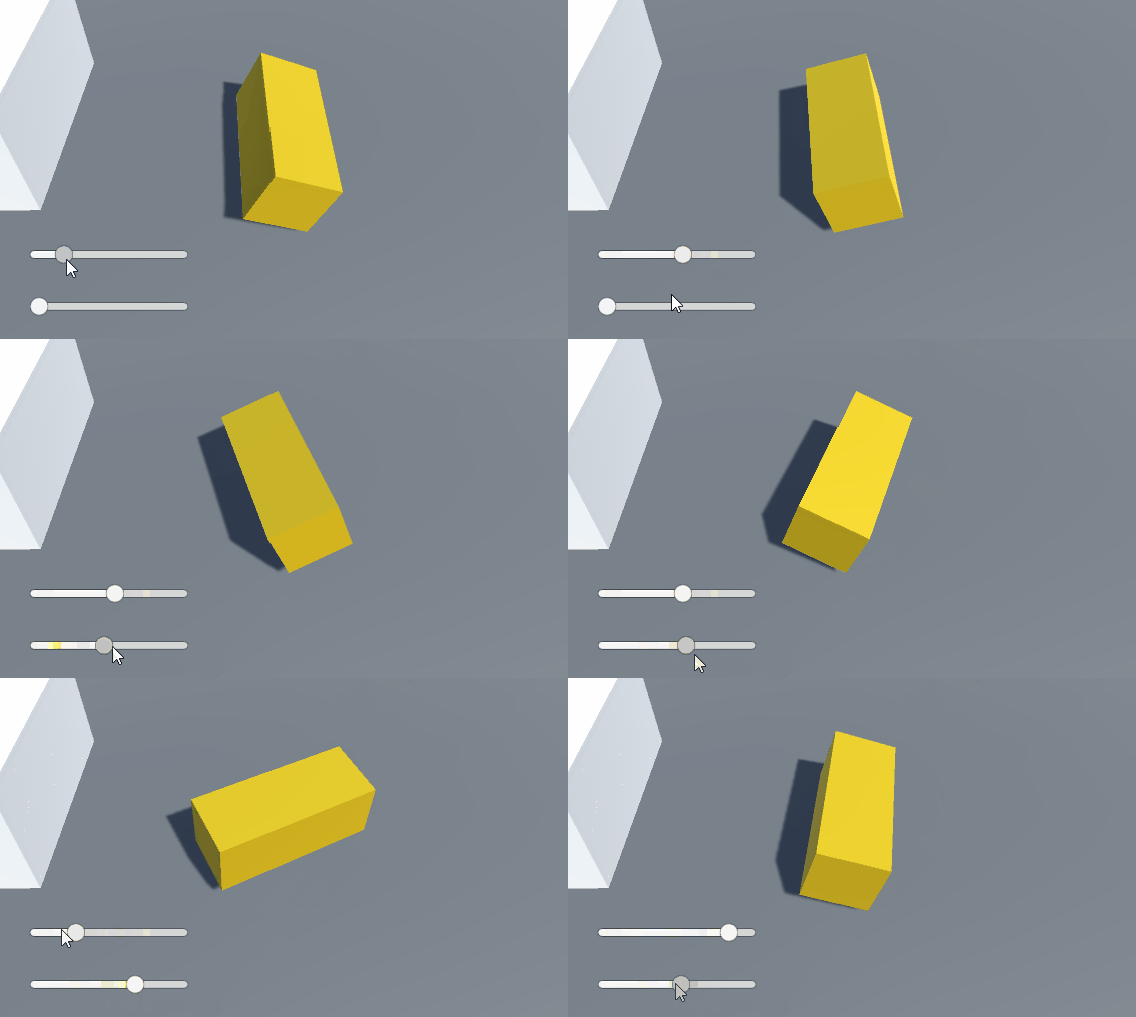

unity-rotate3.gif (430.5 kB)
Comment
Add comment · Show 5 · Share
10 |3000 characters needed characters left characters exceeded
▼
  • Viewable by all users
  • Viewable by moderators
  • Viewable by moderators and the original poster
  • Advanced visibility
Viewable by all users
avatar image sneakybig · Jun 12, 2018 at 07:01 PM 0
Share

Wow! you are amazing! It is so easy to get stuck when you don't know all the available options when coding...

If you don't $$anonymous$$d me asking, as the beginner I am, what is the best source to get better at this? $$anonymous$$ost of my program$$anonymous$$g experience has been in ExtendScript to create user interfaces for After Effects of when I was learning about that, there were good video courses to follow along... Hope to find the same now that I am getting more into Unity.

Thank you once again!!!

Fabio

avatar image bakir-omarov sneakybig · Jun 12, 2018 at 07:10 PM 0
Share

For the beginning my advice is to follow 5-10 full courses (tutorial series). For example you can find a bunch of them here: https://unity3d.com/learn/tutorials/

Or just type in youtube "how to make unity game", and watch all video of some playlist from episode 1 till the end, and parallel implement all this stuff in your project. Have a nice Unity trip !

avatar image sneakybig bakir-omarov · Jun 12, 2018 at 07:33 PM 0
Share

Hi Bakir, let me ask you another question, after making the changes, the rotation and the tilt are working well together, but for some reason, when I tilt, I get very strange results, as I move the slider, at certain amount of degrees, the object starts to flicker. I recorded the problem for you to see: https://vimeo.com/274754621 I found that this is a very common problem and found this might be a solution: https://answers.unity.com/questions/395033/quaternionfromtorotation-misunderstanding.html Just not sure how this applies to my script in order to fix it... Thank you again for your time! Fabio

Show more comments

Your answer

Hint: You can notify a user about this post by typing @username

Up to 2 attachments (including images) can be used with a maximum of 524.3 kB each and 1.0 MB total.

Follow this Question

Answers Answers and Comments

175 People are following this question.

avatar image avatar image avatar image avatar image avatar image avatar image avatar image avatar image avatar image avatar image avatar image avatar image avatar image avatar image avatar image avatar image avatar image avatar image avatar image avatar image avatar image avatar image avatar image avatar image avatar image avatar image avatar image avatar image avatar image avatar image avatar image avatar image avatar image avatar image avatar image avatar image avatar image avatar image avatar image avatar image avatar image avatar image avatar image avatar image avatar image avatar image avatar image avatar image avatar image avatar image avatar image avatar image avatar image avatar image avatar image avatar image avatar image avatar image avatar image avatar image avatar image avatar image avatar image avatar image avatar image avatar image avatar image avatar image avatar image avatar image avatar image avatar image avatar image avatar image avatar image avatar image avatar image avatar image avatar image avatar image avatar image avatar image avatar image avatar image avatar image avatar image avatar image avatar image avatar image avatar image avatar image avatar image avatar image avatar image avatar image avatar image avatar image avatar image avatar image avatar image avatar image avatar image avatar image avatar image avatar image avatar image avatar image avatar image avatar image avatar image avatar image avatar image avatar image avatar image avatar image avatar image avatar image avatar image avatar image avatar image avatar image avatar image avatar image avatar image avatar image avatar image avatar image avatar image avatar image avatar image avatar image avatar image avatar image avatar image avatar image avatar image avatar image avatar image avatar image avatar image avatar image avatar image avatar image avatar image avatar image avatar image avatar image avatar image avatar image avatar image avatar image avatar image avatar image avatar image avatar image avatar image avatar image avatar image avatar image avatar image avatar image avatar image avatar image avatar image avatar image avatar image avatar image avatar image avatar image avatar image avatar image avatar image avatar image avatar image avatar image

Related Questions

How can I move Object over local axis with sliders 1 Answer

how do I rezolve "look rotation viewing vector is zero"? 1 Answer

how to shoot on different direction while moving away 1 Answer

How can I properly tilt an object about two axes, while preventing the other axis from rotating? 1 Answer

How to keep the same yaw(right/left) and pitch(up/down) controls rotation as I roll ? 0 Answers


Enterprise
Social Q&A

Social
Subscribe on YouTube social-youtube Follow on LinkedIn social-linkedin Follow on Twitter social-twitter Follow on Facebook social-facebook Follow on Instagram social-instagram

Footer

  • Purchase
    • Products
    • Subscription
    • Asset Store
    • Unity Gear
    • Resellers
  • Education
    • Students
    • Educators
    • Certification
    • Learn
    • Center of Excellence
  • Download
    • Unity
    • Beta Program
  • Unity Labs
    • Labs
    • Publications
  • Resources
    • Learn platform
    • Community
    • Documentation
    • Unity QA
    • FAQ
    • Services Status
    • Connect
  • About Unity
    • About Us
    • Blog
    • Events
    • Careers
    • Contact
    • Press
    • Partners
    • Affiliates
    • Security
Copyright © 2020 Unity Technologies
  • Legal
  • Privacy Policy
  • Cookies
  • Do Not Sell My Personal Information
  • Cookies Settings
"Unity", Unity logos, and other Unity trademarks are trademarks or registered trademarks of Unity Technologies or its affiliates in the U.S. and elsewhere (more info here). Other names or brands are trademarks of their respective owners.
  • Anonymous
  • Sign in
  • Create
  • Ask a question
  • Spaces
  • Default
  • Help Room
  • META
  • Moderators
  • Explore
  • Topics
  • Questions
  • Users
  • Badges
