 koobas.hobune.stream


Set a sun light (Day Night Cycle)
Hello,
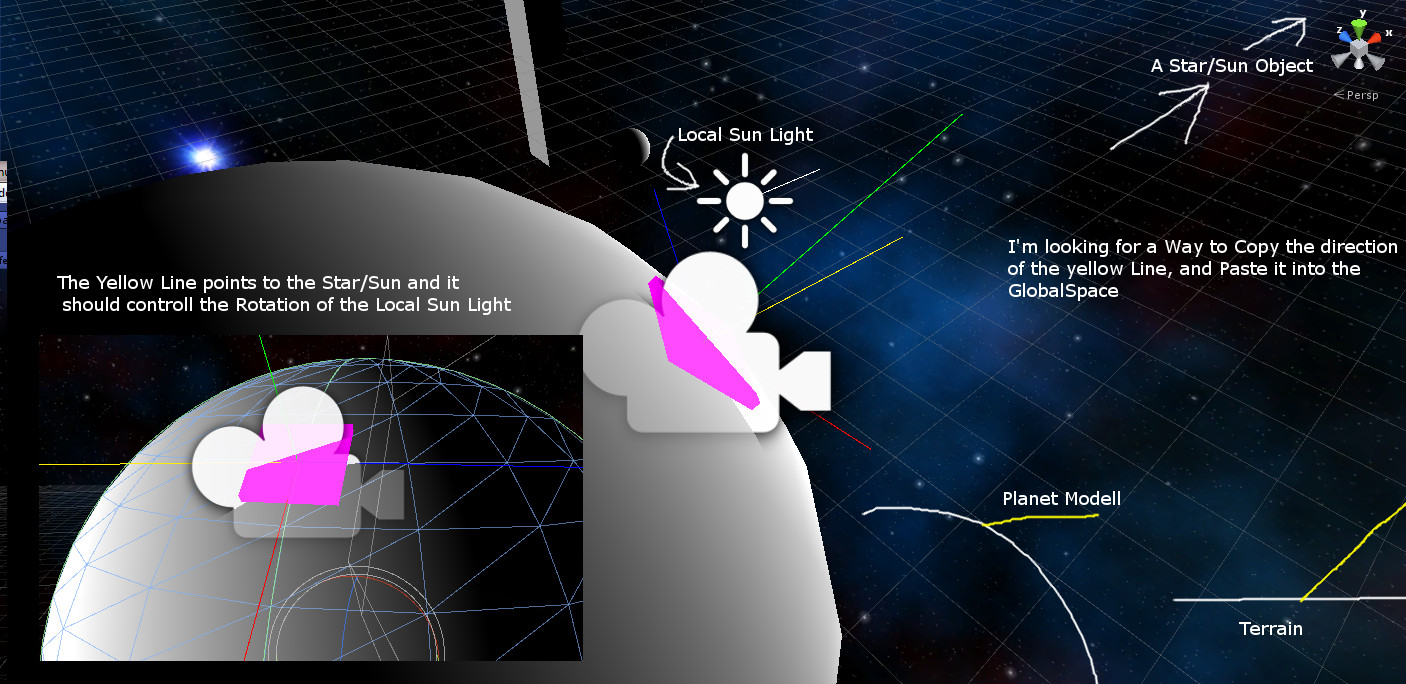
I want to make a day/night cycle by using the planetay rotaion. Now I have a Problem, the yewllow line in the Screenshot is the Direction to the Star for a Local directional Light
I have trouble with the correct direction of the Local Sun Light.
The Local Directional Light has the script:
 using UnityEngine;
 using System.Collections;

 public class LocalSun : MonoBehaviour
 {

     public GameObject star;
     public GameObject skyBoxCam;
     public LayerMask layer;

     Light localSun;

     void Start ()
     {
         localSun = light;
     }

     void Update ()
     {
         Quaternion starDirection = Quaternion.LookRotation(star.transform.position - skyBoxCam.transform.position);
         Vector3 v3LocalStarDirection = starDirection * Vector3.forward;

         Debug.DrawRay(skyBoxCam.transform.position, v3LocalStarDirection, Color.yellow);

         Debug.DrawRay(skyBoxCam.transform.position, skyBoxCam.transform.forward, Color.blue);
         Debug.DrawRay(skyBoxCam.transform.position, skyBoxCam.transform.right, Color.red);
         Debug.DrawRay(skyBoxCam.transform.position, skyBoxCam.transform.up, Color.green);

         Vector3 v3Relative = skyBoxCam.transform.parent.transform.TransformDirection(v3LocalStarDirection);

         Ray ray = new Ray(skyBoxCam.transform.position, starDirection * Vector3.forward);
         RaycastHit hit;
         if(Physics.Raycast(ray, out hit, 10000f, layer.value))
         {
             if(hit.transform.light)
             {
                 light.enabled = true;
             }
             else
             {
                 light.enabled = false;
             }
         }


         Debug.DrawRay(transform.position, v3Relative, Color.white);
         transform.rotation = Quaternion.LookRotation(v3Relative);

     }
 }
The skyBoxCam object is parented to an object to algin it to the planet surface in an easier way.
I think the problem is the way I try to Copy the Direction to the Sun:
Vector3 v3Relative = skyBoxCam.transform.parent.transform.TransformDirection(v3LocalStarDirection);
The Sunlight points in a wrong Direction and can't go under the horizon if I Rotate the Planet (but the Yellow line[direction to the sun] is under the horizon).
I'm sorry for the odd english, I'm not a native speaker.

Now I can fix this by using a relativ roation offset.
 using UnityEngine;
 using System.Collections;

 public class LocalSun : $$anonymous$$onoBehaviour
 {

     public GameObject star;
     public GameObject skyBoxCam;
     public Layer$$anonymous$$ask layer;

     Light localSun;

     void Start ()
     {
         localSun = light;
     }

     void Update ()
     {
         Quaternion starDirection = Quaternion.LookRotation(star.transform.position - skyBoxCam.transform.position);
         /*
         Vector3 v3LocalStarDirection = starDirection * Vector3.forward;
         Debug.DrawRay(skyBoxCam.transform.position, v3LocalStarDirection, Color.yellow);
         Debug.DrawRay(skyBoxCam.transform.position, skyBoxCam.transform.forward, Color.blue);
         Debug.DrawRay(skyBoxCam.transform.position, skyBoxCam.transform.right, Color.red);
         Debug.DrawRay(skyBoxCam.transform.position, skyBoxCam.transform.up, Color.green);
         */

         Ray ray = new Ray(skyBoxCam.transform.position, starDirection * Vector3.forward);
         RaycastHit hit;
         if(Physics.Raycast(ray, out hit, 10000f, layer.value))
         {
             if(hit.transform.light)
             {
                 light.enabled = true;
             }
             else
             {
                 light.enabled = false;
             }
         }

         Quaternion offset = Quaternion.Inverse(skyBoxCam.transform.parent.rotation) * starDirection;
         Debug.DrawRay(transform.position, offset * Vector3.forward, Color.white);
         transform.rotation = offset;
         transform.Rotate(0,180,0);

     }

 }



