
Wayback Machinekoobas.hobune.stream
May JUN Jul
Previous capture 12 Next capture
2021 2022 2023
1 capture
12 Jun 22 - 12 Jun 22
sparklines
Close Help
  • Products
  • Solutions
  • Made with Unity
  • Learning
  • Support & Services
  • Community
  • Asset Store
  • Get Unity

UNITY ACCOUNT

You need a Unity Account to shop in the Online and Asset Stores, participate in the Unity Community and manage your license portfolio. Login Create account
  • Blog
  • Forums
  • Answers
  • Evangelists
  • User Groups
  • Beta Program
  • Advisory Panel

Navigation

  • Home
  • Products
  • Solutions
  • Made with Unity
  • Learning
  • Support & Services
  • Community
    • Blog
    • Forums
    • Answers
    • Evangelists
    • User Groups
    • Beta Program
    • Advisory Panel

Unity account

You need a Unity Account to shop in the Online and Asset Stores, participate in the Unity Community and manage your license portfolio. Login Create account

Language

  • Chinese
  • Spanish
  • Japanese
  • Korean
  • Portuguese
  • Ask a question
  • Spaces
    • Default
    • Help Room
    • META
    • Moderators
    • Topics
    • Questions
    • Users
    • Badges
  • Home /
avatar image
0
Question by oliver-jones · Jun 07, 2016 at 02:47 PM · transformdirectiongizmosdrawline

Gizmos.DrawRay is Incorrect

Hello,

I'm trying to draw a ray within my Gizmo, but I can't seem to get it to go in the correct direction.

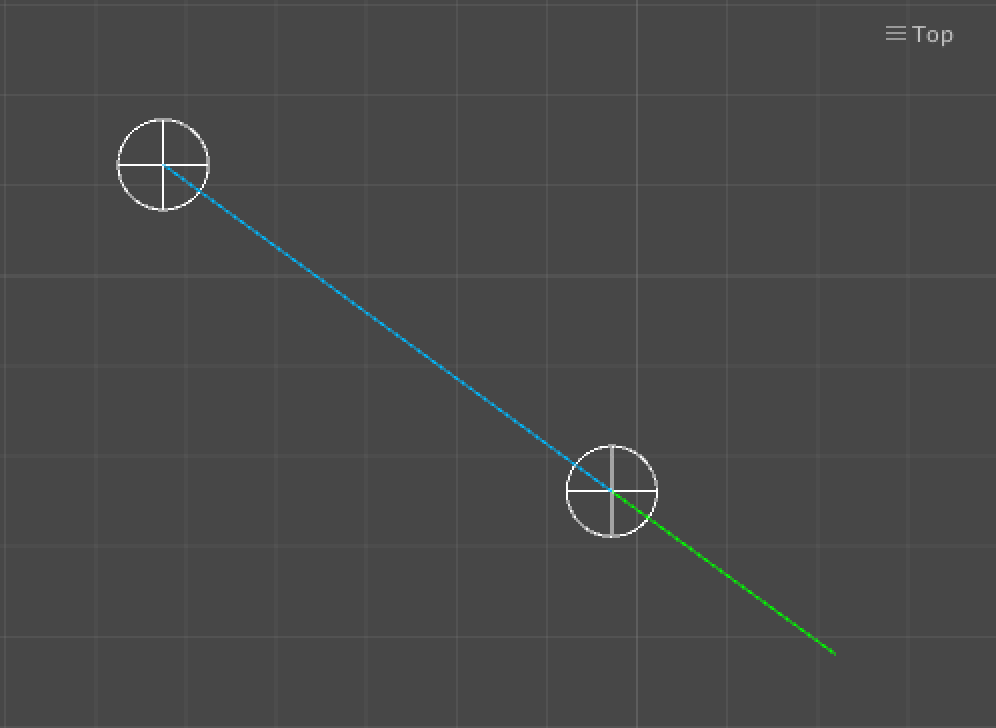
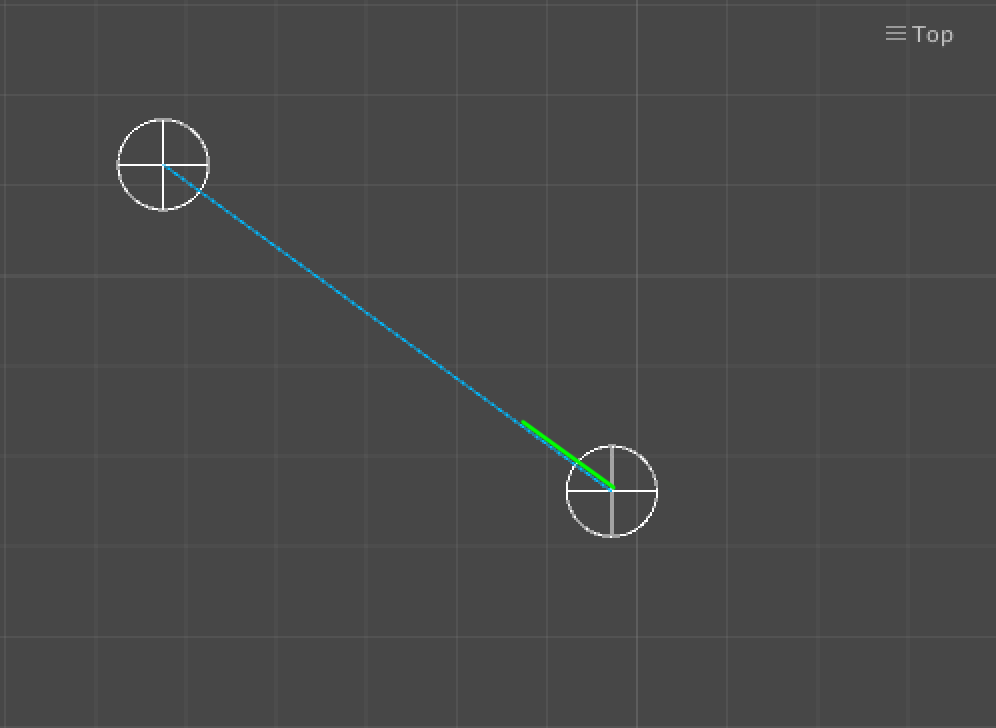
I basically have two GameObjects, called A and B. A is connected to B, and fires a Blue DrawLine from A to B. I want to also fire a smaller Green line from A, in the DIRECTION of B, but for it to only be a short line, and also offset to the left. This is to show the user that A is connected to B.

This is what I currently have:
alt text

The Upper Left is B, the Lower Right is A. A is connected to B (shown by the Blue Line).

I want to Green Line to be basically 180 degrees the other way, and offset a little so its not on-top of the Blue Line.

This is what I want:
alt text

How can I achieve this?

 //this transform is _A
 Gizmos.color = Color.green;
 Vector3 dir = transform.TransformDirection(transform.position - _B.transform.position) * 0.5f;
 Gizmos.DrawRay(transform.position, dir);
 
 Gizmos.color = Color.light_blue;
 Gizmos.DrawLine(transform.position, _B.transform.position);

line-length.png (23.3 kB)
screen-shot-2016-06-07-at-153454.png (50.3 kB)
Comment
Add comment
10 |3000 characters needed characters left characters exceeded
▼
  • Viewable by all users
  • Viewable by moderators
  • Viewable by moderators and the original poster
  • Advanced visibility
Viewable by all users

1 Reply

· Add your reply
  • Sort: 
avatar image
0

Answer by Bunny83 · Jun 07, 2016 at 02:55 PM

The rule for vector math is: "tip minus tail". So to get a direction vector that goes from A to B you need to calculate (B - A). You calculate A - B at the moment, so the vector points the other way round.

ps: Your TransformDirection call is most likely wrong as well. transform.position is a position in worldspace. So the resulting direction vector after you calculated (B - A) is also a world space direction. TransformDirection transforms a local space vector into worldspace. So you should remove the TransformDirection completely here.

Comment
Add comment · Show 3 · Share
10 |3000 characters needed characters left characters exceeded
▼
  • Viewable by all users
  • Viewable by moderators
  • Viewable by moderators and the original poster
  • Advanced visibility
Viewable by all users
avatar image oliver-jones · Jun 07, 2016 at 03:09 PM 0
Share

Thank you! I now have:

 dir = (_B.transform.position - transform.position) * 0.5f

All I need to do now is to offset it a little because right now, it is rendered under the Blue line - I would like to shift is a pixel or two to the Right of the point.

avatar image oliver-jones · Jun 07, 2016 at 03:19 PM 0
Share

I currently have:

 Vector3 dir = (_B.transform.position - transform.position) * 0.5f;
 Vector3 a_offset = new Vector3(transform.position.x + 0.1f, transform.position.y, transform.position.z);
 Vector3 b_offset = new Vector3(dir.x, dir.y, dir.z);
 Gizmos.DrawRay(a_offset, b_offset);

However, this is World, so it looks fine when I move _B directly above _A on the Z axis, but not when I rotate _B around _A.

avatar image Bunny83 oliver-jones · Jun 07, 2016 at 04:16 PM 0
Share

Well, you need to calculate an offset that is perpendicular to your original direction. It's not clear if your problem is actually a 2D or 3D problem. 2D makes it a bit easier. In 3D it depends on the position of the camera.

In 2D you can simply swap the x and y coordinates of your direction and invert one coordinate to get a vector that is perpendicular on the original.

 Vector2 offset = new Vector2(dir.y, -dir.x).normalized * 0.1f;

This offset can simply be added to your origin.

If it should work in 3D you have to calculate the cross product between your direction vector and your camera's forward vector. That gives you a vector that is perpendicular to the plane that your direction and the forward axis define.

Something like this:

 Vector3 offset = Vector3.Cross(dir, Camera.current.transform.forward).normalized * 0.1f;

Your answer

Hint: You can notify a user about this post by typing @username

Up to 2 attachments (including images) can be used with a maximum of 524.3 kB each and 1.0 MB total.

Follow this Question

Answers Answers and Comments

48 People are following this question.

avatar image avatar image avatar image avatar image avatar image avatar image avatar image avatar image avatar image avatar image avatar image avatar image avatar image avatar image avatar image avatar image avatar image avatar image avatar image avatar image avatar image avatar image avatar image avatar image avatar image avatar image avatar image avatar image avatar image avatar image avatar image avatar image avatar image avatar image avatar image avatar image avatar image avatar image avatar image avatar image avatar image avatar image avatar image avatar image avatar image avatar image avatar image avatar image

Related Questions

Shoot second cell in 2d 0 Answers

CharacterController.Move Issue 2 Answers

Rotate the player toward a direction 0 Answers

InverseTransformDirection and TransformDirection 1 Answer

tranform.TransformDirection not effecting spawned object 2 Answers


Enterprise
Social Q&A

Social
Subscribe on YouTube social-youtube Follow on LinkedIn social-linkedin Follow on Twitter social-twitter Follow on Facebook social-facebook Follow on Instagram social-instagram

Footer

  • Purchase
    • Products
    • Subscription
    • Asset Store
    • Unity Gear
    • Resellers
  • Education
    • Students
    • Educators
    • Certification
    • Learn
    • Center of Excellence
  • Download
    • Unity
    • Beta Program
  • Unity Labs
    • Labs
    • Publications
  • Resources
    • Learn platform
    • Community
    • Documentation
    • Unity QA
    • FAQ
    • Services Status
    • Connect
  • About Unity
    • About Us
    • Blog
    • Events
    • Careers
    • Contact
    • Press
    • Partners
    • Affiliates
    • Security
Copyright © 2020 Unity Technologies
  • Legal
  • Privacy Policy
  • Cookies
  • Do Not Sell My Personal Information
  • Cookies Settings
"Unity", Unity logos, and other Unity trademarks are trademarks or registered trademarks of Unity Technologies or its affiliates in the U.S. and elsewhere (more info here). Other names or brands are trademarks of their respective owners.
  • Anonymous
  • Sign in
  • Create
  • Ask a question
  • Spaces
  • Default
  • Help Room
  • META
  • Moderators
  • Explore
  • Topics
  • Questions
  • Users
  • Badges
