
Wayback Machinekoobas.hobune.stream
May JUN Jul
Previous capture 13 Next capture
2021 2022 2023
1 capture
13 Jun 22 - 13 Jun 22
sparklines
Close Help
  • Products
  • Solutions
  • Made with Unity
  • Learning
  • Support & Services
  • Community
  • Asset Store
  • Get Unity

UNITY ACCOUNT

You need a Unity Account to shop in the Online and Asset Stores, participate in the Unity Community and manage your license portfolio. Login Create account
  • Blog
  • Forums
  • Answers
  • Evangelists
  • User Groups
  • Beta Program
  • Advisory Panel

Navigation

  • Home
  • Products
  • Solutions
  • Made with Unity
  • Learning
  • Support & Services
  • Community
    • Blog
    • Forums
    • Answers
    • Evangelists
    • User Groups
    • Beta Program
    • Advisory Panel

Unity account

You need a Unity Account to shop in the Online and Asset Stores, participate in the Unity Community and manage your license portfolio. Login Create account

Language

  • Chinese
  • Spanish
  • Japanese
  • Korean
  • Portuguese
  • Ask a question
  • Spaces
    • Default
    • Help Room
    • META
    • Moderators
    • Topics
    • Questions
    • Users
    • Badges
  • Home /
avatar image
0
Question by Mithosbluefish · Jan 28, 2015 at 10:52 PM · gridtriangleshexagon

Hexagon mesh subdivided into triangles

Edit: after some editing I have fixed the bug of the incomplete hexagons.

Hi guys,

I am trying to create a hexagon mesh where each hexagon is subdivided into 6 triangles. I want to be able to texture each triangle with an individual texture, however have run into a snag creating the mesh. At the moment I have written some code that creates hexagons however the results are pretty far off from what I want to achieve.
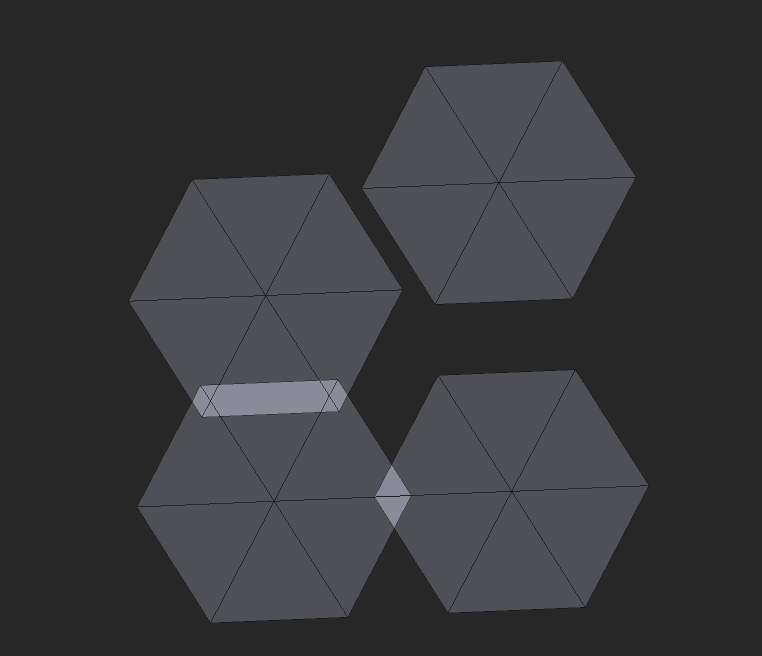
alt text

After some messing around I have managed to fix a bug causing the hexagons to appear incomplete. Now I need to solve how to correctly place the hexagons in a grid formation. The code for the offset of each hexagon is:

 float height = _radius * 2;
 float width = Mathf.Sqrt(3)/2 * height;
 float horizon = height*3/4;
 float vertical = width;
 
 
 Vector2 sO = new Vector2(x*horizon, z*vertical);
 Vector2 sOffset = new Vector2(_startCenter.x + (sO.x + (z%2==0 ? 0 : (sO.x/2))), (_startCenter.z + sO.y));

Complete code below:

 private void GenerateGrid()
 {
     //Constants for hexagon calculations
     float height = _radius * 2;
     float width = Mathf.Sqrt(3)/2 * height;
     float horizon = height*3/4;
     float vertical = width;
 
     //Arrays for hexagon vertices (tG), nomalization and uv
     Vector3[] tG = new Vector3[_totalHex*18];
     Vector3[] norm = new Vector3[_totalHex*18];
     Vector2[] uv = new Vector2[_totalHex*18];
         
     for(int z = 0; z < _size.y; z++)
     {
         for(int x = 0; x < _size.x; x++)
         {    
             //Sets variables for hexagon creation
             int y = 0;
             Vector2 sO = new Vector2(x*horizon, z*vertical);
             Vector2 sOffset = new Vector2(_startCenter.x + (sO.x + (z%2==0 ? 0 : (sO.x/2))), (_startCenter.z + sO.y));
             for(int i = 0; i < 18; i++)
             {
                 //Iterates y every third iteration of i
                 y += ((i+1)%3 == 0 ? 1  : 0); 
 
                 //sets y to 0 to close the hexagon and the end
                 if((i+1)%18 == 0)
                 {
                     y = 0;
                 }
                 ////
 
                 //Every third (including 0) should be the center vertex (c), all others should be the vertexes of the outer ring (n)
                 //The iteration on hexagon one should be [c, n0, n1, c, n1, n2, c, n2, n3, c, n3, n4, c, n4, n5, c, n5, n0]
                 tG[((z*_size.x+x)*18)+i] = (i%3 == 0 ? new Vector3(sOffset.x, _startCenter.y, sOffset.y)
                                                 : new Vector3(sOffset.x + (_radius * Mathf.Cos(2*Mathf.PI * (y+0.5f)/6)), 
                                                   _startCenter.y,
                                                  sOffset.y + (_radius * Mathf.Sin(2*Mathf.PI * (y+0.5f)/6))));
 
                 //uv[((z*_size.x+x)*18)+i] = new Vector2(x*i, y*i);
                 norm[((z*_size.x+x)*18)+i] = Vector3.up;
             }
         }
     }
 
     //sets arrays for mesh (_key = triangles)
     _worldVertices = tG;
     _normals = norm;
     _key = Enumerable.Range(0, _totalHex*18).ToArray();
 }

I hope I have made the question easily understandable and someone is able to tell me what I'm doing wrong and how I might fix it. Possibly tell me a less contrived way of doing this. Finally, I apologize if this question is cluttered.

Bonus question: How would I UV map these hexagons?

undesierable-mesh.png (15.3 kB)
undesierable-mesh.png (14.5 kB)
Comment
Add comment
10 |3000 characters needed characters left characters exceeded
▼
  • Viewable by all users
  • Viewable by moderators
  • Viewable by moderators and the original poster
  • Advanced visibility
Viewable by all users

1 Reply

· Add your reply
  • Sort: 
avatar image
0
Best Answer

Answer by Mithosbluefish · Jan 29, 2015 at 12:53 AM

Solved the issues, turns out my offset calculations were wrong. I was calculating distance for a pointed top grid while I was generating a flat top grid.

Correct calculations are:

 float width = _radius * 2;
 float height = Mathf.Sqrt(3)/2 * width;
 float horizon = width*3/4;
 float vertical = height;
 
 Vector2 sO = new Vector2(x*horizon, z*vertical+(x%2 == 0 ?(vertical/2) : 0));
 Vector2 sOffset = new Vector2(_startCenter.x + sO.x, _startCenter.z + sO.y);

Comment
Add comment · Share
10 |3000 characters needed characters left characters exceeded
▼
  • Viewable by all users
  • Viewable by moderators
  • Viewable by moderators and the original poster
  • Advanced visibility
Viewable by all users

Your answer

Hint: You can notify a user about this post by typing @username

Up to 2 attachments (including images) can be used with a maximum of 524.3 kB each and 1.0 MB total.

Follow this Question

Answers Answers and Comments

19 People are following this question.

avatar image avatar image avatar image avatar image avatar image avatar image avatar image avatar image avatar image avatar image avatar image avatar image avatar image avatar image avatar image avatar image avatar image avatar image avatar image

Related Questions

Hexagonal grid with 120 degree angles 1 Answer

How can customize which prefabs are instantiated in a grid? 1 Answer

Hexagonal grid 1 Answer

Merging coplanar triangles of a mesh into polygon 1 Answer

Change hex tilemap to use axial coordinates? 0 Answers


Enterprise
Social Q&A

Social
Subscribe on YouTube social-youtube Follow on LinkedIn social-linkedin Follow on Twitter social-twitter Follow on Facebook social-facebook Follow on Instagram social-instagram

Footer

  • Purchase
    • Products
    • Subscription
    • Asset Store
    • Unity Gear
    • Resellers
  • Education
    • Students
    • Educators
    • Certification
    • Learn
    • Center of Excellence
  • Download
    • Unity
    • Beta Program
  • Unity Labs
    • Labs
    • Publications
  • Resources
    • Learn platform
    • Community
    • Documentation
    • Unity QA
    • FAQ
    • Services Status
    • Connect
  • About Unity
    • About Us
    • Blog
    • Events
    • Careers
    • Contact
    • Press
    • Partners
    • Affiliates
    • Security
Copyright © 2020 Unity Technologies
  • Legal
  • Privacy Policy
  • Cookies
  • Do Not Sell My Personal Information
  • Cookies Settings
"Unity", Unity logos, and other Unity trademarks are trademarks or registered trademarks of Unity Technologies or its affiliates in the U.S. and elsewhere (more info here). Other names or brands are trademarks of their respective owners.
  • Anonymous
  • Sign in
  • Create
  • Ask a question
  • Spaces
  • Default
  • Help Room
  • META
  • Moderators
  • Explore
  • Topics
  • Questions
  • Users
  • Badges
