
Wayback Machinekoobas.hobune.stream
May JUN Jul
Previous capture 13 Next capture
2021 2022 2023
1 capture
13 Jun 22 - 13 Jun 22
sparklines
Close Help
  • Products
  • Solutions
  • Made with Unity
  • Learning
  • Support & Services
  • Community
  • Asset Store
  • Get Unity

UNITY ACCOUNT

You need a Unity Account to shop in the Online and Asset Stores, participate in the Unity Community and manage your license portfolio. Login Create account
  • Blog
  • Forums
  • Answers
  • Evangelists
  • User Groups
  • Beta Program
  • Advisory Panel

Navigation

  • Home
  • Products
  • Solutions
  • Made with Unity
  • Learning
  • Support & Services
  • Community
    • Blog
    • Forums
    • Answers
    • Evangelists
    • User Groups
    • Beta Program
    • Advisory Panel

Unity account

You need a Unity Account to shop in the Online and Asset Stores, participate in the Unity Community and manage your license portfolio. Login Create account

Language

  • Chinese
  • Spanish
  • Japanese
  • Korean
  • Portuguese
  • Ask a question
  • Spaces
    • Default
    • Help Room
    • META
    • Moderators
    • Topics
    • Questions
    • Users
    • Badges
  • Home /
avatar image
1
Question by jaroosh · May 03, 2014 at 10:03 AM · 2dterraintop

Top down 2d big terrain

Hi guys,

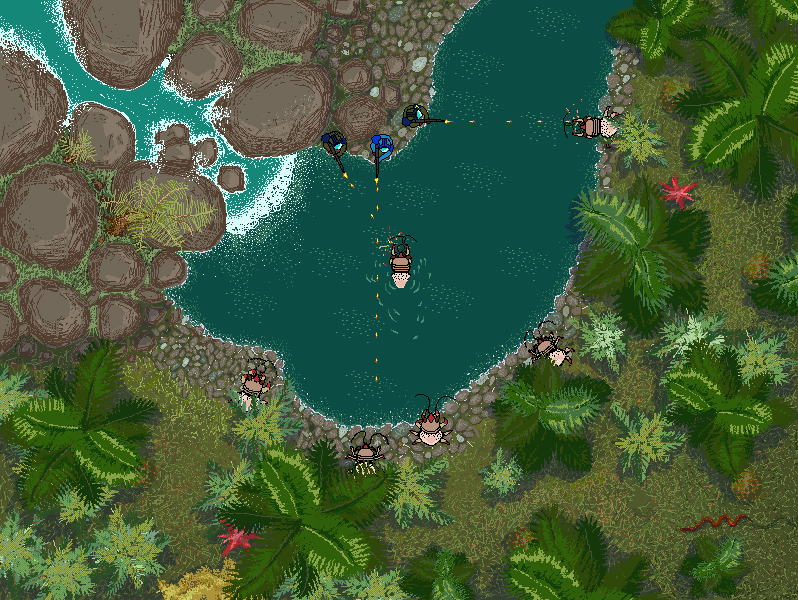
my friends and I are currently working on a top down 2d game in Unity using Unity's 2d features (straight top down, not isometric), here's a screenshot :
alt text

and while prototyping the scene in Unity by placing the objects (rocks, plants etc) directly in the scene for prototyping purposes seemed fine, now we've reached a place where we want to figure out how to implement handling of a huge terrain.

My question is - is it a good practice to do it this way - model the whole map as one huge scene and place the Sprites or prefabs made of bunch of Sprites on the scene one by one or is there a better way ? The problems I see here are : -potential perfomance issues - huge number of objects to be in the hierarchy -pathfinding - most of the things we put should be un-walkable like plants, rocks, the river etc. and I'm affraid that might be an issue too.

Any thoughts ?

dżungla akcja.png (168.5 kB)
Comment
Add comment · Show 1
10 |3000 characters needed characters left characters exceeded
▼
  • Viewable by all users
  • Viewable by moderators
  • Viewable by moderators and the original poster
  • Advanced visibility
Viewable by all users
avatar image Swaggre · May 03, 2014 at 10:53 AM 0
Share

But it doesn't have to load many polygons and complex 3d models so I don't think there will be any performance issues

2 Replies

· Add your reply
  • Sort: 
avatar image
3
Best Answer

Answer by Kobusvdwalt · May 03, 2014 at 11:49 AM

Hey there,

Take a look at Application.LoadLevelAdditiveAsync

http://docs.unity3d.com/Documentation/ScriptReference/Application.LoadLevelAdditiveAsync.html

It allows you to load levels additively without lag. Though I think Asynch is pro only. But theres also http://docs.unity3d.com/Documentation/ScriptReference/Application.LoadLevelAdditive.html

So you can split your level into multiple scenes.

Comment
Add comment · Show 1 · Share
10 |3000 characters needed characters left characters exceeded
▼
  • Viewable by all users
  • Viewable by moderators
  • Viewable by moderators and the original poster
  • Advanced visibility
Viewable by all users
avatar image jaroosh · May 03, 2014 at 03:47 PM 0
Share

awesome stuff, thanks! Did you have a chance to test such scene loading in a game performance wise ?

avatar image
0

Answer by Kamuiyshirou · May 03, 2014 at 03:57 PM

@Kobusvdwalt, Even on this issue, specifically bout the answer ... anyone know explain what has more performance? And what time is more advisable to use? I develop for Android.

http://docs.unity3d.com/Documentation/ScriptReference/Application.LoadLevelAdditiveAsync.html

http://docs.unity3d.com/Documentation/ScriptReference/Application.LoadLevelAdditive.html

THANK YOU!

Comment
Add comment · Share
10 |3000 characters needed characters left characters exceeded
▼
  • Viewable by all users
  • Viewable by moderators
  • Viewable by moderators and the original poster
  • Advanced visibility
Viewable by all users

Your answer

Hint: You can notify a user about this post by typing @username

Up to 2 attachments (including images) can be used with a maximum of 524.3 kB each and 1.0 MB total.

Follow this Question

Answers Answers and Comments

23 People are following this question.

avatar image avatar image avatar image avatar image avatar image avatar image avatar image avatar image avatar image avatar image avatar image avatar image avatar image avatar image avatar image avatar image avatar image avatar image avatar image avatar image avatar image avatar image avatar image

Related Questions

How to create a ground/terrain/floor that won't respond to gravity or objects falling on it? 1 Answer

2D Terrain / Paint on (plane)-mesh 0 Answers

2D Top Perspective game tutorial 1 Answer

Anyone know good options for creating curvy 2D terrain? 2 Answers

Assets/Scripts/PlayerController.cs(32,49): error CS0126: An object of a type convertible to `float' is required for the return statement 1 Answer


Enterprise
Social Q&A

Social
Subscribe on YouTube social-youtube Follow on LinkedIn social-linkedin Follow on Twitter social-twitter Follow on Facebook social-facebook Follow on Instagram social-instagram

Footer

  • Purchase
    • Products
    • Subscription
    • Asset Store
    • Unity Gear
    • Resellers
  • Education
    • Students
    • Educators
    • Certification
    • Learn
    • Center of Excellence
  • Download
    • Unity
    • Beta Program
  • Unity Labs
    • Labs
    • Publications
  • Resources
    • Learn platform
    • Community
    • Documentation
    • Unity QA
    • FAQ
    • Services Status
    • Connect
  • About Unity
    • About Us
    • Blog
    • Events
    • Careers
    • Contact
    • Press
    • Partners
    • Affiliates
    • Security
Copyright © 2020 Unity Technologies
  • Legal
  • Privacy Policy
  • Cookies
  • Do Not Sell My Personal Information
  • Cookies Settings
"Unity", Unity logos, and other Unity trademarks are trademarks or registered trademarks of Unity Technologies or its affiliates in the U.S. and elsewhere (more info here). Other names or brands are trademarks of their respective owners.
  • Anonymous
  • Sign in
  • Create
  • Ask a question
  • Spaces
  • Default
  • Help Room
  • META
  • Moderators
  • Explore
  • Topics
  • Questions
  • Users
  • Badges
