
Wayback Machinekoobas.hobune.stream
May JUN Jul
Previous capture 13 Next capture
2021 2022 2023
1 capture
13 Jun 22 - 13 Jun 22
sparklines
Close Help
  • Products
  • Solutions
  • Made with Unity
  • Learning
  • Support & Services
  • Community
  • Asset Store
  • Get Unity

UNITY ACCOUNT

You need a Unity Account to shop in the Online and Asset Stores, participate in the Unity Community and manage your license portfolio. Login Create account
  • Blog
  • Forums
  • Answers
  • Evangelists
  • User Groups
  • Beta Program
  • Advisory Panel

Navigation

  • Home
  • Products
  • Solutions
  • Made with Unity
  • Learning
  • Support & Services
  • Community
    • Blog
    • Forums
    • Answers
    • Evangelists
    • User Groups
    • Beta Program
    • Advisory Panel

Unity account

You need a Unity Account to shop in the Online and Asset Stores, participate in the Unity Community and manage your license portfolio. Login Create account

Language

  • Chinese
  • Spanish
  • Japanese
  • Korean
  • Portuguese
  • Ask a question
  • Spaces
    • Default
    • Help Room
    • META
    • Moderators
    • Topics
    • Questions
    • Users
    • Badges
  • Home /
avatar image
0
Question by JoeW97 · Nov 11, 2013 at 09:30 PM · editorgizmo

Any way to hide the gizmo of a game object in the editor?

I have an editor script attached to an empty game object. My editor class displays two custom gizmos of its own, but there's the annoying 3rd one getting in the way which belongs to the game object itself. I've looked through the docs but haven't found a way yet.

Thanks

Comment
Add comment · Show 8
10 |3000 characters needed characters left characters exceeded
▼
  • Viewable by all users
  • Viewable by moderators
  • Viewable by moderators and the original poster
  • Advanced visibility
Viewable by all users
avatar image jacobschellenberg · Nov 11, 2013 at 09:34 PM 0
Share

If you click the Gizmos button in the Editor, top right hand corner of the editor view, you can make the gizmos smaller and turn some of them off altogether.

avatar image ArkaneX · Nov 11, 2013 at 09:35 PM 0
Share

Just to clarify - you mean the 3 axes?

avatar image jacobschellenberg · Nov 11, 2013 at 09:37 PM 0
Share

This is what I'm talking about. You can move the slider down to make the gizmos smaller in the editor, or check boxes to turn them off.
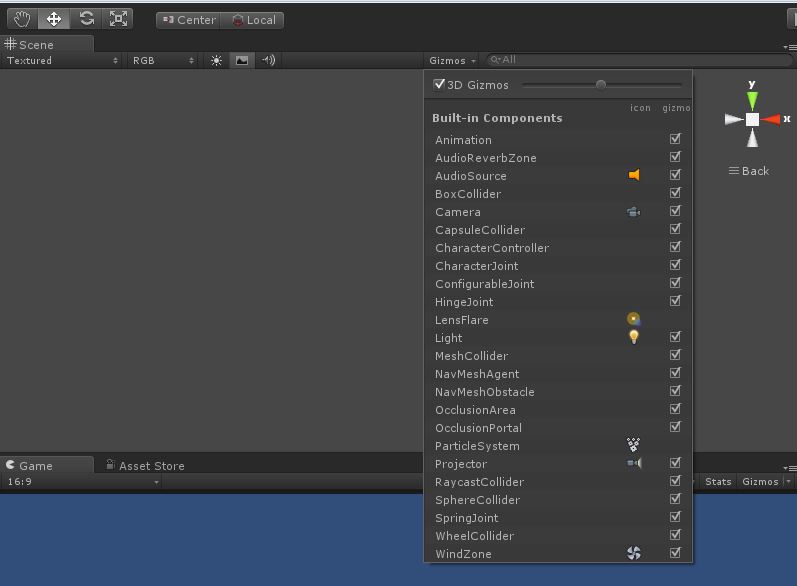
alt text

gizmos.jpg (46.4 kB)
avatar image ArkaneX · Nov 11, 2013 at 09:39 PM 0
Share

@jacobschellenberg - game objects have no gizmos. That's why I asked OP to clarify what he meant.

avatar image JoeW97 · Nov 11, 2013 at 09:43 PM 0
Share

Thanks, yes, the 3 axes, but my understanding is that those controls affect whole classes of object types. I want to hide only 1 specific gizmo of 1 object. The reason is, I'm creating an editor utility and I can't expect users to reconfigure all their gizmos. I hoped there might be some undisclosed script code to let me achieve that.

Show more comments

1 Reply

· Add your reply
  • Sort: 
avatar image
0

Answer by Akusan · Sep 09, 2017 at 04:06 PM

Looks like you can hide them by script:

http://answers.unity3d.com/questions/851470/how-to-hide-gizmos-by-script.html

or using this: https://docs.unity3d.com/ScriptReference/MonoBehaviour.OnDrawGizmosSelected.html?from=Gizmos

Comment
Add comment · Share
10 |3000 characters needed characters left characters exceeded
▼
  • Viewable by all users
  • Viewable by moderators
  • Viewable by moderators and the original poster
  • Advanced visibility
Viewable by all users

Your answer

Hint: You can notify a user about this post by typing @username

Up to 2 attachments (including images) can be used with a maximum of 524.3 kB each and 1.0 MB total.

Follow this Question

Answers Answers and Comments

20 People are following this question.

avatar image avatar image avatar image avatar image avatar image avatar image avatar image avatar image avatar image avatar image avatar image avatar image avatar image avatar image avatar image avatar image avatar image avatar image avatar image avatar image

Related Questions

see colliders in editor 1 Answer

Are textured/z-clipped gizmos possible? 0 Answers

Unity Editor - Create a custom scene view 0 Answers

Select object by selecting gizmo or handle? 1 Answer

Why won't the DrawGizmo attribute work in the editor 1 Answer


Enterprise
Social Q&A

Social
Subscribe on YouTube social-youtube Follow on LinkedIn social-linkedin Follow on Twitter social-twitter Follow on Facebook social-facebook Follow on Instagram social-instagram

Footer

  • Purchase
    • Products
    • Subscription
    • Asset Store
    • Unity Gear
    • Resellers
  • Education
    • Students
    • Educators
    • Certification
    • Learn
    • Center of Excellence
  • Download
    • Unity
    • Beta Program
  • Unity Labs
    • Labs
    • Publications
  • Resources
    • Learn platform
    • Community
    • Documentation
    • Unity QA
    • FAQ
    • Services Status
    • Connect
  • About Unity
    • About Us
    • Blog
    • Events
    • Careers
    • Contact
    • Press
    • Partners
    • Affiliates
    • Security
Copyright © 2020 Unity Technologies
  • Legal
  • Privacy Policy
  • Cookies
  • Do Not Sell My Personal Information
  • Cookies Settings
"Unity", Unity logos, and other Unity trademarks are trademarks or registered trademarks of Unity Technologies or its affiliates in the U.S. and elsewhere (more info here). Other names or brands are trademarks of their respective owners.
  • Anonymous
  • Sign in
  • Create
  • Ask a question
  • Spaces
  • Default
  • Help Room
  • META
  • Moderators
  • Explore
  • Topics
  • Questions
  • Users
  • Badges
