
Wayback Machinekoobas.hobune.stream
May JUN Jul
Previous capture 12 Next capture
2021 2022 2023
1 capture
12 Jun 22 - 12 Jun 22
sparklines
Close Help
  • Products
  • Solutions
  • Made with Unity
  • Learning
  • Support & Services
  • Community
  • Asset Store
  • Get Unity

UNITY ACCOUNT

You need a Unity Account to shop in the Online and Asset Stores, participate in the Unity Community and manage your license portfolio. Login Create account
  • Blog
  • Forums
  • Answers
  • Evangelists
  • User Groups
  • Beta Program
  • Advisory Panel

Navigation

  • Home
  • Products
  • Solutions
  • Made with Unity
  • Learning
  • Support & Services
  • Community
    • Blog
    • Forums
    • Answers
    • Evangelists
    • User Groups
    • Beta Program
    • Advisory Panel

Unity account

You need a Unity Account to shop in the Online and Asset Stores, participate in the Unity Community and manage your license portfolio. Login Create account

Language

  • Chinese
  • Spanish
  • Japanese
  • Korean
  • Portuguese
  • Ask a question
  • Spaces
    • Default
    • Help Room
    • META
    • Moderators
    • Topics
    • Questions
    • Users
    • Badges
  • Home /
avatar image
3
Question by RobertoD91 · Jun 19, 2016 at 08:31 AM · androidtexturevroculus riftphoto

Gear VR - photo inside sphere deformed texture

Hi, i'm building a 360 photo tour.

In my project there are some sphere, inside the first, at center, i put the "OVRPlayer Controller" prefab.

i'm using this shader for the spheres: https://github.com/cmdr2/panorama/blob/master/Assets/Shaders/InsideVisible.shader

the problem is: the photos inside the spheres have some deformation when i start the game (walls, door warped)
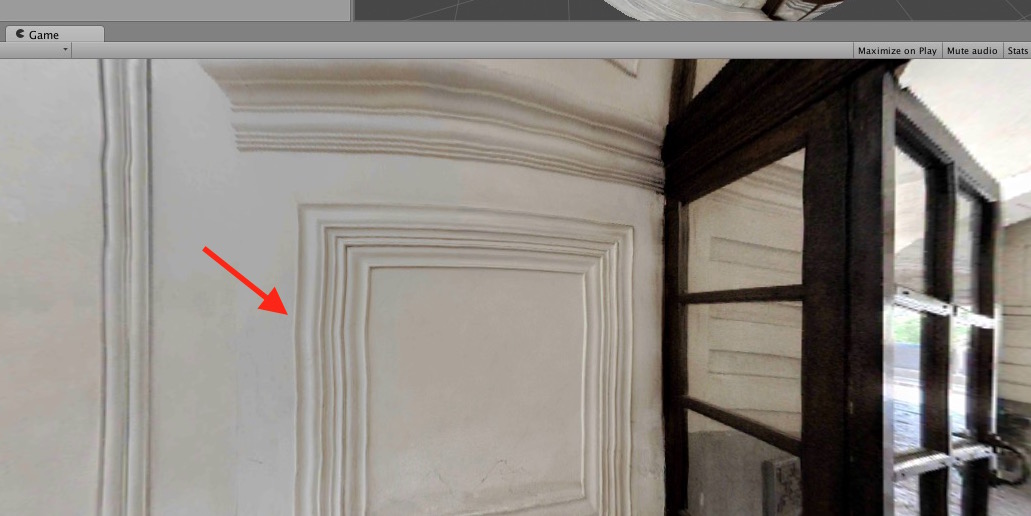
alt text

the same photo in another project (using cardboard sdk) and in the "zplayer demo" app are fine, so the problem is in my unity project.

What is wrong?

Thanks, forgive my bad english.

Roberto

schermata-2016-06-18-alle-163239.jpg (107.2 kB)
Comment
Add comment · Show 1
10 |3000 characters needed characters left characters exceeded
▼
  • Viewable by all users
  • Viewable by moderators
  • Viewable by moderators and the original poster
  • Advanced visibility
Viewable by all users
avatar image svitlana · Nov 08, 2016 at 11:25 AM 0
Share

I also have the same issue and I nee sphere not skybox.

2 Replies

· Add your reply
  • Sort: 
avatar image
3

Answer by svitlana · Nov 08, 2016 at 02:47 PM

Use high poly sphere it should hep!

To make high poly I used Maya.

Created sphere 100 * 100

Then exported as .FBX

Feel free to ask.

Comment
Add comment · Share
10 |3000 characters needed characters left characters exceeded
▼
  • Viewable by all users
  • Viewable by moderators
  • Viewable by moderators and the original poster
  • Advanced visibility
Viewable by all users
avatar image
1

Answer by RobertoD91 · Jun 21, 2016 at 09:24 PM

following this guide http://stackoverflow.com/questions/30748960/unity-photosphere-photo-viewer-for-google-cardboard i switch to skybox, now photos are ok. however the camera sees also the adjacent spheres

Comment
Add comment · Show 2 · Share
10 |3000 characters needed characters left characters exceeded
▼
  • Viewable by all users
  • Viewable by moderators
  • Viewable by moderators and the original poster
  • Advanced visibility
Viewable by all users
avatar image RobertoD91 · Nov 10, 2016 at 01:18 PM 0
Share

you can fix this setting a lower value for "clipping planes" "far" in camera's inspector

avatar image d3garcia · Feb 27, 2018 at 09:00 PM 0
Share

I first tried the answer above and it works well but I had much better results with this answer, using skybox is a much better solution for me.

Your answer

Hint: You can notify a user about this post by typing @username

Up to 2 attachments (including images) can be used with a maximum of 524.3 kB each and 1.0 MB total.

Follow this Question

Answers Answers and Comments

5 People are following this question.

avatar image avatar image avatar image avatar image avatar image

Related Questions

Loading 8192x8192 textures at runtime on android 0 Answers

How to handle many highly detailed models in a mobile device ? 1 Answer

Why I need to put my phone to Gear VR to debug google cardboard app? 3 Answers

Why is a Unity Cardboard/Daydream hybrid app not compatible with a Moto G4? 0 Answers

Android mesh's scaling animation make the texture bug. 0 Answers


Enterprise
Social Q&A

Social
Subscribe on YouTube social-youtube Follow on LinkedIn social-linkedin Follow on Twitter social-twitter Follow on Facebook social-facebook Follow on Instagram social-instagram

Footer

  • Purchase
    • Products
    • Subscription
    • Asset Store
    • Unity Gear
    • Resellers
  • Education
    • Students
    • Educators
    • Certification
    • Learn
    • Center of Excellence
  • Download
    • Unity
    • Beta Program
  • Unity Labs
    • Labs
    • Publications
  • Resources
    • Learn platform
    • Community
    • Documentation
    • Unity QA
    • FAQ
    • Services Status
    • Connect
  • About Unity
    • About Us
    • Blog
    • Events
    • Careers
    • Contact
    • Press
    • Partners
    • Affiliates
    • Security
Copyright © 2020 Unity Technologies
  • Legal
  • Privacy Policy
  • Cookies
  • Do Not Sell My Personal Information
  • Cookies Settings
"Unity", Unity logos, and other Unity trademarks are trademarks or registered trademarks of Unity Technologies or its affiliates in the U.S. and elsewhere (more info here). Other names or brands are trademarks of their respective owners.
  • Anonymous
  • Sign in
  • Create
  • Ask a question
  • Spaces
  • Default
  • Help Room
  • META
  • Moderators
  • Explore
  • Topics
  • Questions
  • Users
  • Badges
