
Wayback Machinekoobas.hobune.stream
May JUN Jul
Previous capture 12 Next capture
2021 2022 2023
1 capture
12 Jun 22 - 12 Jun 22
sparklines
Close Help
  • Products
  • Solutions
  • Made with Unity
  • Learning
  • Support & Services
  • Community
  • Asset Store
  • Get Unity

UNITY ACCOUNT

You need a Unity Account to shop in the Online and Asset Stores, participate in the Unity Community and manage your license portfolio. Login Create account
  • Blog
  • Forums
  • Answers
  • Evangelists
  • User Groups
  • Beta Program
  • Advisory Panel

Navigation

  • Home
  • Products
  • Solutions
  • Made with Unity
  • Learning
  • Support & Services
  • Community
    • Blog
    • Forums
    • Answers
    • Evangelists
    • User Groups
    • Beta Program
    • Advisory Panel

Unity account

You need a Unity Account to shop in the Online and Asset Stores, participate in the Unity Community and manage your license portfolio. Login Create account

Language

  • Chinese
  • Spanish
  • Japanese
  • Korean
  • Portuguese
  • Ask a question
  • Spaces
    • Default
    • Help Room
    • META
    • Moderators
    • Topics
    • Questions
    • Users
    • Badges
  • Home /
  • Help Room /
avatar image
0
Question by Yamin-Nather · Dec 25, 2016 at 12:58 PM · physicsobjectgravitythrough

RayCast detected only after penetrating the body

So now i have a Sphere which is the player and a lot of tiles.
This sphere which is the player has a rigidbody only for the purpose of collider detection because i get wierd physics stuff happening to the sphere when isKinematic is false (If someone can help me with that problem pls check out my other question. Thanks in advance)
So the isKinematic is set to true
But as isKinematic is enabled, the ball move downwards (ie. gravity) so i had to write a script for gravity on my own
I got the gravity working but the ball doesnt stop when it hits a collider below it so i had to find if the ball is grounded using a function which uses raycasts to checkif theres an object below the sphere
Now the problem is the sphere keeps moving down and only stops when the sphere penetrates a little through the tiles below it.
So heres the script i attached to the sphere :

 using UnityEngine;
 using System.Collections;
 
 public class PlayerManager : MonoBehaviour
 {
 
     // Variables
     Collider collider;
     public float ZSpeed;
     public float XSpeed;
     public float AccGravity;
     Rigidbody rigidbody;
     public float JumpForce;
     public Vector3 Velocity;
     public int GemsCollected = 0;
     public float VerticalVelocity;
     public int isGrounded;
     public float RayDistance;
     public float DistFromEnd;
     public Vector3 Test1;
     public float Test2;
     //Variables
 
     //Properties
     public int IsGrounded ()
     {
         int r = 0;
         if ( Physics.Raycast ( transform.position, Vector3.down, RayDistance ) )
         {
             r = 1;
         }
         else
         {
             r = 0;
         }
         return r;
     }
     //Properties
 
     void Start ()
     {
         //rigidbody = this.gameObject.GetComponent<Rigidbody> ();
         Collider collider = this.gameObject.GetComponent<Collider> ();
         RayDistance = collider.bounds.extents.y + 0.001f;
     }
 
 
     void Update ()
     {
         if ((Test1 == new Vector3 (0f, 0f, 0f)) && (Test2 == 0) )
         {
             if ( IsGrounded () == 1 )
             {
                 Test1 = transform.position;
                 Debug.Log ("Done"); 
             }
         }
         Debug.DrawLine ( transform.position, transform.position - new Vector3 ( 0f, RayDistance, 0f ), Color.black );
         {
             RaycastHit a;
             isGrounded = IsGrounded ( );
         }
         MovementController ();
         Gravity ();
         //ForwardMove ();
         //VerticalMove ();
         //Velocity = rigidbody.velocity;
     }
 
     public void MovementController ()
     {
         float XKey = Input.GetAxis ( "Horizontal" );
         transform.position += new Vector3 ( XKey * XSpeed, 0f, ZSpeed ) * Time.deltaTime;
     }
 
     public void Gravity ()
     {
         if ( IsGrounded ( ) == 1 )
         {
             VerticalVelocity = 0;
             if ( Input.GetKeyDown ( KeyCode.Space ) )
             {
                 VerticalVelocity = JumpForce;
             }
         }
         else
         {
             VerticalVelocity -= AccGravity * Time.deltaTime;
         }
         if ( VerticalVelocity != 0 )
         {
             transform.position += new Vector3 ( 0f, VerticalVelocity, 0f ) * Time.deltaTime;
         }
     }
     /*
     public void ForwardMove ()
     {
         //rigidbody.velocity = new Vector3 ( rigidbody.velocity.x, rigidbody.velocity.y, ZSpeed );
     }
 
     public void VerticalMove ()
     {
         float XKey = Input.GetAxis ( "Horizontal" );
         if ( XKey != 0 )
         {
             rigidbody.velocity = new Vector3 ( XKey * XSpeed, rigidbody.velocity.y, rigidbody.velocity.z );
         }
         else
         {
             rigidbody.velocity = new Vector3 ( 0f, rigidbody.velocity.y, rigidbody.velocity.z );
         }
     }
 
     */
 
     public void OnTriggerEnter ( Collider C )
     {
         if ( C.transform.tag == "Destroy" )
         {
             GameObject.Destroy ( this.gameObject );
             Debug.Log ( "Destroy done" );
         }
         if ( C.transform.tag == "Jump" )
         {
             Debug.Log ( "Entered Collider" );
             transform.position += new Vector3 ( 0f, JumpForce, 0f ) * Time.deltaTime;
             Debug.Log ( "Jump Done" );
         }
         if ( C.transform.tag == "Gem" )
         {
             GameObject.Destroy ( C.gameObject );
             GemsCollected += 1;
             Debug.Log ( GemsCollected + " Gems Collected" );
         }
     }
 }


At different heights from which the sphere is dropped the sphere penetrates a little more or less.

Before playing the scene :
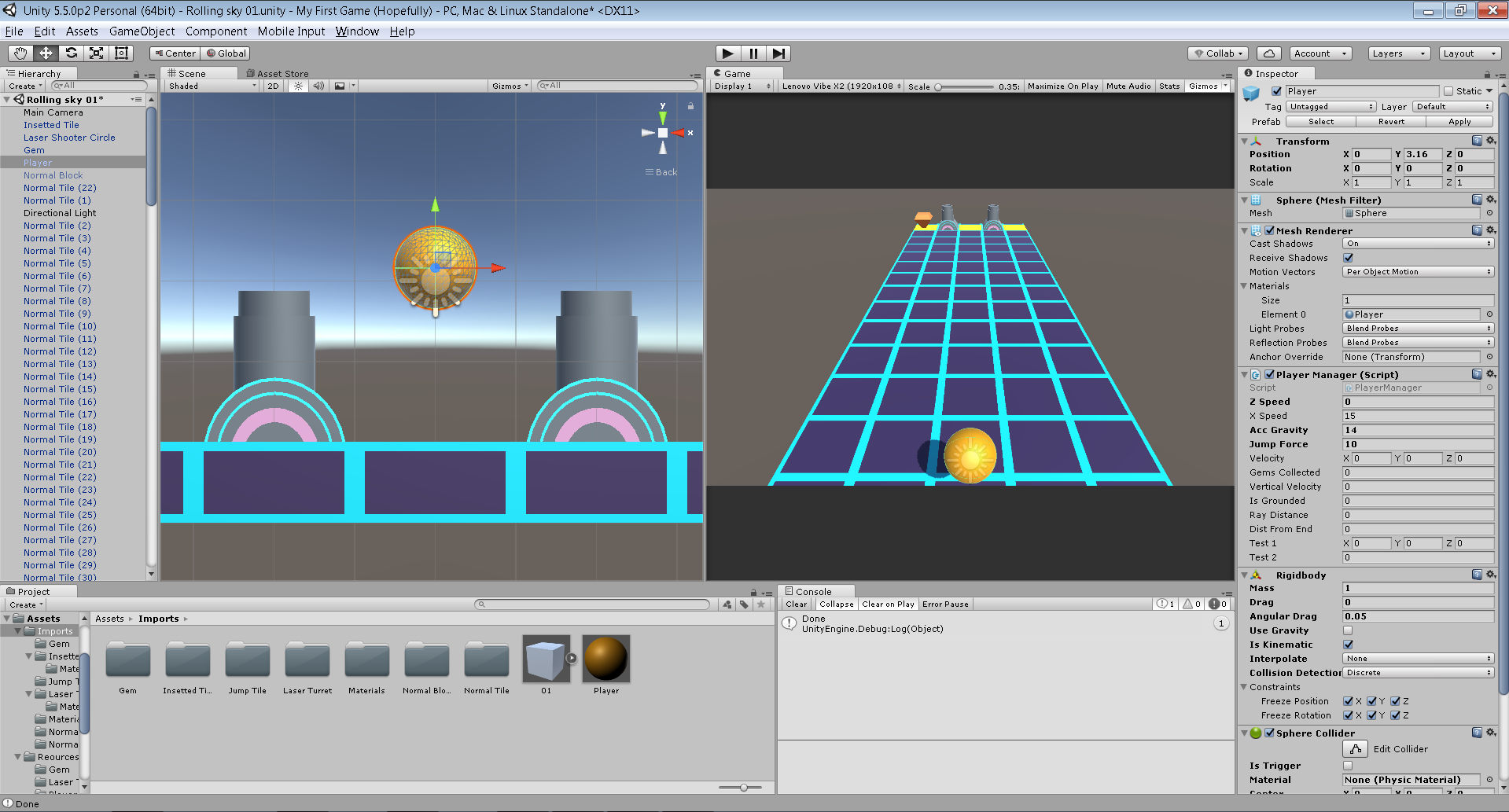
alt text

After playing the scene (U need to zoom in to see the RayCast) :
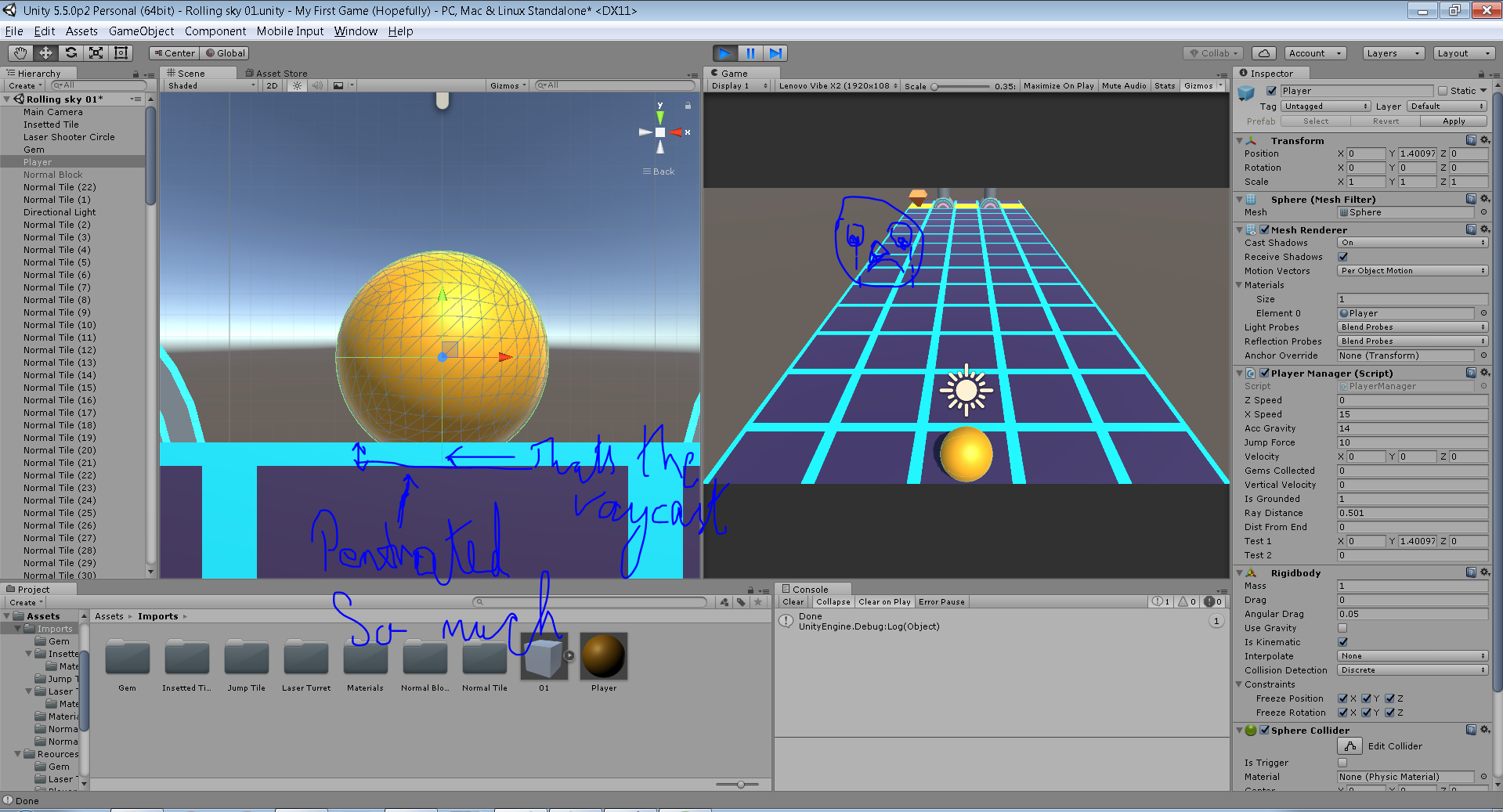
alt text

unity-1.png (292.6 kB)
unity-2.png (406.1 kB)
Comment
Add comment
10 |3000 characters needed characters left characters exceeded
▼
  • Viewable by all users
  • Viewable by moderators
  • Viewable by moderators and the original poster
  • Advanced visibility
Viewable by all users

0 Replies

· Add your reply
  • Sort: 

Your answer

Hint: You can notify a user about this post by typing @username

Up to 2 attachments (including images) can be used with a maximum of 524.3 kB each and 1.0 MB total.

Follow this Question

Answers Answers and Comments

119 People are following this question.

avatar image avatar image avatar image avatar image avatar image avatar image avatar image avatar image avatar image avatar image avatar image avatar image avatar image avatar image avatar image avatar image avatar image avatar image avatar image avatar image avatar image avatar image avatar image avatar image avatar image avatar image avatar image avatar image avatar image avatar image avatar image avatar image avatar image avatar image avatar image avatar image avatar image avatar image avatar image avatar image avatar image avatar image avatar image avatar image avatar image avatar image avatar image avatar image avatar image avatar image avatar image avatar image avatar image avatar image avatar image avatar image avatar image avatar image avatar image avatar image avatar image avatar image avatar image avatar image avatar image avatar image avatar image avatar image avatar image avatar image avatar image avatar image avatar image avatar image avatar image avatar image avatar image avatar image avatar image avatar image avatar image avatar image avatar image avatar image avatar image avatar image avatar image avatar image avatar image avatar image avatar image avatar image avatar image avatar image avatar image avatar image avatar image avatar image avatar image avatar image avatar image avatar image avatar image avatar image avatar image avatar image avatar image avatar image avatar image avatar image avatar image avatar image avatar image avatar image avatar image avatar image avatar image avatar image avatar image

Related Questions

Smooth Walking Inside a Sphere 0 Answers

Adding Gravity to a game object to make a black hole sucking effect. 1 Answer

How do I make an enemy go through walls, etc and follow then kill the player? 0 Answers

How to make physics for the string of a rising balloon 1 Answer

Change the player's gravity when pressing a key 0 Answers


Enterprise
Social Q&A

Social
Subscribe on YouTube social-youtube Follow on LinkedIn social-linkedin Follow on Twitter social-twitter Follow on Facebook social-facebook Follow on Instagram social-instagram

Footer

  • Purchase
    • Products
    • Subscription
    • Asset Store
    • Unity Gear
    • Resellers
  • Education
    • Students
    • Educators
    • Certification
    • Learn
    • Center of Excellence
  • Download
    • Unity
    • Beta Program
  • Unity Labs
    • Labs
    • Publications
  • Resources
    • Learn platform
    • Community
    • Documentation
    • Unity QA
    • FAQ
    • Services Status
    • Connect
  • About Unity
    • About Us
    • Blog
    • Events
    • Careers
    • Contact
    • Press
    • Partners
    • Affiliates
    • Security
Copyright © 2020 Unity Technologies
  • Legal
  • Privacy Policy
  • Cookies
  • Do Not Sell My Personal Information
  • Cookies Settings
"Unity", Unity logos, and other Unity trademarks are trademarks or registered trademarks of Unity Technologies or its affiliates in the U.S. and elsewhere (more info here). Other names or brands are trademarks of their respective owners.
  • Anonymous
  • Sign in
  • Create
  • Ask a question
  • Spaces
  • Default
  • Help Room
  • META
  • Moderators
  • Explore
  • Topics
  • Questions
  • Users
  • Badges
