 koobas.hobune.stream


Why the materials have a white aspect when the camera is far?
I am working in a Mobile App and I have a problem in some devices. I see the elements with standard material in white aspect when the camera is far. Like this: 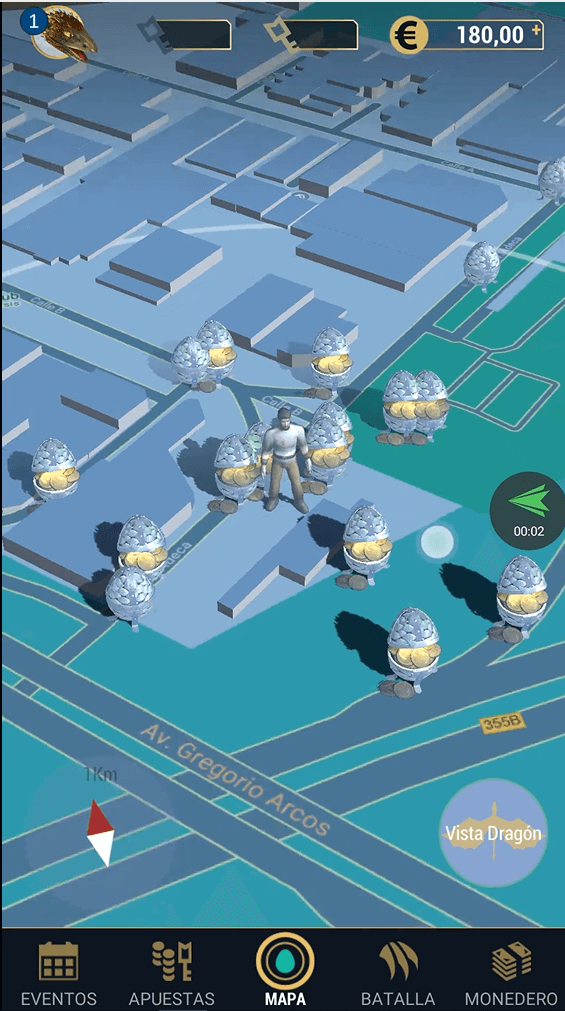
When I do zoom and the camera moves, the elements start to change the white aspect to the real aspect. Like this: 
Somebody knows how can disable the white aspect? This situation only appear on some devices. I dont have problem on the unity editor.
Thanks


Yes. I need some shader to add metallic map, normal map and occlusion map. Do you know some shader good for this?

Best Answer
Ok try this Shader, and have a look what changed..
 Shader "Custom/Custom Shader" {
     Properties {
         _Color ("Color", Color) = (1,1,1,1)
         _MainTex ("Main Texture", 2D) = "white" {}
         _MetallTex("Metallic Texture",2D) = "white" {}
         _Smoothness("Metall Smoothness",Range(0,1)) = 0.5
         _BumpMap("Normal Map", 2D) = "bump" {}
     }
     SubShader {
         Tags { "RenderType"="Opaque" }
         CGPROGRAM
         #pragma surface surf Standard fullforwardshadows

         sampler2D _MainTex;
         sampler2D _MetallTex;
         sampler2D _BumpMap;

         struct Input {
             float2 uv_MainTex;
             float2 uv_BumpMap;
         };
         fixed _Smoothness;
         fixed4 _Color;


         void surf (Input IN, inout SurfaceOutputStandard o) {
             fixed4 c = tex2D (_MainTex, IN.uv_MainTex) * _Color;
             fixed4 m = tex2D(_MetallTex,IN.uv_MainTex);
             fixed4 n = tex2D(_BumpMap,IN.uv_BumpMap);

             o.Albedo = c.rgb;
             o.Metallic = m.r;
             o.Smoothness = m.a * _Smoothness;
             o.Alpha = c.a;
             o.Normal = UnpackNormal(n);
         }
         ENDCG
     }
     FallBack "Diffuse"
 }


