
Wayback Machinekoobas.hobune.stream
May JUN Jul
Previous capture 12 Next capture
2021 2022 2023
1 capture
12 Jun 22 - 12 Jun 22
sparklines
Close Help
  • Products
  • Solutions
  • Made with Unity
  • Learning
  • Support & Services
  • Community
  • Asset Store
  • Get Unity

UNITY ACCOUNT

You need a Unity Account to shop in the Online and Asset Stores, participate in the Unity Community and manage your license portfolio. Login Create account
  • Blog
  • Forums
  • Answers
  • Evangelists
  • User Groups
  • Beta Program
  • Advisory Panel

Navigation

  • Home
  • Products
  • Solutions
  • Made with Unity
  • Learning
  • Support & Services
  • Community
    • Blog
    • Forums
    • Answers
    • Evangelists
    • User Groups
    • Beta Program
    • Advisory Panel

Unity account

You need a Unity Account to shop in the Online and Asset Stores, participate in the Unity Community and manage your license portfolio. Login Create account

Language

  • Chinese
  • Spanish
  • Japanese
  • Korean
  • Portuguese
  • Ask a question
  • Spaces
    • Default
    • Help Room
    • META
    • Moderators
    • Topics
    • Questions
    • Users
    • Badges
  • Home /
avatar image
0
Question by Vel_1828 · Oct 15, 2016 at 11:24 AM · realtimeglobal illumination

Realtime GI - Shadow Leaks

Hello! Recently I've posted a question-answer about improving Realtime Global Illumination. It's good but still not perfect - sometimes I got shadow leaks as on th epicture. Anyone knows why it can be happening?
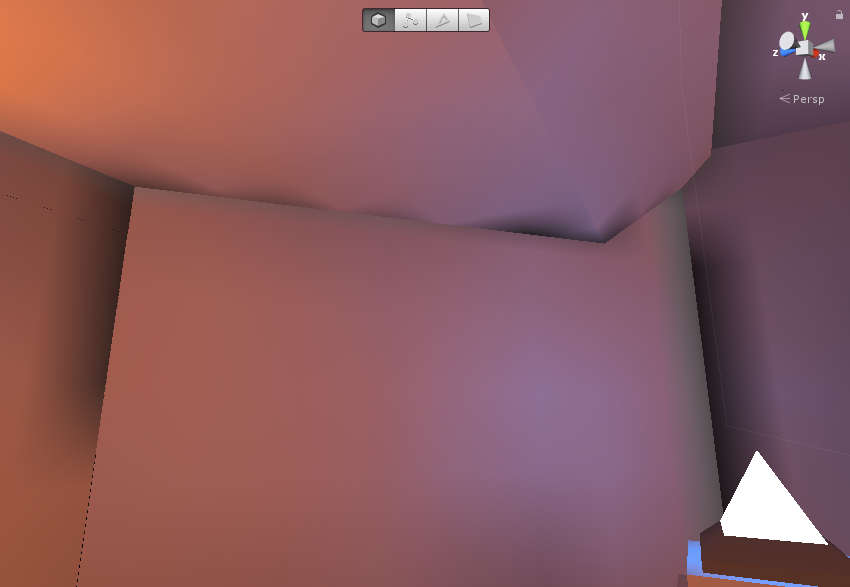
alt text

gi-problem.png (215.8 kB)
Comment
Add comment · Show 5
10 |3000 characters needed characters left characters exceeded
▼
  • Viewable by all users
  • Viewable by moderators
  • Viewable by moderators and the original poster
  • Advanced visibility
Viewable by all users
avatar image Namey5 · Oct 15, 2016 at 11:58 AM 0
Share

It looks less like shadow leakage, more like ambient occlusion/lighting bounces rendered in a low resolution. Perhaps try increasing the resolution of the bake?

avatar image Vel_1828 Namey5 · Oct 15, 2016 at 12:23 PM 0
Share

Cranking up Default Parameters to High Resolution made the effect smaller, yet still it persists. :/ Also, It's only realtime GI, not baked - there's not ambient occlusion active.

avatar image b1gry4n · Oct 15, 2016 at 01:08 PM 0
Share

Looks like you have different mesh objects representing the walls. Combine the mesh objects into a single mesh (merged vertices) or try overlapping them slightly. The gap is visible on the left side of the image.

avatar image Vel_1828 b1gry4n · Oct 15, 2016 at 01:18 PM 0
Share

It's already combined with Draw Call $$anonymous$$inimizer - it's a single mesh. Before it was combined, it was A LOT worse. Trust me. :/

avatar image b1gry4n Vel_1828 · Oct 15, 2016 at 01:25 PM 0
Share

making it a single mesh and combining vertices are two different things. You can combine 2 meshes into a single mesh that are 100 meters apart. The difference is that if the vertices are combined into a TRUE single mesh, there will be no gaps between the mesh objects. They would be sharing edge vertices.

Your options are:

  • combine the vertices of these mesh objects in an external program (blender/3dmax)

  • get this asset that allows mesh modification inside unity : https://www.assetstore.unity3d.com/en/#!/content/11919 (i am not sure about the limitations of the free version)

  • make these objects slightly overlap eachother

It does not matter if 2 different meshes have their own vertices in the EXACT same spot. The vertices could be overlapping visually, but under the hood they are still 2 different vertices. They are treated as different objects unless they are both sharing the exact same vertex and at that point they are truly part of the same mesh. The gap still exists on the tiniest of scale even if it isnt visible. Sometimes it might not matter, but it clearly does with unity GI.

Think of light as water and the mesh being the thing you want to collect the water. If your mesh is not "water tight" the water is going to seep through the cracks.

1 Reply

· Add your reply
  • Sort: 
avatar image
0

Answer by Acreates · Mar 12, 2017 at 06:01 AM

Weld your meshes or if you are using planes make sure they transect.

Comment
Add comment · Share
10 |3000 characters needed characters left characters exceeded
▼
  • Viewable by all users
  • Viewable by moderators
  • Viewable by moderators and the original poster
  • Advanced visibility
Viewable by all users

Your answer

Hint: You can notify a user about this post by typing @username

Up to 2 attachments (including images) can be used with a maximum of 524.3 kB each and 1.0 MB total.

Follow this Question

Answers Answers and Comments

60 People are following this question.

avatar image avatar image avatar image avatar image avatar image avatar image avatar image avatar image avatar image avatar image avatar image avatar image avatar image avatar image avatar image avatar image avatar image avatar image avatar image avatar image avatar image avatar image avatar image avatar image avatar image avatar image avatar image avatar image avatar image avatar image avatar image avatar image avatar image avatar image avatar image avatar image avatar image avatar image avatar image avatar image avatar image avatar image avatar image avatar image avatar image avatar image avatar image avatar image avatar image avatar image avatar image avatar image avatar image avatar image avatar image avatar image avatar image avatar image avatar image avatar image

Related Questions

Switch Precomputed Realtime GI data using scripts 0 Answers

Baking Realtime GI for very large worlds is crashing 0 Answers

Baked lights with realtime directional shadows? 1 Answer

Realtime GI not responding to non static shadow? 0 Answers

How can I export the result of Realtime GI to a Texture? 1 Answer


Enterprise
Social Q&A

Social
Subscribe on YouTube social-youtube Follow on LinkedIn social-linkedin Follow on Twitter social-twitter Follow on Facebook social-facebook Follow on Instagram social-instagram

Footer

  • Purchase
    • Products
    • Subscription
    • Asset Store
    • Unity Gear
    • Resellers
  • Education
    • Students
    • Educators
    • Certification
    • Learn
    • Center of Excellence
  • Download
    • Unity
    • Beta Program
  • Unity Labs
    • Labs
    • Publications
  • Resources
    • Learn platform
    • Community
    • Documentation
    • Unity QA
    • FAQ
    • Services Status
    • Connect
  • About Unity
    • About Us
    • Blog
    • Events
    • Careers
    • Contact
    • Press
    • Partners
    • Affiliates
    • Security
Copyright © 2020 Unity Technologies
  • Legal
  • Privacy Policy
  • Cookies
  • Do Not Sell My Personal Information
  • Cookies Settings
"Unity", Unity logos, and other Unity trademarks are trademarks or registered trademarks of Unity Technologies or its affiliates in the U.S. and elsewhere (more info here). Other names or brands are trademarks of their respective owners.
  • Anonymous
  • Sign in
  • Create
  • Ask a question
  • Spaces
  • Default
  • Help Room
  • META
  • Moderators
  • Explore
  • Topics
  • Questions
  • Users
  • Badges
