 koobas.hobune.stream


Sphere Uv Distortion
Hi
Could somebody help me on how to correctly uv map a sphere?
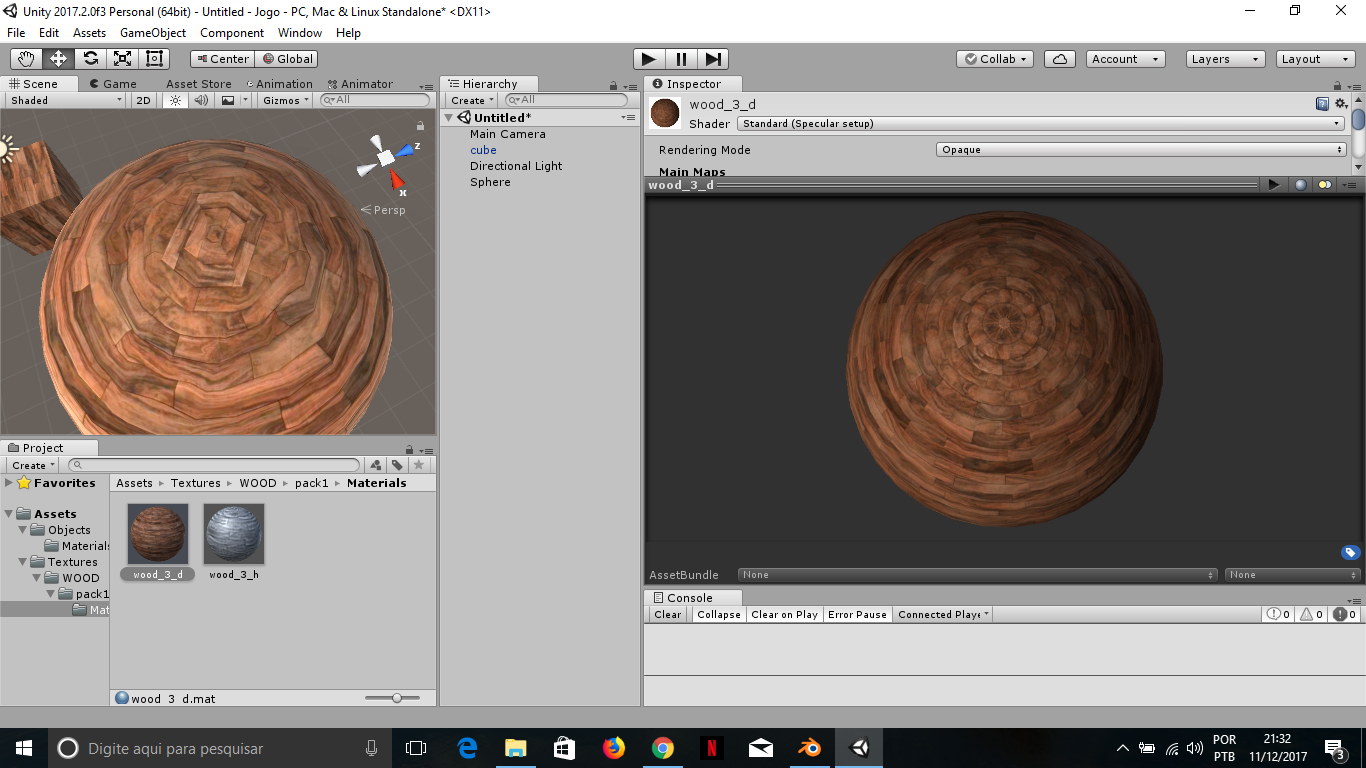
Here's a picture of the issue. On the scene view it's distorted, in the material preview not. I thought it was the height map, but it appears it has no affect if it's not being used.
Also I'm using an unity sphere, I don't know if I must first create the uv maps for it.
Thanks in advance.

Hi,
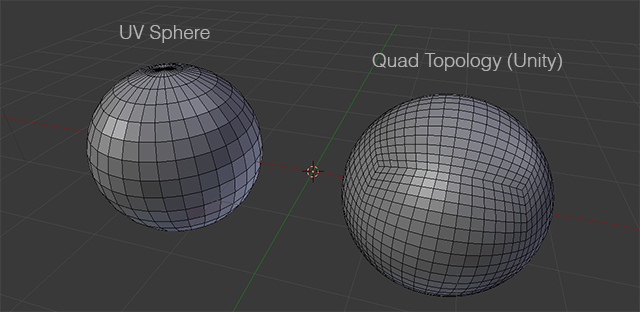
The Unity built in sphere which is available from 3D Object>Sphere is a 'Quad Sphere' but the material preview sphere in Unity is a UV Sphere (as in blender). Thats why the UV mappings are different. So you need to import and use a UV type sphere from any modeling software to get it correct. See the below image to see the difference in wire-frames.

Hi,
sorry for replying so late.
It makes sense being another sphere. I've tried here the uv sphere in blender but it seems to need a good uv unwrap to achieve the same result as the preview sphere of unity. The preview one seems to have "perfect" seams i guess.
Do you know how could I uv unwrap the uv sphere better? or any tutorial that could help.
Also, the reason I want to do this is for test shaders and textures this way:
https://blogs.unity3d.com/wp-content/uploads/2015/02/materialcompare_refl.1.jpg
Thanks for the reply.

@Newstage if you want, also take a look at this tutorial that kind of explains how and why that works:

While you are correct the terms "QuadSphere" and "UV Sphere" aren't really uniquely defined ^^. Both spheres are actually made up of quads (except the poles). The "QuadSphere" is better called a "cuboid sphere" or a "spherified cube". The usual polar sphere got it's topology from the way polar coordinates work.
PS: In the past the Unity sphere primitive actually was a polar sphere. I can't remember which version it was when they switched to the cuboid sphere. The main problem with a polar sphere is that you get infinite distortion at the poles. The cuboid sphere only has slight distortion at the cube corners. However of course if you have a polar coordinate based texture the cuboid sphere isn't the best choice.
$$anonymous$$eep in $$anonymous$$d that the primitive objects Unity provides are ment for quick prototyping or as placeholders. You should create your actual meshes and models in a modelling tool.





