
Wayback Machinekoobas.hobune.stream
May JUN Jul
Previous capture 13 Next capture
2021 2022 2023
1 capture
13 Jun 22 - 13 Jun 22
sparklines
Close Help
  • Products
  • Solutions
  • Made with Unity
  • Learning
  • Support & Services
  • Community
  • Asset Store
  • Get Unity

UNITY ACCOUNT

You need a Unity Account to shop in the Online and Asset Stores, participate in the Unity Community and manage your license portfolio. Login Create account
  • Blog
  • Forums
  • Answers
  • Evangelists
  • User Groups
  • Beta Program
  • Advisory Panel

Navigation

  • Home
  • Products
  • Solutions
  • Made with Unity
  • Learning
  • Support & Services
  • Community
    • Blog
    • Forums
    • Answers
    • Evangelists
    • User Groups
    • Beta Program
    • Advisory Panel

Unity account

You need a Unity Account to shop in the Online and Asset Stores, participate in the Unity Community and manage your license portfolio. Login Create account

Language

  • Chinese
  • Spanish
  • Japanese
  • Korean
  • Portuguese
  • Ask a question
  • Spaces
    • Default
    • Help Room
    • META
    • Moderators
    • Topics
    • Questions
    • Users
    • Badges
  • Home /
avatar image
0
Question by DrRocker87 · Mar 22, 2013 at 05:22 AM · animatormecaniminverted

Animator.SetLookAtPosition is Inverted?

So I came across this issue which I think is a bug, but im not sure.

I setup a character with just an idle animation and a animator through Mecanim. Fully rigged and rig = humanoid.

Then in a script I dd:

 public Animator anim;
 
 void Update(){
     anim.SetLookAtWeight(1);
     anim.SetLookAtPosition (FirstPersonController.transform.position);
 }

After I did attached the script to the character and moved close to them, I got this.

Almost like the LookAtPosition was Inverted. Any thoughts?

PS : I tried going between Global and Local Positions and used other objects (ie cube), no luck. It was still inverted.
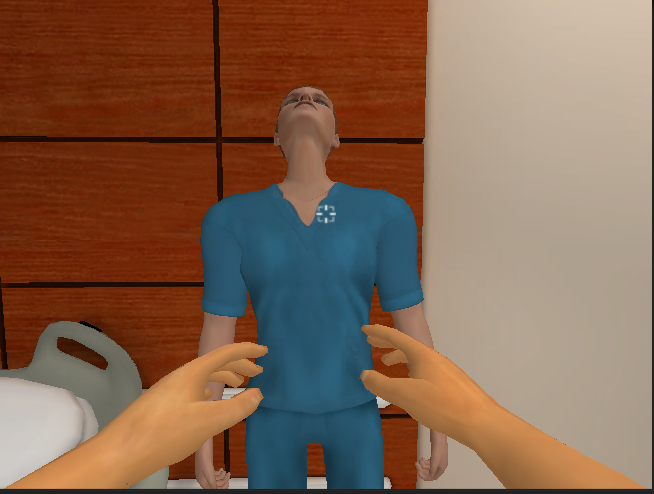
alt text

screen shot 2013-03-21 at 11.48.42 pm.png (298.2 kB)
Comment
Add comment · Show 4
10 |3000 characters needed characters left characters exceeded
▼
  • Viewable by all users
  • Viewable by moderators
  • Viewable by moderators and the original poster
  • Advanced visibility
Viewable by all users
avatar image sdgd · Mar 22, 2013 at 08:28 AM 0
Share

I kinda can't believe it's inverted

what is it looking at you = the neck? or eyes what parent is looking and so on...

avatar image DrRocker87 · Mar 22, 2013 at 06:13 PM 0
Share

From what I know, $$anonymous$$ecanim should be using the I$$anonymous$$s that are setup on the rig to "look at" things. The object that I have the player looking at is the first person controllers position which is below the arms you see in the picture.

I could use the old method of Slerping the head position, but I wanted to keep everything within the new $$anonymous$$ecanim System.

avatar image Loius · Mar 22, 2013 at 06:54 PM 0
Share

It looks like the base of her skull is staring at your torso. You want her nose to stare at your torso. Since these two directions are exactly 90 degrees apart, this is likely due to mismatched bone axes.

The standard LookAt function uses transform.forward as the looking direction - if your head bone is vertical (in T-pose) and rolled properly, transform.forward is the nose. This looks like the head bone is horizontal.

I haven't used $$anonymous$$ecanim. Can you specify a looker object? If you can, you can make the head a child of your looker object and not worry about the bones. Otherwise you might have to go back into your skeleton and rotate the head bone.

avatar image DrRocker87 · Mar 22, 2013 at 08:17 PM 0
Share

Loius,

Yes, I agree with you about the standard look at function props. In the standard look at, when you placed the script on the object it was based off the "Forward" or Z axis. Ive come across that issue before and adjusted.

With $$anonymous$$ecanim, I cannot find a place to "Set" the Looker object since the everything is based in the "Animator". The weird thing is that the left and right looking is fine, but up and down is inverted. I will keep searching....

0 Replies

· Add your reply
  • Sort: 

Your answer

Hint: You can notify a user about this post by typing @username

Up to 2 attachments (including images) can be used with a maximum of 524.3 kB each and 1.0 MB total.

Follow this Question

Answers Answers and Comments

12 People are following this question.

avatar image avatar image avatar image avatar image avatar image avatar image avatar image avatar image avatar image avatar image avatar image avatar image

Related Questions

Head Look for Mecanim 1 Answer

How to not always show first frame of animation 1 Answer

Character animation position 1 Answer

Animator Cannot Get Rotation Right (Unfinished? Rounding error?) 1 Answer

How to check if mecanim animation stopped 0 Answers


Enterprise
Social Q&A

Social
Subscribe on YouTube social-youtube Follow on LinkedIn social-linkedin Follow on Twitter social-twitter Follow on Facebook social-facebook Follow on Instagram social-instagram

Footer

  • Purchase
    • Products
    • Subscription
    • Asset Store
    • Unity Gear
    • Resellers
  • Education
    • Students
    • Educators
    • Certification
    • Learn
    • Center of Excellence
  • Download
    • Unity
    • Beta Program
  • Unity Labs
    • Labs
    • Publications
  • Resources
    • Learn platform
    • Community
    • Documentation
    • Unity QA
    • FAQ
    • Services Status
    • Connect
  • About Unity
    • About Us
    • Blog
    • Events
    • Careers
    • Contact
    • Press
    • Partners
    • Affiliates
    • Security
Copyright © 2020 Unity Technologies
  • Legal
  • Privacy Policy
  • Cookies
  • Do Not Sell My Personal Information
  • Cookies Settings
"Unity", Unity logos, and other Unity trademarks are trademarks or registered trademarks of Unity Technologies or its affiliates in the U.S. and elsewhere (more info here). Other names or brands are trademarks of their respective owners.
  • Anonymous
  • Sign in
  • Create
  • Ask a question
  • Spaces
  • Default
  • Help Room
  • META
  • Moderators
  • Explore
  • Topics
  • Questions
  • Users
  • Badges
