
Wayback Machinekoobas.hobune.stream
May JUN Jul
Previous capture 12 Next capture
2021 2022 2023
1 capture
12 Jun 22 - 12 Jun 22
sparklines
Close Help
  • Products
  • Solutions
  • Made with Unity
  • Learning
  • Support & Services
  • Community
  • Asset Store
  • Get Unity

UNITY ACCOUNT

You need a Unity Account to shop in the Online and Asset Stores, participate in the Unity Community and manage your license portfolio. Login Create account
  • Blog
  • Forums
  • Answers
  • Evangelists
  • User Groups
  • Beta Program
  • Advisory Panel

Navigation

  • Home
  • Products
  • Solutions
  • Made with Unity
  • Learning
  • Support & Services
  • Community
    • Blog
    • Forums
    • Answers
    • Evangelists
    • User Groups
    • Beta Program
    • Advisory Panel

Unity account

You need a Unity Account to shop in the Online and Asset Stores, participate in the Unity Community and manage your license portfolio. Login Create account

Language

  • Chinese
  • Spanish
  • Japanese
  • Korean
  • Portuguese
  • Ask a question
  • Spaces
    • Default
    • Help Room
    • META
    • Moderators
    • Topics
    • Questions
    • Users
    • Badges
  • Home /
  • Help Room /
This question was closed Jun 11, 2018 at 08:14 PM by someguywithamouse for the following reason:

Other: Problem varies, see article: https://answers.unity.com/questions/1007845/i-have-lots-of-lag-in-my-game-while-testing-the-gr.html?childToView=1517076#answer-1517076

avatar image
0
Question by someguywithamouse · Jun 02, 2018 at 05:59 AM · lagperformance optimization2d animationeffectslow fps

Not in a hurry, but does anybody wanna share some good optimization practices?

This isn't a programming-related issue, but if someone can suggest me a way of optimizing my particle effects through either Unity settings or custom scripts, without making them look so so different, that'd be helpful for me in the future. Thank you.


I may or may not need help with this in a bit... Anyone have some good performance practices, in terms of rendering? In my situation here I'm mostly concerned with the 3D particles and lighting.


If there's a C# method or function I can use kill off unnecessary particles and effects, or maybe some setting I can change in Unity, that would be helpful. (apart from the quality settings, didn't find anything related to lights or particles in there).


I only recently started on it, there's only a few basic objects in the scene I'm working on right now. In other words, this scene is still fairly basic, yet the moment I have more than 40 spheres lit up on screen at a time it has a total meltdown trying to keep up.

The particles and lighting around the player character, when in HD, will cause large lagspikes. I understand this is a hardware issue, but I still think it's pathetic that I barely have worked on the game's graphics lately and now I get this kind pf performance. AKA, barely developed graphics + poor performance = horrible presentation.


The performance can really impact my gameplay, especially since late in development I plan to add multiplayer if possible. Whenever it starts doing this, it always causes severe input lag with it. In multiplayer the rest of the game would just go on without you for every late/missed frame you get, giving other players a better chance. To make matters worse, I plan to make this effect happen during more intense moments, indicating a Combo-induced buff., like if you do a certain number of damage to several players, etc. Imagine trying to take on 5 other players at once and just when you're doing really good the speed slows to a crawl and they defeat you for no reason other than you don't have a good PC to play on. It sucks. I've been there before.


An average, low-end prebuilt PC would be probably worse than this. Meaning those players are going to get what I'm assuming will be around 7 to 18 FPS whenever this effect pops up: (don't mind the sloppy placeholder sprite.)
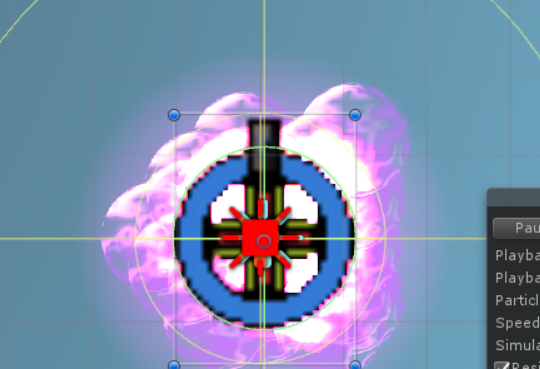
Particle effect

I can't tell for sure how bad an average low-end GPU would perform. I'd have to wait to find my old computer somewhere, from some years ago.


Particle setup explained but it has too much detail

What it's doing is spawning about 500 particles per second and 400 per distance each one travels. The max is 1000. 1000 spheres may sound extreme, but I added a trigger that made sure the particles are deleted once they go outside the particle collider, which only covers a little bit more space than the player. Each particle has a high velocity going outward.
This means that within 1 or 2 frames of it spawning, it vanishes. Period. So there are really no more than a couple dozens onscreen at a time.

Sadly since there are a ton of spheres placed on top of each other, it ends up rendering several polygons more than what is needed. I might write a script to clear extra particles that are overlapping where they shouldn't, and reduce the number that can exist in a small area at the center.


Sorry for the huge post. Feel free to ask questions if you didn't understand. I'll be mostly busy this weekend...

performancecomplaint.png (204.7 kB)
Comment
Add comment · Show 1
10 |3000 characters needed characters left characters exceeded
▼
  • Viewable by all users
  • Viewable by moderators
  • Viewable by moderators and the original poster
  • Advanced visibility
Viewable by all users
avatar image AlphaGarg8447 · Feb 20, 2020 at 04:03 PM 0
Share

Perhaps if you utilize an animated texture ins$$anonymous$$d of several instances of one bubble texture? $$anonymous$$aybe even record a loop of the current setup in order to make the animated texture. Not sure, but it could be worth a try.

0 Replies

  • Sort: 

Follow this Question

Answers Answers and Comments

143 People are following this question.

avatar image avatar image avatar image avatar image avatar image avatar image avatar image avatar image avatar image avatar image avatar image avatar image avatar image avatar image avatar image avatar image avatar image avatar image avatar image avatar image avatar image avatar image avatar image avatar image avatar image avatar image avatar image avatar image avatar image avatar image avatar image avatar image avatar image avatar image avatar image avatar image avatar image avatar image avatar image avatar image avatar image avatar image avatar image avatar image avatar image avatar image avatar image avatar image avatar image avatar image avatar image avatar image avatar image avatar image avatar image avatar image avatar image avatar image avatar image avatar image avatar image avatar image avatar image avatar image avatar image avatar image avatar image avatar image avatar image avatar image avatar image avatar image avatar image avatar image avatar image avatar image avatar image avatar image avatar image avatar image avatar image avatar image avatar image avatar image avatar image avatar image avatar image avatar image avatar image avatar image avatar image avatar image avatar image avatar image avatar image avatar image avatar image avatar image avatar image avatar image avatar image avatar image avatar image avatar image avatar image avatar image avatar image avatar image avatar image avatar image avatar image avatar image avatar image avatar image avatar image avatar image avatar image avatar image avatar image avatar image avatar image avatar image avatar image avatar image avatar image avatar image avatar image avatar image avatar image avatar image avatar image avatar image avatar image avatar image avatar image avatar image avatar image avatar image avatar image avatar image avatar image avatar image avatar image

Related Questions

Unity SpriteSkin Huge performance issue 0 Answers

Gfx.WaitForPresentOnGfxThread costing over 30ms at RANDOM 0 Answers

Enabling canvas lags build, but only the first time on the first load 0 Answers

Problem with game in android low fps and lag 0 Answers

Bad Performance URP 0 Answers


Enterprise
Social Q&A

Social
Subscribe on YouTube social-youtube Follow on LinkedIn social-linkedin Follow on Twitter social-twitter Follow on Facebook social-facebook Follow on Instagram social-instagram

Footer

  • Purchase
    • Products
    • Subscription
    • Asset Store
    • Unity Gear
    • Resellers
  • Education
    • Students
    • Educators
    • Certification
    • Learn
    • Center of Excellence
  • Download
    • Unity
    • Beta Program
  • Unity Labs
    • Labs
    • Publications
  • Resources
    • Learn platform
    • Community
    • Documentation
    • Unity QA
    • FAQ
    • Services Status
    • Connect
  • About Unity
    • About Us
    • Blog
    • Events
    • Careers
    • Contact
    • Press
    • Partners
    • Affiliates
    • Security
Copyright © 2020 Unity Technologies
  • Legal
  • Privacy Policy
  • Cookies
  • Do Not Sell My Personal Information
  • Cookies Settings
"Unity", Unity logos, and other Unity trademarks are trademarks or registered trademarks of Unity Technologies or its affiliates in the U.S. and elsewhere (more info here). Other names or brands are trademarks of their respective owners.
  • Anonymous
  • Sign in
  • Create
  • Ask a question
  • Spaces
  • Default
  • Help Room
  • META
  • Moderators
  • Explore
  • Topics
  • Questions
  • Users
  • Badges
