
Wayback Machinekoobas.hobune.stream
May JUN Jul
Previous capture 12 Next capture
2021 2022 2023
1 capture
12 Jun 22 - 12 Jun 22
sparklines
Close Help
  • Products
  • Solutions
  • Made with Unity
  • Learning
  • Support & Services
  • Community
  • Asset Store
  • Get Unity

UNITY ACCOUNT

You need a Unity Account to shop in the Online and Asset Stores, participate in the Unity Community and manage your license portfolio. Login Create account
  • Blog
  • Forums
  • Answers
  • Evangelists
  • User Groups
  • Beta Program
  • Advisory Panel

Navigation

  • Home
  • Products
  • Solutions
  • Made with Unity
  • Learning
  • Support & Services
  • Community
    • Blog
    • Forums
    • Answers
    • Evangelists
    • User Groups
    • Beta Program
    • Advisory Panel

Unity account

You need a Unity Account to shop in the Online and Asset Stores, participate in the Unity Community and manage your license portfolio. Login Create account

Language

  • Chinese
  • Spanish
  • Japanese
  • Korean
  • Portuguese
  • Ask a question
  • Spaces
    • Default
    • Help Room
    • META
    • Moderators
    • Topics
    • Questions
    • Users
    • Badges
  • Home /
This question was closed Nov 22, 2019 at 01:05 PM by Hylus for the following reason:

The question is answered, right answer was accepted

avatar image
0
Question by Hylus · Nov 21, 2019 at 10:35 PM · importcolor changepng

Imported png doesn't keep colors

After imported png (which i want to use like a mask) colors of image are changed. I've been looking up of solution but still can't find it.


For now I changed in Project Settings->Other Settings->Color Space-> Gamma and change format of png to RGBA 32 bit.


But all these things just don't solve my problem. When I open my png in Paint and use pipette to pick up a color then the color is right/original/like it shoud be.

So, colors in my png is (rgb):

  • (0,0,0)

  • (1,0,0)

  • (2,0,0)

  • (3,0,0)

  • etc


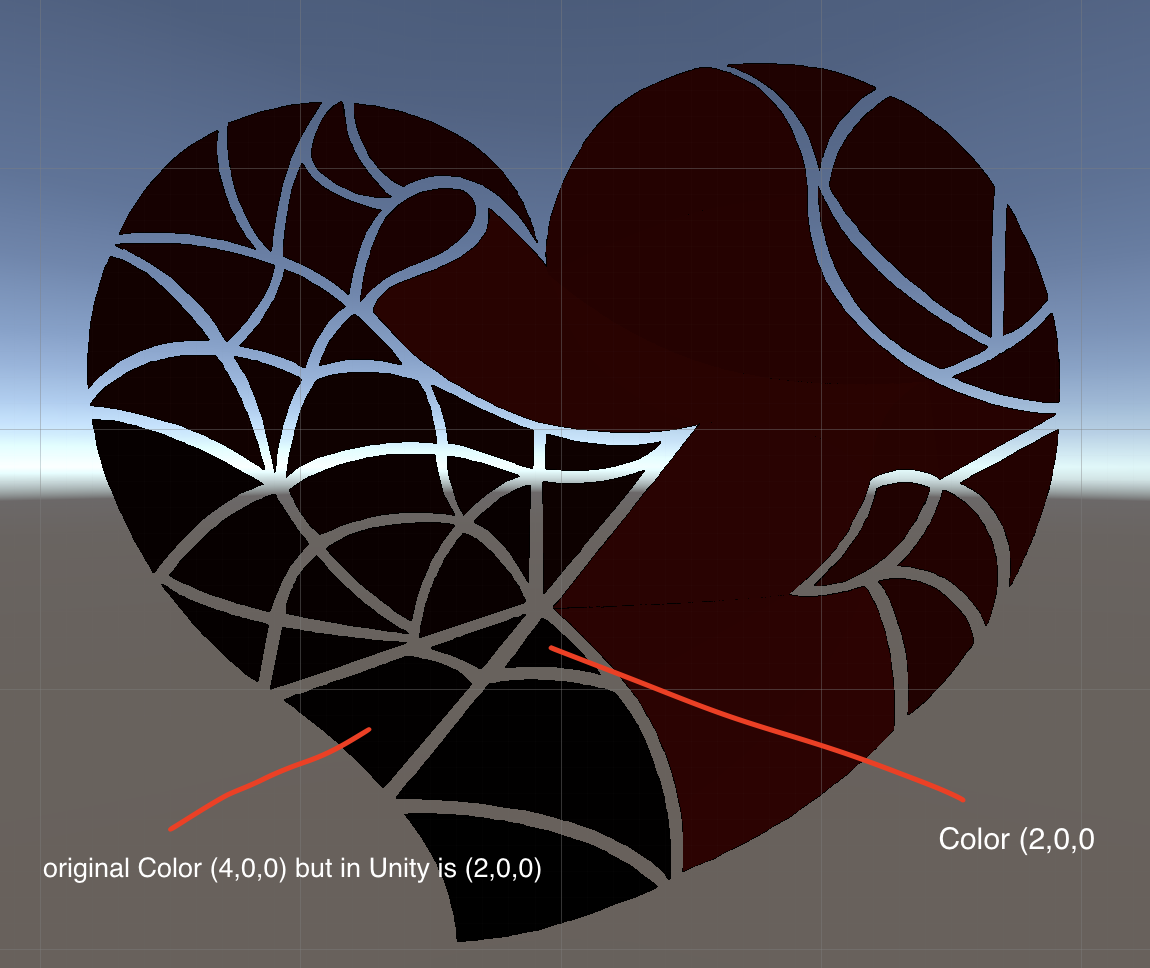
Weirdly but after imported png to unity and using pipette to pick up color from place where original color is (4,0,0) a chosen pixel has (2,0,0) color. This is one example of a lot of difference in other colors. Fun fact is colors such as (0,0,0), (1,0,0), (2,0,0), (3,0,0), (5,0,0), (6,0,0), (7,0,0) are distinguished.

I can not attache image here because of size limit, however i upload image to outer website, link below:

 https://ibb.co/Ms0MHYx


Have you got any ideas to import png and keeps original colors?

Target platform is Android

PS. I don't have any light in my scene


EDIT: I found a solution!

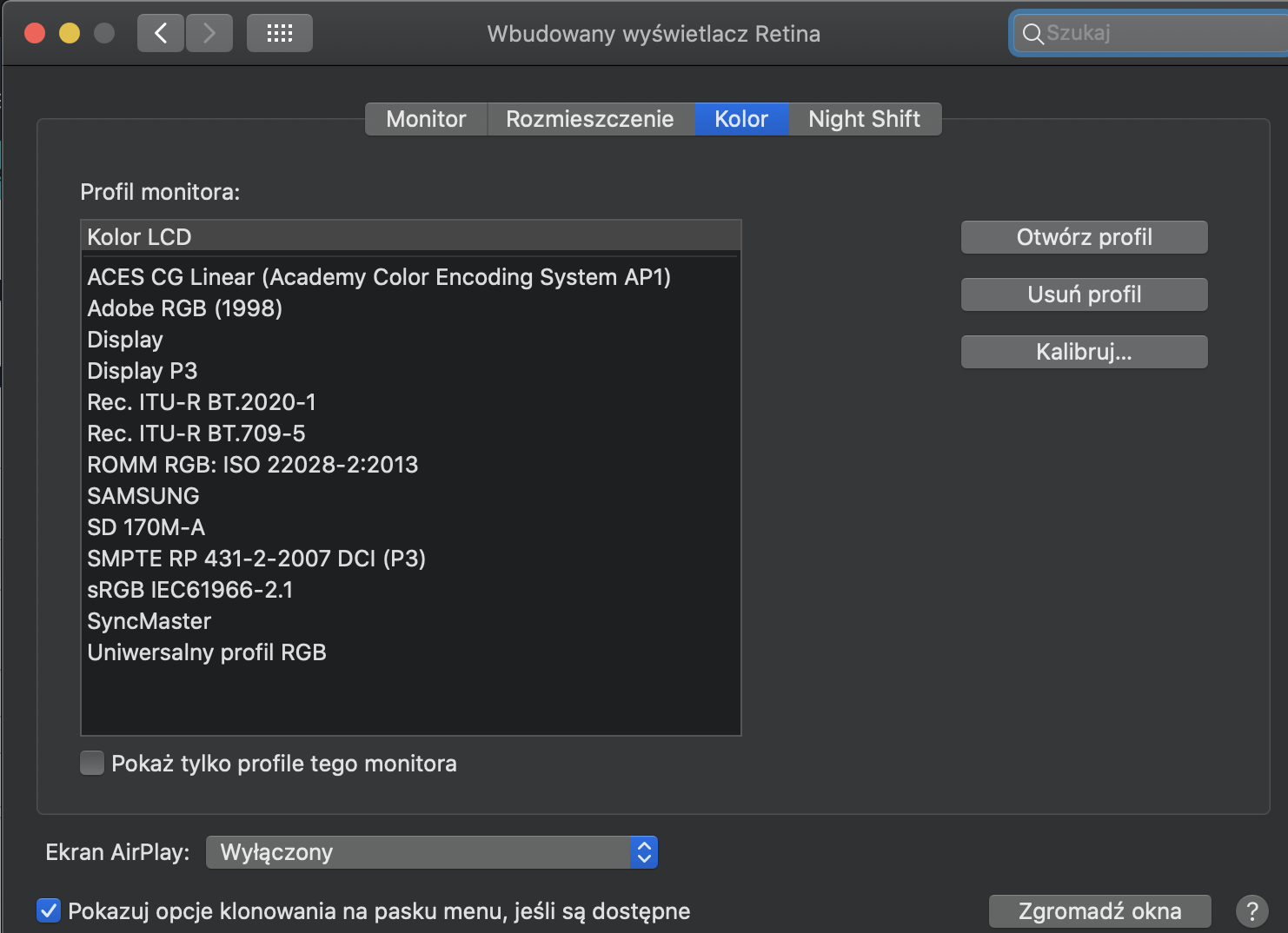
The problem is in Unity pipette. It's not working like pipette in for example Paint or Gimp. Unity creators didn't consider about display colors profiles. I'm working on Macbook and i have connected second monitor. Everything was clear for me when I moved instance of unity to my old screen where pippette works fine.

So everything what have we do is to change dislpay profile because pipette in Unity do not get original pixel color but a color mixed with display profile what is lame. After changed profile I can finally pick up right color but I have been thinking how it will be work in android. Screen below. alt text
zrzut-ekranu-2019-11-21-o-202316.png (303.5 kB)
Comment
Add comment
10 |3000 characters needed characters left characters exceeded
▼
  • Viewable by all users
  • Viewable by moderators
  • Viewable by moderators and the original poster
  • Advanced visibility
Viewable by all users

2 Replies

  • Sort: 
avatar image
0

Answer by Naggil · Nov 20, 2019 at 04:39 PM

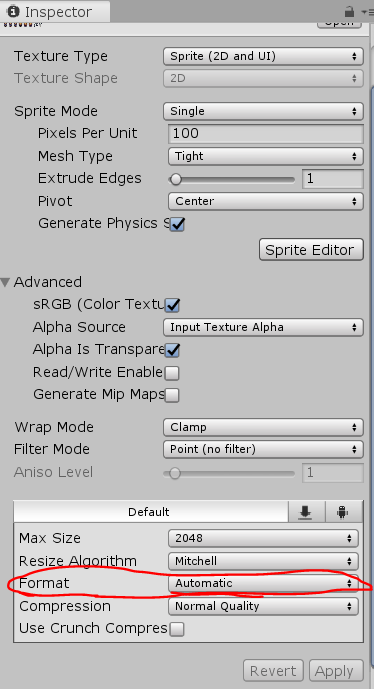
changing the format option under the sprite inspector to RGBA 32 bits will solve ur problem alt text

example.png (50.0 kB)
Comment
Add comment · Show 1 · Share
10 |3000 characters needed characters left characters exceeded
▼
  • Viewable by all users
  • Viewable by moderators
  • Viewable by moderators and the original poster
  • Advanced visibility
Viewable by all users
avatar image Hylus · Nov 21, 2019 at 12:58 PM 0
Share

I'm afraid this changing doesn't fix problem. alt text


EDIT: Ups. Sorry, my mistake. I post wrong ss.. I changed that to RGBA 32 but still the same.
avatar image
0

Answer by Hylus · Nov 21, 2019 at 01:04 PM

alt text


zrzut-ekranu-2019-11-21-o-135956.png (223.2 kB)
Comment
Add comment · Share
10 |3000 characters needed characters left characters exceeded
▼
  • Viewable by all users
  • Viewable by moderators
  • Viewable by moderators and the original poster
  • Advanced visibility
Viewable by all users

Follow this Question

Answers Answers and Comments

126 People are following this question.

avatar image avatar image avatar image avatar image avatar image avatar image avatar image avatar image avatar image avatar image avatar image avatar image avatar image avatar image avatar image avatar image avatar image avatar image avatar image avatar image avatar image avatar image avatar image avatar image avatar image avatar image avatar image avatar image avatar image avatar image avatar image avatar image avatar image avatar image avatar image avatar image avatar image avatar image avatar image avatar image avatar image avatar image avatar image avatar image avatar image avatar image avatar image avatar image avatar image avatar image avatar image avatar image avatar image avatar image avatar image avatar image avatar image avatar image avatar image avatar image avatar image avatar image avatar image avatar image avatar image avatar image avatar image avatar image avatar image avatar image avatar image avatar image avatar image avatar image avatar image avatar image avatar image avatar image avatar image avatar image avatar image avatar image avatar image avatar image avatar image avatar image avatar image avatar image avatar image avatar image avatar image avatar image avatar image avatar image avatar image avatar image avatar image avatar image avatar image avatar image avatar image avatar image avatar image avatar image avatar image avatar image avatar image avatar image avatar image avatar image avatar image avatar image avatar image avatar image avatar image avatar image avatar image avatar image avatar image avatar image avatar image avatar image avatar image avatar image avatar image avatar image

Related Questions

Importing .png as a custom font in Unity 4.3 0 Answers

Error importing PNG: file could not be read 3 Answers

Heightmaps not importing properly 0 Answers

Textures weird transparency problem -- black lines on edges -- 2 Answers

Image - Actual Size / Unity Size 2 Answers


Enterprise
Social Q&A

Social
Subscribe on YouTube social-youtube Follow on LinkedIn social-linkedin Follow on Twitter social-twitter Follow on Facebook social-facebook Follow on Instagram social-instagram

Footer

  • Purchase
    • Products
    • Subscription
    • Asset Store
    • Unity Gear
    • Resellers
  • Education
    • Students
    • Educators
    • Certification
    • Learn
    • Center of Excellence
  • Download
    • Unity
    • Beta Program
  • Unity Labs
    • Labs
    • Publications
  • Resources
    • Learn platform
    • Community
    • Documentation
    • Unity QA
    • FAQ
    • Services Status
    • Connect
  • About Unity
    • About Us
    • Blog
    • Events
    • Careers
    • Contact
    • Press
    • Partners
    • Affiliates
    • Security
Copyright © 2020 Unity Technologies
  • Legal
  • Privacy Policy
  • Cookies
  • Do Not Sell My Personal Information
  • Cookies Settings
"Unity", Unity logos, and other Unity trademarks are trademarks or registered trademarks of Unity Technologies or its affiliates in the U.S. and elsewhere (more info here). Other names or brands are trademarks of their respective owners.
  • Anonymous
  • Sign in
  • Create
  • Ask a question
  • Spaces
  • Default
  • Help Room
  • META
  • Moderators
  • Explore
  • Topics
  • Questions
  • Users
  • Badges