
Wayback Machinekoobas.hobune.stream
May JUN Jul
Previous capture 12 Next capture
2021 2022 2023
1 capture
12 Jun 22 - 12 Jun 22
sparklines
Close Help
  • Products
  • Solutions
  • Made with Unity
  • Learning
  • Support & Services
  • Community
  • Asset Store
  • Get Unity

UNITY ACCOUNT

You need a Unity Account to shop in the Online and Asset Stores, participate in the Unity Community and manage your license portfolio. Login Create account
  • Blog
  • Forums
  • Answers
  • Evangelists
  • User Groups
  • Beta Program
  • Advisory Panel

Navigation

  • Home
  • Products
  • Solutions
  • Made with Unity
  • Learning
  • Support & Services
  • Community
    • Blog
    • Forums
    • Answers
    • Evangelists
    • User Groups
    • Beta Program
    • Advisory Panel

Unity account

You need a Unity Account to shop in the Online and Asset Stores, participate in the Unity Community and manage your license portfolio. Login Create account

Language

  • Chinese
  • Spanish
  • Japanese
  • Korean
  • Portuguese
  • Ask a question
  • Spaces
    • Default
    • Help Room
    • META
    • Moderators
    • Topics
    • Questions
    • Users
    • Badges
  • Home /
avatar image
0
Question by brunoleos · Jun 29, 2016 at 05:44 PM · collisionoverlapspherecollidercontacts

Unexpected position of contact point from sphere-sphere or sphere-capsule colliders

I need to know the shortest distance between a point and other surfaces, in any direction. The image shows my setup: the selected object represents the point, which has a sphere collider, and has a mesh that can be ignored. The other objects have their collider meshes tight to their render meshes. The yellow lines are rays from the contact points in the direction of the normals. The red line is the shortest distance from the sphere center. The spheres are Z-aligned.
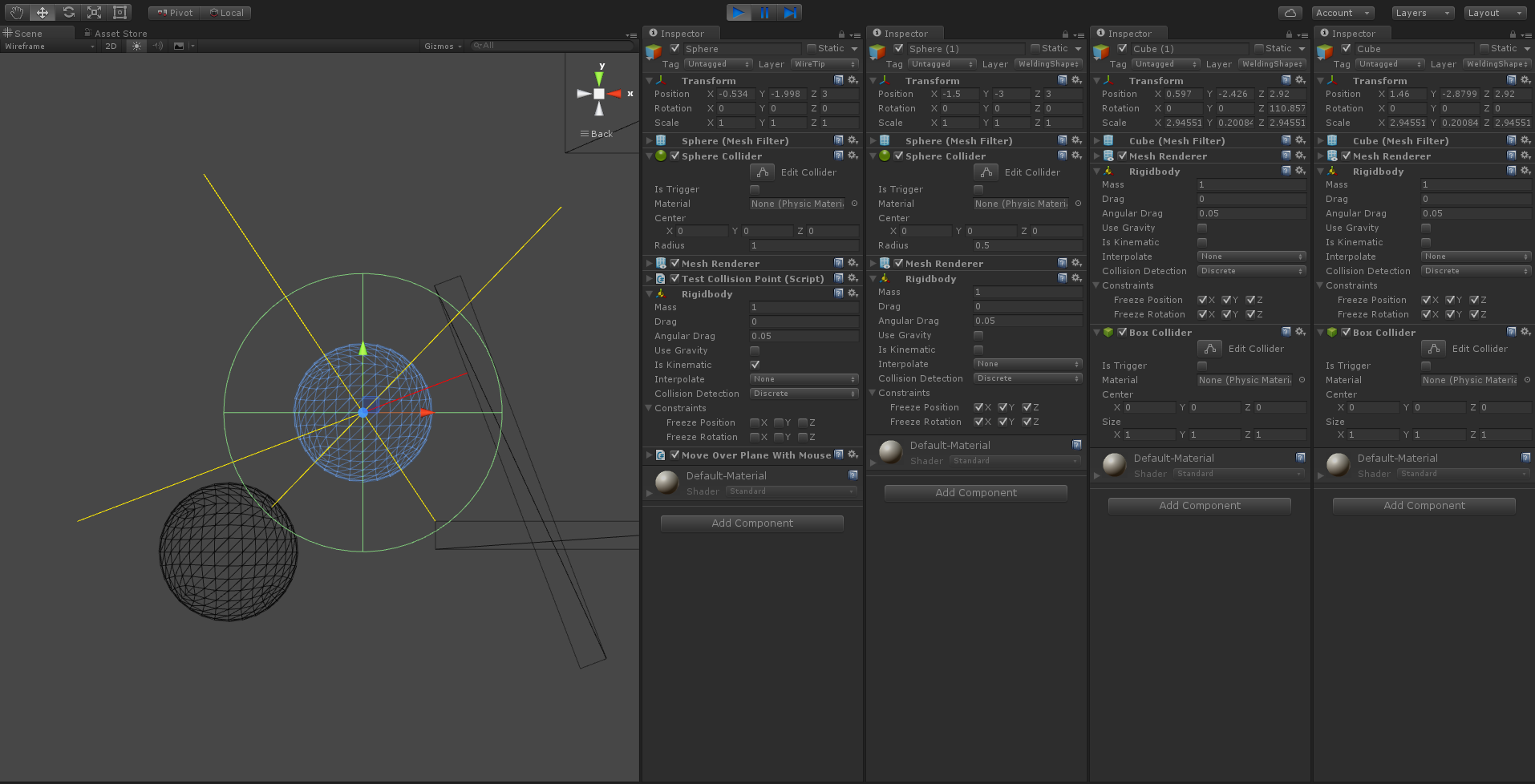
alt text

I've set my collision detection to happen between a kinematic rigidbody with sphere collider (the point), and the other body has a default rigidbody. As I want the collider meshes to overlap, I don't want the physics engine to process the collision. So I've set all the six freeze flags from the second object.

I can get the contact point from the argument of OnCollisionStay, that I receive. A sample of the script:

 void FixedUpdate() {
             foreach (var contact in differentObjectsCollisions) {
                 Debug.DrawRay(contact.point, contact.normal * 3, Color.yellow);
             }
 
             lastContact = FindClosestContactPoint(differentObjectsCollisions, transform.position);
             differentObjectsCollisions.Clear();
 
             Debug.DrawLine(transform.position, lastContact.point, Color.red);
         }
 
         void OnCollisionStay(Collision other) {
             differentObjectsCollisions.Add(
                 other.contacts.Length == 1 ?
                 new ContactInfo(other.gameObject, other.contacts[0].point, other.contacts[0].normal) :
                 FindClosestContactPoint(other, transform.position));
         }

My problem happens depending on the collider of the second object. When the collider is box or mesh, the contact point is correctly on the surface of the second object even when colliders overlap. When it is sphere or capsule, the contact point appears inside the second object, when the colliders overlap. In the image, the problem is happening in the unselected sphere, as the contact point is inside it, instead of over its surface.

I expected a contact point always in the surface of the second body, but, in the unexpected cases, it appears to be in a midpoint of the overlapping volume of the two colliders.

Is this a bug or the expected behaviour?

overlapping.png (177.4 kB)
Comment
Add comment
10 |3000 characters needed characters left characters exceeded
▼
  • Viewable by all users
  • Viewable by moderators
  • Viewable by moderators and the original poster
  • Advanced visibility
Viewable by all users

0 Replies

· Add your reply
  • Sort: 

Your answer

Hint: You can notify a user about this post by typing @username

Up to 2 attachments (including images) can be used with a maximum of 524.3 kB each and 1.0 MB total.

Follow this Question

Answers Answers and Comments

3 People are following this question.

avatar image avatar image avatar image

Related Questions

Unity Colliders are Overlapping/Intersecting 2 Answers

Is there a way to detect object collision detection based on camera perspective rather than direct polygonal collision in game space. 2 Answers

Rigidbody gets stuck in wall after falling 0 Answers

Overlap detection 1 Answer

detection cube face while rotating 0 Answers


Enterprise
Social Q&A

Social
Subscribe on YouTube social-youtube Follow on LinkedIn social-linkedin Follow on Twitter social-twitter Follow on Facebook social-facebook Follow on Instagram social-instagram

Footer

  • Purchase
    • Products
    • Subscription
    • Asset Store
    • Unity Gear
    • Resellers
  • Education
    • Students
    • Educators
    • Certification
    • Learn
    • Center of Excellence
  • Download
    • Unity
    • Beta Program
  • Unity Labs
    • Labs
    • Publications
  • Resources
    • Learn platform
    • Community
    • Documentation
    • Unity QA
    • FAQ
    • Services Status
    • Connect
  • About Unity
    • About Us
    • Blog
    • Events
    • Careers
    • Contact
    • Press
    • Partners
    • Affiliates
    • Security
Copyright © 2020 Unity Technologies
  • Legal
  • Privacy Policy
  • Cookies
  • Do Not Sell My Personal Information
  • Cookies Settings
"Unity", Unity logos, and other Unity trademarks are trademarks or registered trademarks of Unity Technologies or its affiliates in the U.S. and elsewhere (more info here). Other names or brands are trademarks of their respective owners.
  • Anonymous
  • Sign in
  • Create
  • Ask a question
  • Spaces
  • Default
  • Help Room
  • META
  • Moderators
  • Explore
  • Topics
  • Questions
  • Users
  • Badges
