 koobas.hobune.stream


Create mask overlay from images at runtime
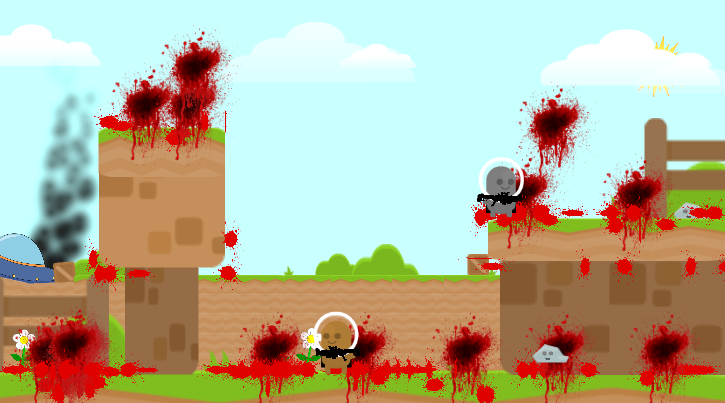
I've created a blood effect system that creates blood splatters on the game. However I want to mask the splatters to certain places. (Walls, floors etc... ) so they can only been seen on these surfaces.
All the images for the blood are stored under the same parent which currently contains a mask and a handmade alpha image of the map that it needs to mask.
I'm looking to create an overlay of the surfaces when the game starts by creating a Texture2D and iterating over the Images that will mask the blood. However this isn't working well as There's a lot of transformations that's not working well.
Here is the closest I have gotten. But this doesn't display anything in the alpha at this time.
 public class BloodMaskMaker : MonoBehaviour
 {

     public List<Image> ImagesToMask;

     public Image finalMask;

     void Start ()
     {
         int width = Screen.width;
         int height = Screen.height;
         Texture2D mask = new Texture2D(width, height, TextureFormat.ARGB32, false);

         for (int i = 0; i < width; i++)
         {
             for (int j = 0; j < height; j++)
             {
                 mask.SetPixel(i, j, GetColor(i, j, width, height));
             }
         }
         mask.Apply();
         var sprite = Sprite.Create(mask, new Rect(0, 0, width, height), new Vector2(0.5f, 0.5f));
         finalMask.sprite = sprite;
     }

     public Color GetColor(int xPixel, int yPixel, int screenWidth, int screenHeight)
     {
         Vector2 screenPoint = new Vector2(xPixel, yPixel);
         foreach (Image image in ImagesToMask)
         {
             Rect imageTransform = RectTransformToScreenSpace(image.rectTransform);
             int x = xPixel + (int)imageTransform.xMin;
             int y = yPixel + (int)imageTransform.yMin;
             int width  = (int)imageTransform.width;
             int height = (int)imageTransform.height;

             if (x < 0 || y < 0 || x >= width || y >= height)
                 continue;

             var tex = image.mainTexture as Texture2D;
             int colorX = Mathf.CeilToInt(x / width);
             int colorY = Mathf.CeilToInt(y / height);
             return new Color(1,1,1, tex.GetPixel(colorX, colorY).a);
         }

         return Color.clear;
     }

     public static Rect RectTransformToScreenSpace(RectTransform t)
     {
         Vector2 size = Vector2.Scale(t.rect.size, t.lossyScale);
         return new Rect((Vector2)t.position - (size * 0.5f), size);
     }
 }
 Hierarchy example is below
 Canvas
     Panel
         BackgroundImages
             Floor (Image Component)
             Wall (Image Component)
         BloodImages (Image & Mask Components)
             Blood (Clone) (Image Component)
             Blood (Clone) (Image Component)
             More and more (Image Component)
Can someone assist or provide an alternative to how I can mask the blood?
Cheers

What mask did you use? Mask or Mask 2d? As I know, you just need a Mask on an image( like your wall, floor), and your blood image is a child of that object, everything will be taken care of by unity.

I'm using a $$anonymous$$ask Component.
I've added a Hierarchy example to the post to show how the components and objects are set up.
I added the blood splatters to a single parent to reduce the amount of images i'll need if a blood splatter needs to overlay more than 1 object.

If you want to show your image only on your Wall, you need a $$anonymous$$ask on that Wall, right? Why is there a mask on Blood image?
Ah perhaps I should have been a bit more clear on what I was asking.
I attempting to have 1 mask which is applied for all blood splatters in the scene; but the mask needs to be computed at runtime.
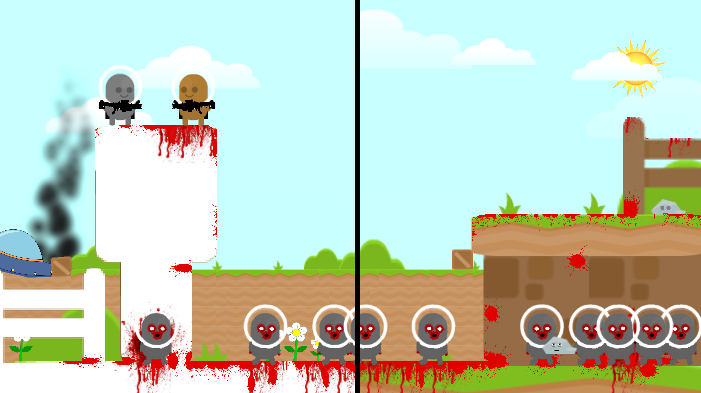 Showing Mask Graphics on the left, hiding the mask on the right.
Managed to figure it out once I learned about the RectTransformUtility from this post This code even works with rotation.
This code manages to build the mask in around 2ms with 8 different images on my PC. I'm sure there is a way to optimize this further by only iterating through the images instead of all pixels then all images. But at the moment 2ms is fast enough haha.
 public class BloodMaskMaker : MonoBehaviour
 {
     public List<Image> ImagesToMask;
     public Image finalMask;

     IEnumerator Start ()
     {
         int width = Screen.width;
         int height = Screen.height;

         Texture2D mask = new Texture2D(width, height, TextureFormat.ARGB32, false);
         for (int i = 0; i < width; i++)
         {
             for (int j = 0; j < height; j++)
             {
                 mask.SetPixel(i, j, GetColor(i, j, width, height));
             }
         }
         mask.Apply();

         var sprite = Sprite.Create(mask, new Rect(0, 0, width, height), new Vector2(0.5f, 0.5f));
         finalMask.sprite = sprite;

         yield break;
     }

     public Color GetColor(int xPixel, int yPixel, int screenWidth, int screenHeight)
     {
         float alpha = 0;

         Vector2 screenPoint = new Vector2(xPixel, yPixel);
         foreach (Image image in ImagesToMask)
         {
             if (RectTransformUtility.RectangleContainsScreenPoint(image.rectTransform, screenPoint,Camera.main))
             {
                 Vector2 localPoint;
                 RectTransformUtility.ScreenPointToLocalPointInRectangle(image.rectTransform, screenPoint, Camera.main, out localPoint);

                 float localX = Mathf.Abs(localPoint.x + image.rectTransform.rect.xMax);
                 float localY = Mathf.Abs(localPoint.y + image.rectTransform.rect.yMax);

                 var tex = image.mainTexture as Texture2D;
                 float colorX = (localX / image.rectTransform.rect.width) * tex.width;
                 float colorY = (localY / image.rectTransform.rect.height) * tex.height;
                 float colorAlpha = tex.GetPixel((int)colorX, (int)colorY).a;
                 alpha += colorAlpha;
             }
         }

         return new Color(1,1,1, Mathf.Clamp01(alpha));
     }
 }




