 koobas.hobune.stream


Rigidbody.sweeptest only seems to work when hitting certain object
Hi, I'm making a game with procedurally generated roads. to stop them from overlapping, I'm using Rigidbody.sweeptest to check for overlapping road sections as each new road section is laid down. This seems to work great, but only when the road section overlaps the starting tile. all other instances of overlap are ignored for some reason.
The starting tile is just a prefab object with some geo, a mesh collider, and 4 empties with scripts attached (road ends). the road sections themselves are prefabs with geo, a mesh collider, and two empties: one of which only has a script (road end) attached, and the other (road start) has a script, rigidbody and bounding box colliders (to assist in overlap checks).
The idea is that the rigidbody in the roadstart of each road section (and its colliders) would sweep just a hair up and down, and that would cause a true bool to be passed back. if true: try a different road section, etc...
here's a picture describing the problem: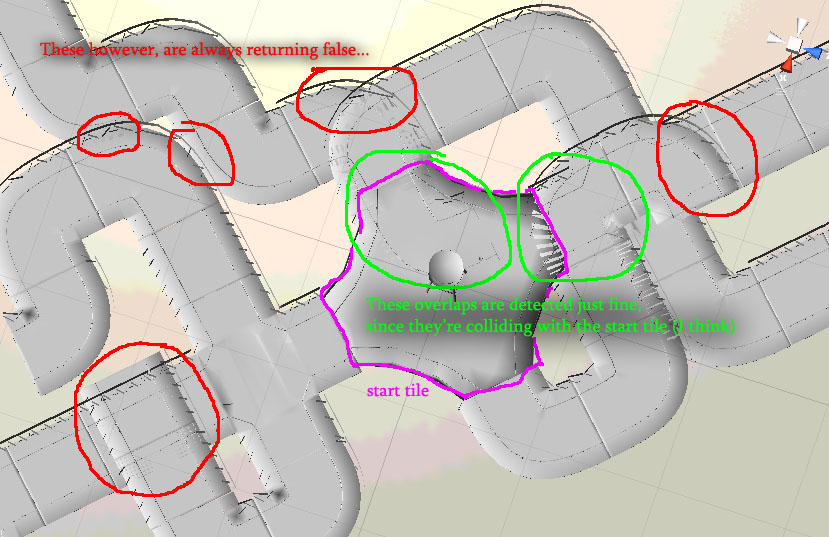
and here's the code where i try to detect the overlap (note that this happens for every road section and temproad is the road being laid down on this iteration):
 //turn off the road geo, so overlap check wont hit itself.
                     tempcollider = temproad.transform.Find ("RoadGeo");
                     tempcollider.gameObject.SetActive(false);

                         //Debug.Log(collisioninfo.collider);
                         /*if((collisioninfo.collider.gameObject.transform.parent == temproad))
                         {
                             //do nothing, you're colliding with yourself idiot.
                             Debug.Log ("self collision. ignore.");
                         }//end if
                         else
                         {*/

                             //OMGoverlap = true;

                             //check for overlaps using the roadstart colliders
                             Debug.Log ("overlap: " + (temproad.GetComponentInChildren<RoadStartstuff>().gameObject.rigidbody.SweepTest(transform.up, out collisioninfo, 2.0f)) +" on " + totalroadcount);// if yes, send a debug message
                             OMGoverlap = false;


                     //turns back on roadgeo so players can drive on roads
                     tempcollider = temproad.transform.Find ("RoadGeo");
                     tempcollider.gameObject.SetActive(true);


                     //turns the roadstart colliders into triggers so the player doesnt run into them
                     tempcollider = temproad.transform.Find ("RoadStart");
                     tempcollider.collider.isTrigger = true;

                     //sets the number on each section of road so I can keep track of em.
                     temproad.GetComponentInChildren<RoadStartstuff>().iamroad = totalroadcount;

                     //tell the roadend we're working on that it is paired with a road... finally.
                     roadends[i].GetComponent<RoadEndStuff>().paired = true;
If you need anything else (like hierarchy maps of the game objects or more code or whatever) please let me know! I want to get this working! i have a girl i need to impress on saturday!"
HA! I figured it out! well, kinda. sweeptest wont work if the object you're sweeping starts already colliding with the object you're trying to see if it'll collide with. I guess it just disregards that collision... i only KINDA figured it out because while I have proper collisions now, that explanation still doesn't explain why i was getting it on the start tile (as the road sections were spawned touching it as well as the other road sections....)

5 years later and this answer helped me get a good workaround. You're right, it doesn't regard the collider the rigidbody is on top of, so what I did was shift the position slightly up before the sweeptest and shifted it back down again. Thanks for your answer!!!



