Wayback Machinekoobas.hobune.stream
May JUN Jul
Previous capture 12 Next capture
2021 2022 2023
1 capture
12 Jun 22 - 12 Jun 22
sparklines
Close Help
  • Products
  • Solutions
  • Made with Unity
  • Learning
  • Support & Services
  • Community
  • Asset Store
  • Get Unity

UNITY ACCOUNT

You need a Unity Account to shop in the Online and Asset Stores, participate in the Unity Community and manage your license portfolio. Login Create account
  • Blog
  • Forums
  • Answers
  • Evangelists
  • User Groups
  • Beta Program
  • Advisory Panel

Navigation

  • Home
  • Products
  • Solutions
  • Made with Unity
  • Learning
  • Support & Services
  • Community
    • Blog
    • Forums
    • Answers
    • Evangelists
    • User Groups
    • Beta Program
    • Advisory Panel

Unity account

You need a Unity Account to shop in the Online and Asset Stores, participate in the Unity Community and manage your license portfolio. Login Create account

Language

  • Chinese
  • Spanish
  • Japanese
  • Korean
  • Portuguese
  • Ask a question
  • Spaces
    • Default
    • Help Room
    • META
    • Moderators
    • Topics
    • Questions
    • Users
    • Badges
  • Home /
avatar image
0
Question by Abdul91 · Oct 28, 2015 at 09:59 AM · unity 2drigidbody2dboxcollider2d

Colliders2d not colliding, yet stoping the rigibody2d.

Hi, I have a very weird problem dealing with colliders2d and rigidbody2d. Kind of similar to this question Problem with colliders2D with GameObjects

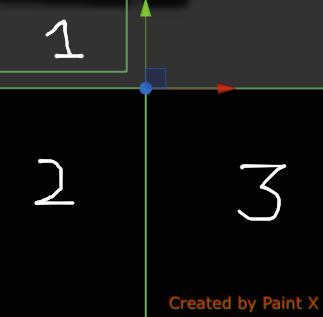
I have a gameobject with rigidbody2d and boxcollider2d attached to it (lets call it "Player"). I am moving that object by AddForce method on top of other gameobjects in the world which only have boxcolliders2d attached to them. But at times my Player stops moving as if it is colliding with a gameobject and cannot move further ahead. Here are the images for it. I will explain more via images. Image 1 Image 2
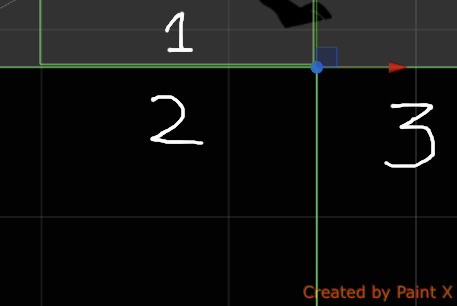
Both are images of same scenario. First Image is a bit zoomed out. And Second is zoomed in at the direction my Player is moving. Now the thing is my player is stuck there. And will be stuck there, unless I move my Gameobject 1 or Gameobject 2 a bit upward (increase their Y from even from the inspector). Or move Gameobject 3 a little downwards. Till I wont do that, my player is stuck there. I know this is a very weird problem and more information might be required. So, if you need to know anything else in the scenario, please do let me know. I would be very thankful if some1 help me to fix this problem. Thank you in advance.

image1.png (17.2 kB)
image2.png (14.8 kB)
Comment
Add comment · Show 2
10 |3000 characters needed characters left characters exceeded
▼
  • Viewable by all users
  • Viewable by moderators
  • Viewable by moderators and the original poster
  • Advanced visibility
Viewable by all users
avatar image toromano · Oct 28, 2015 at 10:29 AM 0
Share

Probably your gameobject 1 is hitting the edge of gameobject 3. If it is possible you can make gameobject 2 and 3 one single gameobject. If it is not, you can play with collision penetration threshold values from here: http://docs.unity3d.com/$$anonymous$$anual/class-Physics2D$$anonymous$$anager.html $$anonymous$$odifying addforce value might help too.

avatar image Abdul91 toromano · Nov 06, 2015 at 07:06 AM 0
Share

yes that is my take on that also, but i have zoomed in as shown in images and they dont seem to be colliding and y value of gameobject 2 and gameobject 3 is same. I will check the link you told. Thank you for replying

1 Reply

· Add your reply
  • Sort: 
avatar image
0

Answer by Ali-hatem · Oct 28, 2015 at 10:32 AM

1.in 2d even if the player is above the other game objects it will be considered like they face each other so the (Z) index doesn't matter.

2.now if you want the player to move above objects it will be moving throw them so you have to set objects box collider to triger in hierarchy.

Comment
Add comment · Show 2 · Share
10 |3000 characters needed characters left characters exceeded
▼
  • Viewable by all users
  • Viewable by moderators
  • Viewable by moderators and the original poster
  • Advanced visibility
Viewable by all users
avatar image Abdul91 · Nov 06, 2015 at 07:08 AM 0
Share

Thnx for replying but what are you talking about ? What does Z index have to do with any collisions in 2d ? You did not make any sense in your two points, or I did not get them at all..... :|

avatar image Ali-hatem · Nov 06, 2015 at 09:34 AM 0
Share

@Abdul91! man this is what a im talking about " Z index have nothing to do with any collisions in 2d " read my replay .

Your answer

Hint: You can notify a user about this post by typing @username

Up to 2 attachments (including images) can be used with a maximum of 524.3 kB each and 1.0 MB total.

Follow this Question

Answers Answers and Comments

33 People are following this question.

avatar image avatar image avatar image avatar image avatar image avatar image avatar image avatar image avatar image avatar image avatar image avatar image avatar image avatar image avatar image avatar image avatar image avatar image avatar image avatar image avatar image avatar image avatar image avatar image avatar image avatar image avatar image avatar image avatar image avatar image avatar image avatar image avatar image

Related Questions

Why does poligon collider 2d restricts movement of box collider? 0 Answers

,Player Passes through walls 2d 1 Answer

The object of type 'Rigidbody2D' has been destroyed but you are still trying to access it. with StartCoroutine 1 Answer

Player sprite clipping through game boundary in 2d scene 1 Answer

My raycasts rotate weirdly around their 2DboxCollider, they try to match the starting position of the collider *instead* of matching the new position when rotating 1 Answer


Enterprise
Social Q&A

Social
Subscribe on YouTube social-youtube Follow on LinkedIn social-linkedin Follow on Twitter social-twitter Follow on Facebook social-facebook Follow on Instagram social-instagram

Footer

  • Purchase
    • Products
    • Subscription
    • Asset Store
    • Unity Gear
    • Resellers
  • Education
    • Students
    • Educators
    • Certification
    • Learn
    • Center of Excellence
  • Download
    • Unity
    • Beta Program
  • Unity Labs
    • Labs
    • Publications
  • Resources
    • Learn platform
    • Community
    • Documentation
    • Unity QA
    • FAQ
    • Services Status
    • Connect
  • About Unity
    • About Us
    • Blog
    • Events
    • Careers
    • Contact
    • Press
    • Partners
    • Affiliates
    • Security
Copyright © 2020 Unity Technologies
  • Legal
  • Privacy Policy
  • Cookies
  • Do Not Sell My Personal Information
  • Cookies Settings
"Unity", Unity logos, and other Unity trademarks are trademarks or registered trademarks of Unity Technologies or its affiliates in the U.S. and elsewhere (more info here). Other names or brands are trademarks of their respective owners.
  • Anonymous
  • Sign in
  • Create
  • Ask a question
  • Spaces
  • Default
  • Help Room
  • META
  • Moderators
  • Explore
  • Topics
  • Questions
  • Users
  • Badges