
Wayback Machinekoobas.hobune.stream
May JUN Jul
Previous capture 12 Next capture
2021 2022 2023
1 capture
12 Jun 22 - 12 Jun 22
sparklines
Close Help
  • Products
  • Solutions
  • Made with Unity
  • Learning
  • Support & Services
  • Community
  • Asset Store
  • Get Unity

UNITY ACCOUNT

You need a Unity Account to shop in the Online and Asset Stores, participate in the Unity Community and manage your license portfolio. Login Create account
  • Blog
  • Forums
  • Answers
  • Evangelists
  • User Groups
  • Beta Program
  • Advisory Panel

Navigation

  • Home
  • Products
  • Solutions
  • Made with Unity
  • Learning
  • Support & Services
  • Community
    • Blog
    • Forums
    • Answers
    • Evangelists
    • User Groups
    • Beta Program
    • Advisory Panel

Unity account

You need a Unity Account to shop in the Online and Asset Stores, participate in the Unity Community and manage your license portfolio. Login Create account

Language

  • Chinese
  • Spanish
  • Japanese
  • Korean
  • Portuguese
  • Ask a question
  • Spaces
    • Default
    • Help Room
    • META
    • Moderators
    • Topics
    • Questions
    • Users
    • Badges
  • Home /
avatar image
0
Question by Nackles42 · Nov 21, 2018 at 01:40 AM · rigidbody2drigidbody.addforceflying

Character flies away at high speed with Rigidbody.AddForce

I am working on a game similar to Super Smash Bros. In this game, characters need to be able to receive knockback of different angles. My code appears to work when using this to launch my character straight upward, but trying to use it to launch any other angle, even 1 degree off, it simply zips my character off the screen at ridiculous speed. I have a screen recording of the phenomenon as well as the relevant code.

Video: link text

About a quarter of the way through is when I attempt to use it to launch me upwards, and halfway through is to the side.

Code: alt text This 'zipping off the screen' result occurs when either attempting to hold left or right to DI this attack, or when I edit the numbers so the attack sends me in another direction
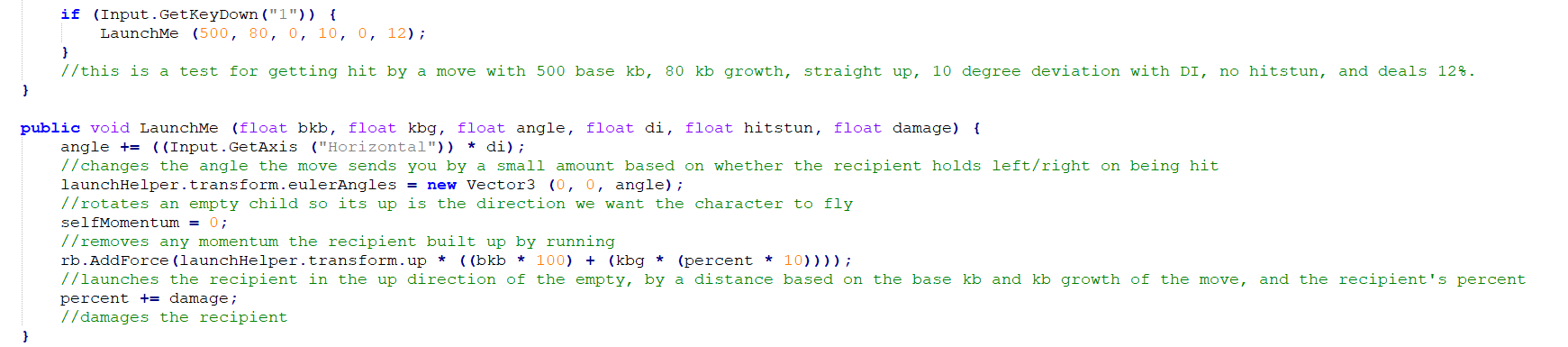
code.png (39.2 kB)
Comment
Add comment · Show 1
10 |3000 characters needed characters left characters exceeded
▼
  • Viewable by all users
  • Viewable by moderators
  • Viewable by moderators and the original poster
  • Advanced visibility
Viewable by all users
avatar image Nackles42 · Nov 23, 2018 at 07:48 PM 0
Share

I still have no idea what's going on. I've tried changing the 'transform.up' to 'transform.forward', and that simply has no effect (presumably due to the fact this is a Rigidbody2D) and to 'transform.right', and that has the same 'zipping away' result. I've tried rotating the launch helper manually ins$$anonymous$$d of with code, but that gave the same result. I'm not sure what else I can try.

1 Reply

· Add your reply
  • Sort: 
avatar image
2
Best Answer

Answer by Eno-Khaon · Nov 23, 2018 at 09:48 PM

First off, looking at how you're applying the force, you should probably change the ForceMode2D to Impulse. Among other reasons, this will let you reduce the force application by 50 times (by default), as well as allowing you to change the physics timestep without changing the amount of force applied.

 // multiplied by mass as an example to ignore mass as a factor for the force application
 rb.AddForce(forceAmount * rb.mass, ForceMode2D.Impulse);


Seeing that you're currently applying a force of 50,000 (reduced to 1,000 instantaneous by the default ForceMode at the default physics rate of 50/s), however, this brings to light other questions and concerns.

The reason your character flies off to a side at incredible speed is because you're suddenly sending them to the side at up to 1,000 units (meters, etc.) per second. Therefore, the more urgent question here is: Did you turn gravity waaaaaaay up or are you applying downward force by some other, additional means?

Comment
Add comment · Show 3 · Share
10 |3000 characters needed characters left characters exceeded
▼
  • Viewable by all users
  • Viewable by moderators
  • Viewable by moderators and the original poster
  • Advanced visibility
Viewable by all users
avatar image Nackles42 · Nov 25, 2018 at 11:21 PM 0
Share

Hey, thank you for getting back to me. So, I looked into this, and for testing purposes, changed the actual launching line to:

 rb.AddForce(launchHelper.transform.up * 10, Force$$anonymous$$ode2D.Impulse);

In addition, the gravity is the normal -9.81, the mass of the character is 1 (hence why I didn't bother multiplying by mass), the RB2D's gravity scale is also 1, and it doesn't look like any other external sources are making it go downwards at speed. To top it off, using the code to launch it straight downwards did so at around the same speed as the one straight upwards. Even after these changes, launching straight up and down works fine, but trying to go any other direction, even 1 degree off, is still causing the object to fly away at huge speed. In fact, even making the code launch me at "launchHelper.transform.up * 0.1f" still causes this 'zipping away effect'. I can't tell if the power of the AddForce is what's causing this effect or not.

avatar image Eno-Khaon Nackles42 · Nov 26, 2018 at 10:23 AM 2
Share

Looking over the gif again, it occurs to me that, if I'm understanding what I'm seeing correctly with the fairly low framerate, the character appears to accelerate as it zips away.

That could suggest interference from another script applying velocity to the side, since your script sample doesn't appear to have any specific reason to rapidly call the function listed.

avatar image Nackles42 Eno-Khaon · Nov 28, 2018 at 09:20 PM 0
Share

To test your theory, I disabled all scripts attached to my object, and it turns out, it was actually something from my jump script messing with it! I figured out what line it was, and managed to completely fix it! Thank you so much!

Essentially, I had it on every frame doubling the sideways velocity for some reason. Glad it got figured out.

Your answer

Hint: You can notify a user about this post by typing @username

Up to 2 attachments (including images) can be used with a maximum of 524.3 kB each and 1.0 MB total.

Follow this Question

Answers Answers and Comments

114 People are following this question.

avatar image avatar image avatar image avatar image avatar image avatar image avatar image avatar image avatar image avatar image avatar image avatar image avatar image avatar image avatar image avatar image avatar image avatar image avatar image avatar image avatar image avatar image avatar image avatar image avatar image avatar image avatar image avatar image avatar image avatar image avatar image avatar image avatar image avatar image avatar image avatar image avatar image avatar image avatar image avatar image avatar image avatar image avatar image avatar image avatar image avatar image avatar image avatar image avatar image avatar image avatar image avatar image avatar image avatar image avatar image avatar image avatar image avatar image avatar image avatar image avatar image avatar image avatar image avatar image avatar image avatar image avatar image avatar image avatar image avatar image avatar image avatar image avatar image avatar image avatar image avatar image avatar image avatar image avatar image avatar image avatar image avatar image avatar image avatar image avatar image avatar image avatar image avatar image avatar image avatar image avatar image avatar image avatar image avatar image avatar image avatar image avatar image avatar image avatar image avatar image avatar image avatar image avatar image avatar image avatar image avatar image avatar image avatar image avatar image avatar image avatar image avatar image avatar image avatar image

Related Questions

AddForce to mouse direction not working well horizontally. 1 Answer

Rigidbody.addforce not working with prefab 1 Answer

Array of different rigidbody 0 Answers

rigidbody2d.addforce for is not working for the x axis 0 Answers

2D AddForce towards direction with CONSTANT FORCE whether the direction is far or near. 1 Answer


Enterprise
Social Q&A

Social
Subscribe on YouTube social-youtube Follow on LinkedIn social-linkedin Follow on Twitter social-twitter Follow on Facebook social-facebook Follow on Instagram social-instagram

Footer

  • Purchase
    • Products
    • Subscription
    • Asset Store
    • Unity Gear
    • Resellers
  • Education
    • Students
    • Educators
    • Certification
    • Learn
    • Center of Excellence
  • Download
    • Unity
    • Beta Program
  • Unity Labs
    • Labs
    • Publications
  • Resources
    • Learn platform
    • Community
    • Documentation
    • Unity QA
    • FAQ
    • Services Status
    • Connect
  • About Unity
    • About Us
    • Blog
    • Events
    • Careers
    • Contact
    • Press
    • Partners
    • Affiliates
    • Security
Copyright © 2020 Unity Technologies
  • Legal
  • Privacy Policy
  • Cookies
  • Do Not Sell My Personal Information
  • Cookies Settings
"Unity", Unity logos, and other Unity trademarks are trademarks or registered trademarks of Unity Technologies or its affiliates in the U.S. and elsewhere (more info here). Other names or brands are trademarks of their respective owners.
  • Anonymous
  • Sign in
  • Create
  • Ask a question
  • Spaces
  • Default
  • Help Room
  • META
  • Moderators
  • Explore
  • Topics
  • Questions
  • Users
  • Badges
