
Wayback Machinekoobas.hobune.stream
May JUN Jul
Previous capture 12 Next capture
2021 2022 2023
1 capture
12 Jun 22 - 12 Jun 22
sparklines
Close Help
  • Products
  • Solutions
  • Made with Unity
  • Learning
  • Support & Services
  • Community
  • Asset Store
  • Get Unity

UNITY ACCOUNT

You need a Unity Account to shop in the Online and Asset Stores, participate in the Unity Community and manage your license portfolio. Login Create account
  • Blog
  • Forums
  • Answers
  • Evangelists
  • User Groups
  • Beta Program
  • Advisory Panel

Navigation

  • Home
  • Products
  • Solutions
  • Made with Unity
  • Learning
  • Support & Services
  • Community
    • Blog
    • Forums
    • Answers
    • Evangelists
    • User Groups
    • Beta Program
    • Advisory Panel

Unity account

You need a Unity Account to shop in the Online and Asset Stores, participate in the Unity Community and manage your license portfolio. Login Create account

Language

  • Chinese
  • Spanish
  • Japanese
  • Korean
  • Portuguese
  • Ask a question
  • Spaces
    • Default
    • Help Room
    • META
    • Moderators
    • Topics
    • Questions
    • Users
    • Badges
  • Home /
avatar image
0
Question by w88dy · Aug 24, 2017 at 12:47 AM · animationunity 5physicsobjectshands

Realistic Hand Grapping

I've got a pretty nice human hand/arm model which I've written a script for to open and close the fingers/thumb in unison so that they resemble a closed fist (of sorts). I've used hard-coded constraints on the fingers so they don't contort into weird unnatural angles and so that they don't pass through the palm.

My end goal is to get the hand to grasp objects, but I'm having a real hard time doing it. I've attempted to give the fingers/thumb/palm box/capsule colliders along with rigidbodies, but whenever I try to 'pick up' a small cube, it will slide off the collider, or if the hand is moving too fast the cube will pass straight through it. I've played around with all the settings for the rigidbody and collider items, including changing the discrete/continuous/dynamic continuous collision detection. I've tried making the walls of the colliders thicker to compensate for fast movement. I've tried adding physic material to the objects, such as friction to the cubes I'm trying to pick up, to try and stop them from sliding off the hand. I've tried using mesh colliders, but have seen online that I shouldn't use them for dynamic/animated objects as the mesh uses a lot of resources to move with the object. I've also tried using raycasters to detect collision, as I've read online it's better for fast objects.

Basically what I want to do is to be able to close the fingers around an object, and if the object is small enough the fingers are to wrap around the object and for it to stay in the hand until I open to drop the object. The cubes currently sliding in the hand, flying off when I try to grasp them, or are passing through the hand. If I was able to make the hand 'solid' I think it would solve a lot of my issues, but that seems to be easier said than done as objects keep passing through it.

Any suggestions on how to tackle this issue would be great, thanks. I've attached a couple of images to show the hand model.
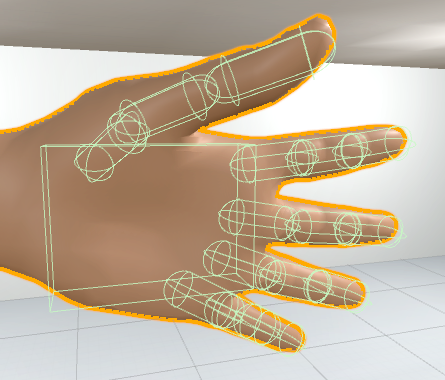
alt text Image showing my attempt at using colliders to pick up objects.
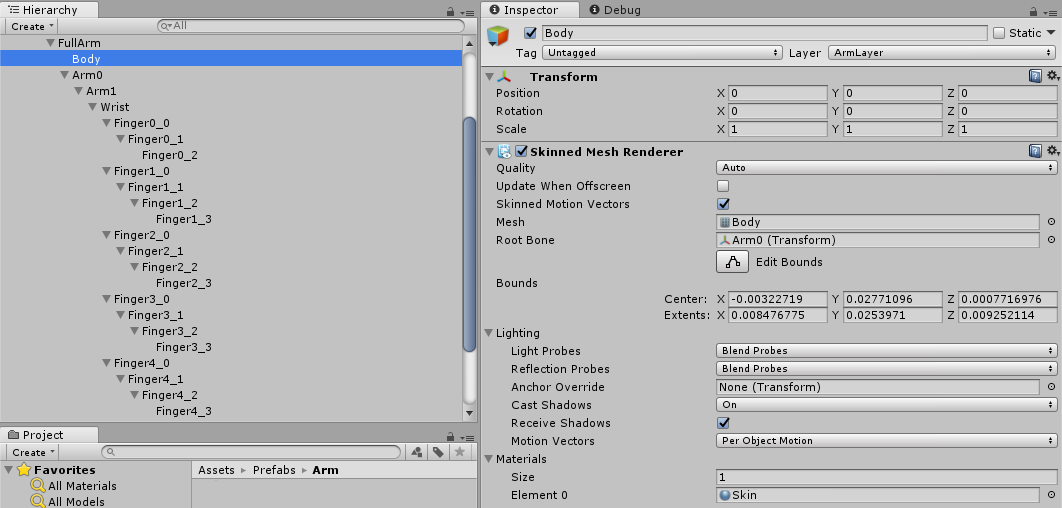
alt text Image showing my hand model's layout, along with the 'body' part, which I believe contains the bone information. The thumb is made up of three joints while the fingers have 4. The wrist is a single joint and there are two joints for the forearm (although the wrist/forearm aren't of interest right now).

1.png (158.8 kB)
2.png (76.0 kB)
Comment
Add comment · Show 6
10 |3000 characters needed characters left characters exceeded
▼
  • Viewable by all users
  • Viewable by moderators
  • Viewable by moderators and the original poster
  • Advanced visibility
Viewable by all users
avatar image Cherno · Aug 24, 2017 at 02:24 PM 0
Share

It sounds like a rather special problem, but I could suggest looking into using a I$$anonymous$$ solution and maybe just make the held object a child of the hand bone ins$$anonymous$$d of relying on physics to keep it there. If the fingers open enough, you can always "unchild" it.

avatar image w88dy Cherno · Aug 24, 2017 at 03:19 PM 0
Share

Thanks for your suggestion. I've got a couple of solutions for less-realistic picking up of items, such as what you're suggesting, but I'm really looking for some more 'life-like'. Currently I have a collision box that hovers below the palm and when an object is within that area and the hand closes it will pick up the item, but then the item isn't really being 'held', more just interacted with. I'm not sure if what I'm asking is possible, but thought I'd ask.

avatar image FortisVenaliter w88dy · Aug 24, 2017 at 07:56 PM 1
Share

It's probably possible, but this is not likely to be the last problem you'll have with it. It sounds like you've already tried everything I would try, so all I can really offer is this:

How important is it that the grabbing be physics driven? If you want it to look more natural, why not parent the object to the hand, lerp it into position over a second or so, and dynamically animate the hand to close around the object properly without intersecting. That way you won't have to deal with the physics portion at all.

Typically (not always, but typically) it's easier to work with dynamic animations than force the physics engine to do a specific task. Physics tend not to play well with deter$$anonymous$$istic actions.

avatar image fourfourtwo · Aug 23, 2018 at 01:34 AM 0
Share

I have the same problem. I am also trying to grasp an object purely using physics but I am unable to... did you manage to find a solution?

avatar image w88dy fourfourtwo · Aug 23, 2018 at 02:29 PM 0
Share

Unfortunately I never got this working as intended, but my solution worked pretty well in the end. I posted it above in response to another user, but to reiterate: 'Currently I have a collision box that hovers below the palm and when an object is within that area and the hand closes it will pick up the item, but then the item isn't really being 'held', more just interacted with.' Hope this helps.

avatar image SunnyChow · Aug 23, 2018 at 07:38 AM 0
Share

i remember for leap motion, when you grab an object, that object is actually stick to your fingers

1 Reply

· Add your reply
  • Sort: 
avatar image
0

Answer by theANMATOR2b · Aug 24, 2017 at 07:36 PM

Personally I would do this with animations and parenting the grasped objects instead. If you make one animation to close the hand it can close to a certain point if the object is large or small. Stop the animation from playing and parent the object to the wrist/palm bone at that time and the object will move with the hand.

The rotation of the wrist could be rigged up to manually control the blending of the wrist rotations by a blend tree.

Comment
Add comment · Share
10 |3000 characters needed characters left characters exceeded
▼
  • Viewable by all users
  • Viewable by moderators
  • Viewable by moderators and the original poster
  • Advanced visibility
Viewable by all users

Your answer

Hint: You can notify a user about this post by typing @username

Up to 2 attachments (including images) can be used with a maximum of 524.3 kB each and 1.0 MB total.

Follow this Question

Answers Answers and Comments

255 People are following this question.

avatar image avatar image avatar image avatar image avatar image avatar image avatar image avatar image avatar image avatar image avatar image avatar image avatar image avatar image avatar image avatar image avatar image avatar image avatar image avatar image avatar image avatar image avatar image avatar image avatar image avatar image avatar image avatar image avatar image avatar image avatar image avatar image avatar image avatar image avatar image avatar image avatar image avatar image avatar image avatar image avatar image avatar image avatar image avatar image avatar image avatar image avatar image avatar image avatar image avatar image avatar image avatar image avatar image avatar image avatar image avatar image avatar image avatar image avatar image avatar image avatar image avatar image avatar image avatar image avatar image avatar image avatar image avatar image avatar image avatar image avatar image avatar image avatar image avatar image avatar image avatar image avatar image avatar image avatar image avatar image avatar image avatar image avatar image avatar image avatar image avatar image avatar image avatar image avatar image avatar image avatar image avatar image avatar image avatar image avatar image avatar image avatar image avatar image avatar image avatar image avatar image avatar image avatar image avatar image avatar image avatar image avatar image avatar image avatar image avatar image avatar image avatar image avatar image avatar image avatar image avatar image avatar image avatar image avatar image avatar image avatar image avatar image avatar image avatar image avatar image avatar image avatar image avatar image avatar image avatar image avatar image avatar image avatar image avatar image avatar image avatar image avatar image avatar image avatar image avatar image avatar image avatar image avatar image avatar image avatar image avatar image avatar image avatar image avatar image avatar image avatar image avatar image avatar image avatar image avatar image avatar image avatar image avatar image avatar image avatar image avatar image avatar image avatar image avatar image avatar image avatar image avatar image avatar image avatar image avatar image avatar image avatar image avatar image avatar image avatar image avatar image avatar image avatar image avatar image avatar image avatar image avatar image avatar image avatar image avatar image avatar image avatar image avatar image avatar image avatar image avatar image avatar image avatar image avatar image avatar image avatar image avatar image avatar image avatar image avatar image avatar image avatar image avatar image avatar image avatar image avatar image avatar image avatar image avatar image avatar image avatar image avatar image avatar image avatar image avatar image avatar image avatar image avatar image avatar image avatar image avatar image avatar image avatar image avatar image avatar image avatar image avatar image avatar image avatar image avatar image avatar image avatar image avatar image avatar image avatar image avatar image avatar image avatar image avatar image avatar image avatar image avatar image avatar image avatar image avatar image avatar image avatar image avatar image avatar image avatar image avatar image avatar image avatar image avatar image avatar image

Related Questions

How to make Animation and Physics work together? 2 Answers

How to make Animation and Physics work together? 0 Answers

How do I get the Root Transform Position (XY) to loop seamlessly? [Unity] 0 Answers

Playing An Animation At A Certain Point Based On Mouse Position 0 Answers

Converting discrete intensity distribution to a continuous figure.,Discrete intensity to continuous figure. 0 Answers


Enterprise
Social Q&A

Social
Subscribe on YouTube social-youtube Follow on LinkedIn social-linkedin Follow on Twitter social-twitter Follow on Facebook social-facebook Follow on Instagram social-instagram

Footer

  • Purchase
    • Products
    • Subscription
    • Asset Store
    • Unity Gear
    • Resellers
  • Education
    • Students
    • Educators
    • Certification
    • Learn
    • Center of Excellence
  • Download
    • Unity
    • Beta Program
  • Unity Labs
    • Labs
    • Publications
  • Resources
    • Learn platform
    • Community
    • Documentation
    • Unity QA
    • FAQ
    • Services Status
    • Connect
  • About Unity
    • About Us
    • Blog
    • Events
    • Careers
    • Contact
    • Press
    • Partners
    • Affiliates
    • Security
Copyright © 2020 Unity Technologies
  • Legal
  • Privacy Policy
  • Cookies
  • Do Not Sell My Personal Information
  • Cookies Settings
"Unity", Unity logos, and other Unity trademarks are trademarks or registered trademarks of Unity Technologies or its affiliates in the U.S. and elsewhere (more info here). Other names or brands are trademarks of their respective owners.
  • Anonymous
  • Sign in
  • Create
  • Ask a question
  • Spaces
  • Default
  • Help Room
  • META
  • Moderators
  • Explore
  • Topics
  • Questions
  • Users
  • Badges
