Wayback Machinekoobas.hobune.stream
May JUN Jul
Previous capture 13 Next capture
2021 2022 2023
1 capture
13 Jun 22 - 13 Jun 22
sparklines
Close Help
  • Products
  • Solutions
  • Made with Unity
  • Learning
  • Support & Services
  • Community
  • Asset Store
  • Get Unity

UNITY ACCOUNT

You need a Unity Account to shop in the Online and Asset Stores, participate in the Unity Community and manage your license portfolio. Login Create account
  • Blog
  • Forums
  • Answers
  • Evangelists
  • User Groups
  • Beta Program
  • Advisory Panel

Navigation

  • Home
  • Products
  • Solutions
  • Made with Unity
  • Learning
  • Support & Services
  • Community
    • Blog
    • Forums
    • Answers
    • Evangelists
    • User Groups
    • Beta Program
    • Advisory Panel

Unity account

You need a Unity Account to shop in the Online and Asset Stores, participate in the Unity Community and manage your license portfolio. Login Create account

Language

  • Chinese
  • Spanish
  • Japanese
  • Korean
  • Portuguese
  • Ask a question
  • Spaces
    • Default
    • Help Room
    • META
    • Moderators
    • Topics
    • Questions
    • Users
    • Badges
  • Home /
avatar image
0
Question by segment · Feb 05, 2014 at 04:11 PM · camerafpsfieldofviewscopesniper

Sniper scope zoom if crosshair is not in the middle of the screen

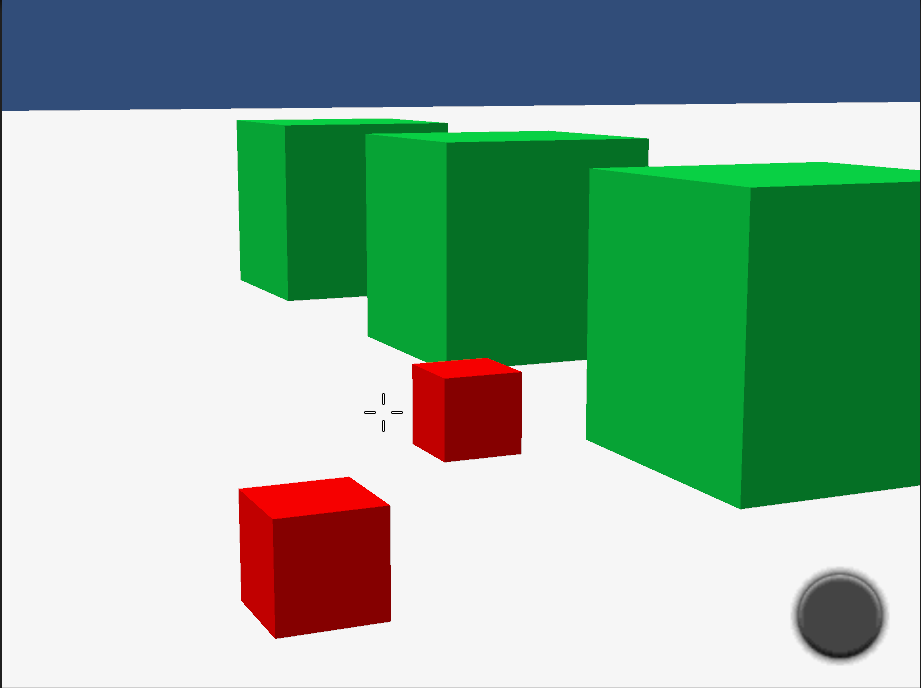
Hi, As you could understand I'm working on FPS game and I need to have a look into sniper scope but the thing is that my crosshair can be anywhere in the screen which makes some troubles for sniper aiming.

Here is my view before the sniper aim. alt text
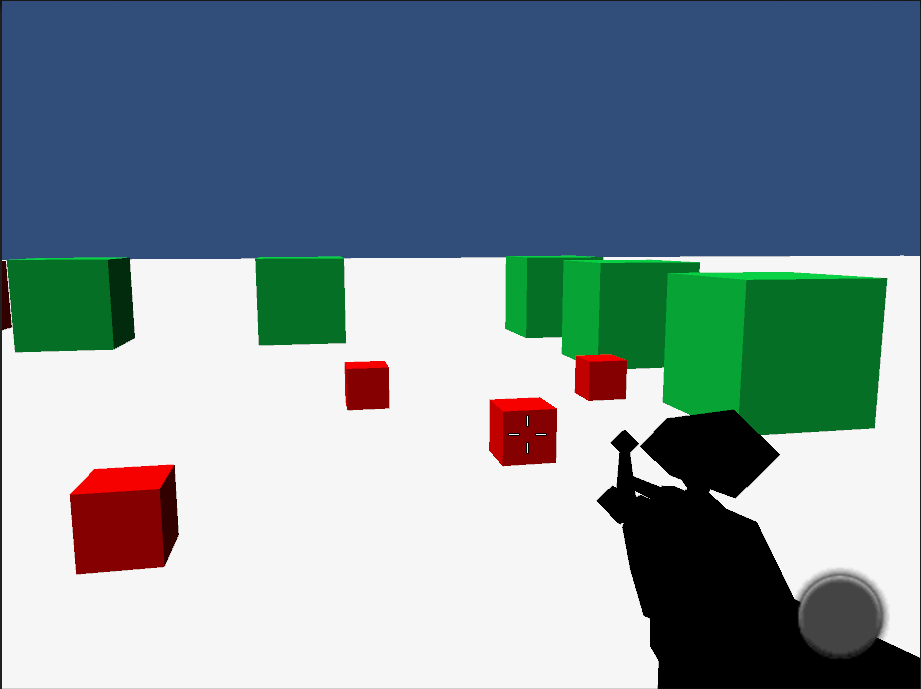
And my view after.

alt text

What I'm doing is decreasing camera's field of view but I get the unneeded offset (as you can see on the screenshot).

Could you please help me to figure out how to calculate new camera position or what do I need to do in this situation?

         var aimTransform = weapon.transform.Find("aim_pos");
         mainCamera.transform.position = aimTransform.position;
         //mainCamera.transform.rotation = aimTransform.rotation;
 
         //TODO: calculate "offset" to stay point at the same object as before zoom in
         // distance to first hit
         // mainCamera.ScreenPointToRay(new Vector3
         var position = new Vector3(crosshairPosition.x, Screen.height - crosshairPosition.y, 0);
         Ray rCast = mainCamera.ScreenPointToRay(position);
         //Debug.LogWarning("Ray param = " + rCast);
         Debug.DrawLine(rCast.origin, rCast.origin + rCast.direction * 10000, Color.yellow,600);
         
         RaycastHit hitInfo;
         bool wasHit = Physics.Raycast(rCast, out hitInfo);
         float distance;
         if (wasHit)
         {
             Debug.Log(string.Format("Hit {0} distance = {1}", hitInfo.collider.name, hitInfo.distance));
             distance = hitInfo.distance;
         }
         else
         {
             Debug.LogWarning("Not hit. take farClipPlane");
             distance = mainCamera.farClipPlane;
         }

         Vector3 wp1 = mainCamera.ScreenToWorldPoint(new Vector3(crosshairPosition.x, crosshairPosition.y, distance));
         Debug.Log(wp1);
         mainCamera.fieldOfView = zoomInFow;
         Vector3 wp2 = mainCamera.ScreenToWorldPoint(new Vector3(crosshairPosition.x, crosshairPosition.y, distance));
         Debug.Log("new " + wp2);
 
         var worldOffsetX = wp1.x - wp2.x;
         var worldOffsetY = wp1.y - wp2.y;
         var worldOffsetZ = wp1.z - wp2.z;
         Debug.LogWarning(string.Format("World offset x={0} y={1}", worldOffsetX, worldOffsetY));
 
 mainCamera.transform.localPosition = new Vector3(mainCamera.transform.localPosition.x + worldOffsetX, mainCamera.transform.localPosition.y + worldOffsetY, mainCamera.transform.localPosition.z);
 

Thank you, Ihor.

after.png (14.5 kB)
before.png (14.7 kB)
Comment
Add comment
10 |3000 characters needed characters left characters exceeded
▼
  • Viewable by all users
  • Viewable by moderators
  • Viewable by moderators and the original poster
  • Advanced visibility
Viewable by all users

2 Replies

· Add your reply
  • Sort: 
avatar image
0
Best Answer

Answer by segment · Feb 06, 2014 at 09:32 AM

Thank you vulgarknight.

I came out with this soltion.

 public void AimAtView()
     {
         isSniperMode = true;
         sniper_scope.SetActive(true);
         mainCamera.fieldOfView = zoomInFow;
         double chnX = crosshairPosition.x / mainCamera.pixelWidth;
         double chnY = (mainCamera.pixelHeight - crosshairPosition.y) / mainCamera.pixelHeight;
         double angY0 = (cameraFov) * (0.5f - chnY);
         double angY = (zoomInFow ) * (0.5f - chnY);
         double angX0 = cameraFov * mainCamera.aspect * (0.5f - chnX);
         double angX = zoomInFow  * mainCamera.aspect * (0.5f - chnX);
         mainCamera.transform.localRotation = Quaternion.Euler((float)(angY0 - angY), - (float)(angX0 - angX), 0);
         WeaponLookAtCrosshair();
         updateSniperScope();
     }
Comment
Add comment · Show 2 · Share
10 |3000 characters needed characters left characters exceeded
▼
  • Viewable by all users
  • Viewable by moderators
  • Viewable by moderators and the original poster
  • Advanced visibility
Viewable by all users
avatar image vulgarknight · Feb 06, 2014 at 06:58 PM 0
Share

If it works, it works! I think you may be able to save some time by using RayCasts, but there's no point in rewriting it, right?

avatar image Nition · Nov 19, 2017 at 02:13 AM 0
Share

Thanks for posting this. I just needed exactly this solution for a non-centered crosshair myself.

avatar image
0

Answer by vulgarknight · Feb 05, 2014 at 05:12 PM

I would first cast a ray from the cross hair to the 3d space that you are looking at. Next I would tell the camera to align itself in that direction. After that you should just be able to decrease the FOV and get the right effect.

Comment
Add comment · Share
10 |3000 characters needed characters left characters exceeded
▼
  • Viewable by all users
  • Viewable by moderators
  • Viewable by moderators and the original poster
  • Advanced visibility
Viewable by all users

Your answer

Hint: You can notify a user about this post by typing @username

Up to 2 attachments (including images) can be used with a maximum of 524.3 kB each and 1.0 MB total.

Follow this Question

Answers Answers and Comments

20 People are following this question.

avatar image avatar image avatar image avatar image avatar image avatar image avatar image avatar image avatar image avatar image avatar image avatar image avatar image avatar image avatar image avatar image avatar image avatar image avatar image avatar image

Related Questions

Lerping Field Of View is buggy 1 Answer

Sniper Zoom Effect 0 Answers

Steam Vr and Camera Target Textures 0 Answers

How do I make a camera's view a texture(screen) 1 Answer

How to bring reticles in different situations to the center of the camera? 0 Answers


Enterprise
Social Q&A

Social
Subscribe on YouTube social-youtube Follow on LinkedIn social-linkedin Follow on Twitter social-twitter Follow on Facebook social-facebook Follow on Instagram social-instagram

Footer

  • Purchase
    • Products
    • Subscription
    • Asset Store
    • Unity Gear
    • Resellers
  • Education
    • Students
    • Educators
    • Certification
    • Learn
    • Center of Excellence
  • Download
    • Unity
    • Beta Program
  • Unity Labs
    • Labs
    • Publications
  • Resources
    • Learn platform
    • Community
    • Documentation
    • Unity QA
    • FAQ
    • Services Status
    • Connect
  • About Unity
    • About Us
    • Blog
    • Events
    • Careers
    • Contact
    • Press
    • Partners
    • Affiliates
    • Security
Copyright © 2020 Unity Technologies
  • Legal
  • Privacy Policy
  • Cookies
  • Do Not Sell My Personal Information
  • Cookies Settings
"Unity", Unity logos, and other Unity trademarks are trademarks or registered trademarks of Unity Technologies or its affiliates in the U.S. and elsewhere (more info here). Other names or brands are trademarks of their respective owners.
  • Anonymous
  • Sign in
  • Create
  • Ask a question
  • Spaces
  • Default
  • Help Room
  • META
  • Moderators
  • Explore
  • Topics
  • Questions
  • Users
  • Badges