
Wayback Machinekoobas.hobune.stream
May JUN Jul
Previous capture 13 Next capture
2021 2022 2023
1 capture
13 Jun 22 - 13 Jun 22
sparklines
Close Help
  • Products
  • Solutions
  • Made with Unity
  • Learning
  • Support & Services
  • Community
  • Asset Store
  • Get Unity

UNITY ACCOUNT

You need a Unity Account to shop in the Online and Asset Stores, participate in the Unity Community and manage your license portfolio. Login Create account
  • Blog
  • Forums
  • Answers
  • Evangelists
  • User Groups
  • Beta Program
  • Advisory Panel

Navigation

  • Home
  • Products
  • Solutions
  • Made with Unity
  • Learning
  • Support & Services
  • Community
    • Blog
    • Forums
    • Answers
    • Evangelists
    • User Groups
    • Beta Program
    • Advisory Panel

Unity account

You need a Unity Account to shop in the Online and Asset Stores, participate in the Unity Community and manage your license portfolio. Login Create account

Language

  • Chinese
  • Spanish
  • Japanese
  • Korean
  • Portuguese
  • Ask a question
  • Spaces
    • Default
    • Help Room
    • META
    • Moderators
    • Topics
    • Questions
    • Users
    • Badges
  • Home /
avatar image
0
Question by infinitypbr · Oct 10, 2013 at 02:43 AM · weaponequipmodel placement

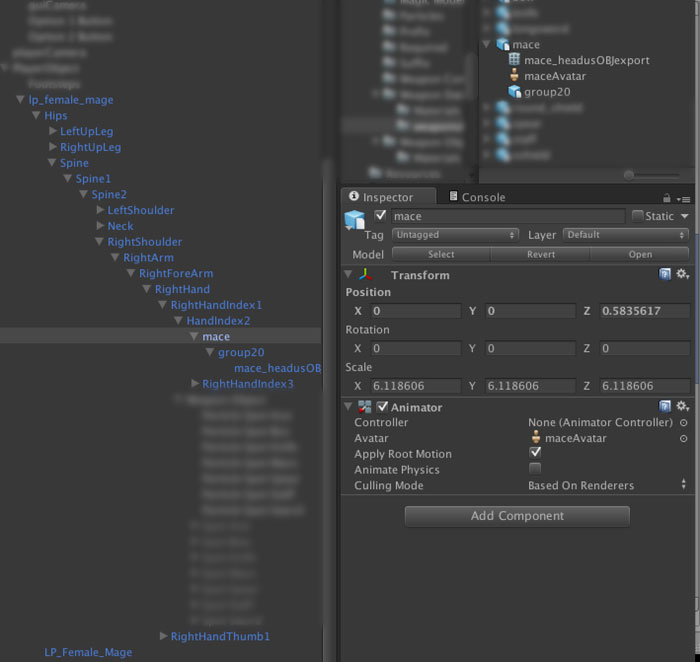
How do I "equip" this weapon properly to a model? (IMG)

I have a custom model, and a custom weapon. The designer doesn't know the answer, so I'm asking the world, how do I "equip" this weapon to the model?

In my head I think it should be a simple process of attaching the weapon model to the hand of the character model, but that doesn't work unless I adjust the rotation etc.

What's the common way of setting all this up, making it re-usable in other models etc? ( like other player or enemies)

Thanks!
alt text

weapon.jpg (46.5 kB)
Comment
Add comment
10 |3000 characters needed characters left characters exceeded
▼
  • Viewable by all users
  • Viewable by moderators
  • Viewable by moderators and the original poster
  • Advanced visibility
Viewable by all users

1 Reply

· Add your reply
  • Sort: 
avatar image
0

Answer by jmatthews · Oct 10, 2013 at 03:12 AM

You just attach the object to whatever bone most closely matches the attachment point. If need be you add a bone in the hierarchy to get the proper placement.

Generally the matrix transform tree handles the rest. Per your example, a mace attached to the wrist bone will move when any bone higher in the tree moves. Attach it to a "weapon" bone you make for this purpose and you can do some additional work to it, such as making it sway around a bit instead of appearing to be glued to the hand.

To make it portable to other weapons and characters you need to design a "weapon socket" concept where each model will have a similarly named bone and programmatically attach the weapons at run time.

Comment
Add comment · Show 2 · Share
10 |3000 characters needed characters left characters exceeded
▼
  • Viewable by all users
  • Viewable by moderators
  • Viewable by moderators and the original poster
  • Advanced visibility
Viewable by all users
avatar image infinitypbr · Oct 10, 2013 at 03:24 AM 0
Share

Cool -- is adding a bone (in unity) the same as adding an empty game object attached to a bone that's already there?

And what's the best method of ensuring that the weapon, when instantiated during the game, ends up being "held" at the right point?

avatar image jmatthews · Oct 10, 2013 at 03:35 AM 0
Share

You'll want to add the "weapon bone" or "socket" when you author the model, and then mecanim will find it when it builds your in-game rig. Just dig into the hierarchy after you import it and you'll see it there.

For weapon placement you'll also want to author the weapon rig with a bone in the right pivot point. For example, a sword may have a bone thats a bit below the hilt and you're going to connect the hilt bone to the weapon socket on your model.

$$anonymous$$ore difficult weapons may require more intricate rigs, both on your weapon and on your model, for example a spear may require each hand to connect to it, or a bow would need at least one bone for the handle and one for the string.

You'll have to trial and error this a bit until you get a look that you're satisfied with.

Your answer

Hint: You can notify a user about this post by typing @username

Up to 2 attachments (including images) can be used with a maximum of 524.3 kB each and 1.0 MB total.

Follow this Question

Answers Answers and Comments

16 People are following this question.

avatar image avatar image avatar image avatar image avatar image avatar image avatar image avatar image avatar image avatar image avatar image avatar image avatar image avatar image avatar image avatar image

Related Questions

Issues with accessing properties in c# 1 Answer

Why is it that when I equip weapons, they rotate in different ways depending on which way I[my character-player] am[is] looking? 1 Answer

Character Equip Animation 0 Answers

How to deal with different Weapon animations on Equip? 1 Answer

How To Assign An Animation When Firing Weapon? 1 Answer


Enterprise
Social Q&A

Social
Subscribe on YouTube social-youtube Follow on LinkedIn social-linkedin Follow on Twitter social-twitter Follow on Facebook social-facebook Follow on Instagram social-instagram

Footer

  • Purchase
    • Products
    • Subscription
    • Asset Store
    • Unity Gear
    • Resellers
  • Education
    • Students
    • Educators
    • Certification
    • Learn
    • Center of Excellence
  • Download
    • Unity
    • Beta Program
  • Unity Labs
    • Labs
    • Publications
  • Resources
    • Learn platform
    • Community
    • Documentation
    • Unity QA
    • FAQ
    • Services Status
    • Connect
  • About Unity
    • About Us
    • Blog
    • Events
    • Careers
    • Contact
    • Press
    • Partners
    • Affiliates
    • Security
Copyright © 2020 Unity Technologies
  • Legal
  • Privacy Policy
  • Cookies
  • Do Not Sell My Personal Information
  • Cookies Settings
"Unity", Unity logos, and other Unity trademarks are trademarks or registered trademarks of Unity Technologies or its affiliates in the U.S. and elsewhere (more info here). Other names or brands are trademarks of their respective owners.
  • Anonymous
  • Sign in
  • Create
  • Ask a question
  • Spaces
  • Default
  • Help Room
  • META
  • Moderators
  • Explore
  • Topics
  • Questions
  • Users
  • Badges
