
Wayback Machinekoobas.hobune.stream
May JUN Jul
Previous capture 12 Next capture
2021 2022 2023
1 capture
12 Jun 22 - 12 Jun 22
sparklines
Close Help
  • Products
  • Solutions
  • Made with Unity
  • Learning
  • Support & Services
  • Community
  • Asset Store
  • Get Unity

UNITY ACCOUNT

You need a Unity Account to shop in the Online and Asset Stores, participate in the Unity Community and manage your license portfolio. Login Create account
  • Blog
  • Forums
  • Answers
  • Evangelists
  • User Groups
  • Beta Program
  • Advisory Panel

Navigation

  • Home
  • Products
  • Solutions
  • Made with Unity
  • Learning
  • Support & Services
  • Community
    • Blog
    • Forums
    • Answers
    • Evangelists
    • User Groups
    • Beta Program
    • Advisory Panel

Unity account

You need a Unity Account to shop in the Online and Asset Stores, participate in the Unity Community and manage your license portfolio. Login Create account

Language

  • Chinese
  • Spanish
  • Japanese
  • Korean
  • Portuguese
  • Ask a question
  • Spaces
    • Default
    • Help Room
    • META
    • Moderators
    • Topics
    • Questions
    • Users
    • Badges
  • Home /
avatar image
0
Question by NuclearWaterBoiler · Jan 06, 2020 at 07:33 AM · material renderer

how to compare materials or colors?,How to compare materials or colors?

Hi!

I started to learn Unity about a month ago and I already made a simple ball game in which the ball(player) rolls forward and goes trough different color "force fields". I managed to create a button and attach a script to the player so when the button is pressed the player changes color, but I don't know how to compare the players color to the "force field's" color so when their color matches the player can pass but when it doesn't, it leads to a game over. I am guessing it's not even the color I should compare but the materials in the Mesh Renderer or object tags, but I don't know how to do it. I was trying to watch YouTube tutorials and read forums but I couldn't make it work. I am stuck here for a week now. Help please.

Comment
Add comment
10 |3000 characters needed characters left characters exceeded
▼
  • Viewable by all users
  • Viewable by moderators
  • Viewable by moderators and the original poster
  • Advanced visibility
Viewable by all users

2 Replies

· Add your reply
  • Sort: 
avatar image
1
Best Answer

Answer by Ady_M · Jan 06, 2020 at 05:43 PM

Personally, I would never compare materials nor colors directly. What if your objects become more complex later? What if there are more materials per object?

In my opinion, you are better off assigning a simple value to each object, like an integer, an enum or even a string.

There are many solutions to this problem. I will show you one that uses a separate component (CustomColorComponent) which is added to the player and all the forcefields. The component has a CustomColor enum (Red, Green, Blue, ...).

When the player collides with another object, call the Player script's method, OnCollisionWithOtherGameObject() and pass the other game object as an argument.

The method looks for a CustomColorComponent on the player and on the other gameobject. If both are present, it compares the two enums.

Note: Simply choosing a different color from the enum dropdown in the Insepector will not automatically change the actual color of the object. This can be implemented through code, though, if you're interested.
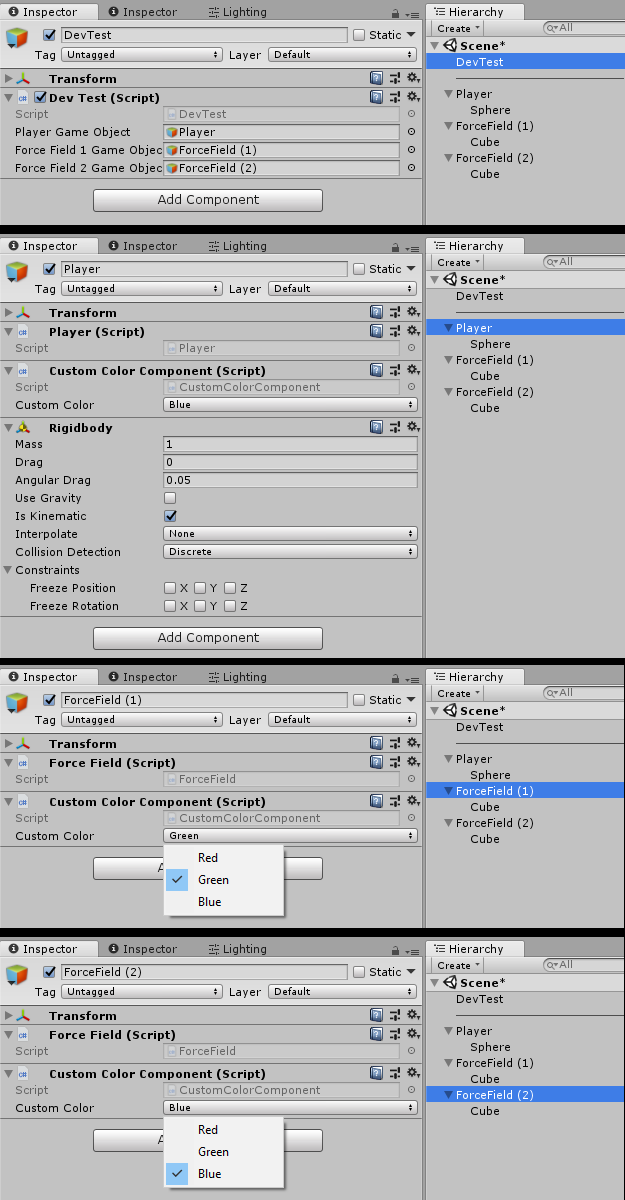
Screenshots of DevTest, Player and ForceFields

The DevTest is used to easily test the system by pressing the keys 1 or 2 to "collide" with one of the force fields. The DevTest script and object can be deleted safely.


The DevTest script:

 public class DevTest : MonoBehaviour
 {
     public GameObject playerGameObject;
     public GameObject forceField1GameObject;
     public GameObject forceField2GameObject;

     protected void Update ()
     {
         if (Input.GetKeyDown (KeyCode.Alpha1))
         {
             DevHandleCollision (forceField1GameObject);
         }

         if (Input.GetKeyDown (KeyCode.Alpha2))
         {
             DevHandleCollision (forceField2GameObject);
         }
     }

     protected void DevHandleCollision (GameObject otherGameObject)
     {
         Player player = playerGameObject.GetComponent <Player> ();

         if (player != null)
         {
             player.OnCollisionWithOtherGameObject (otherGameObject);
         }
     }
 }


The Player script:

 public class Player : MonoBehaviour
 {
     public void OnCollisionWithOtherGameObject (GameObject otherGameObject)
     {
         CustomColorComponent playerCustomColorComponent = this.GetComponent <CustomColorComponent> ();
         CustomColorComponent otherCustomColorComponent  = otherGameObject.GetComponent <CustomColorComponent> ();
         
         if (playerCustomColorComponent == null)
         {
             Debug.Log ("The player does not have a CustomColorComponent");
         }

         else

         if (otherCustomColorComponent == null)
         {
             Debug.Log ("The other object does not have a CustomColorComponent");
         }

         else

         if (playerCustomColorComponent.customColor == otherCustomColorComponent.customColor)
         {
             Debug.Log ("The player collided with an object of the same color");
         }
         else
         {
             Debug.Log ("The player collided with an object of a different color");
         }
     }
 }


The CustomColorComponent script and CustomColorEnum:

 public enum CustomColorEnum { Red, Green, Blue }

 public class CustomColorComponent : MonoBehaviour
 {
     public CustomColorEnum customColor;
 }

unityanswers-compare-materials.png (113.6 kB)
Comment
Add comment · Share
10 |3000 characters needed characters left characters exceeded
▼
  • Viewable by all users
  • Viewable by moderators
  • Viewable by moderators and the original poster
  • Advanced visibility
Viewable by all users
avatar image
0

Answer by NuclearWaterBoiler · Jan 09, 2020 at 01:16 AM

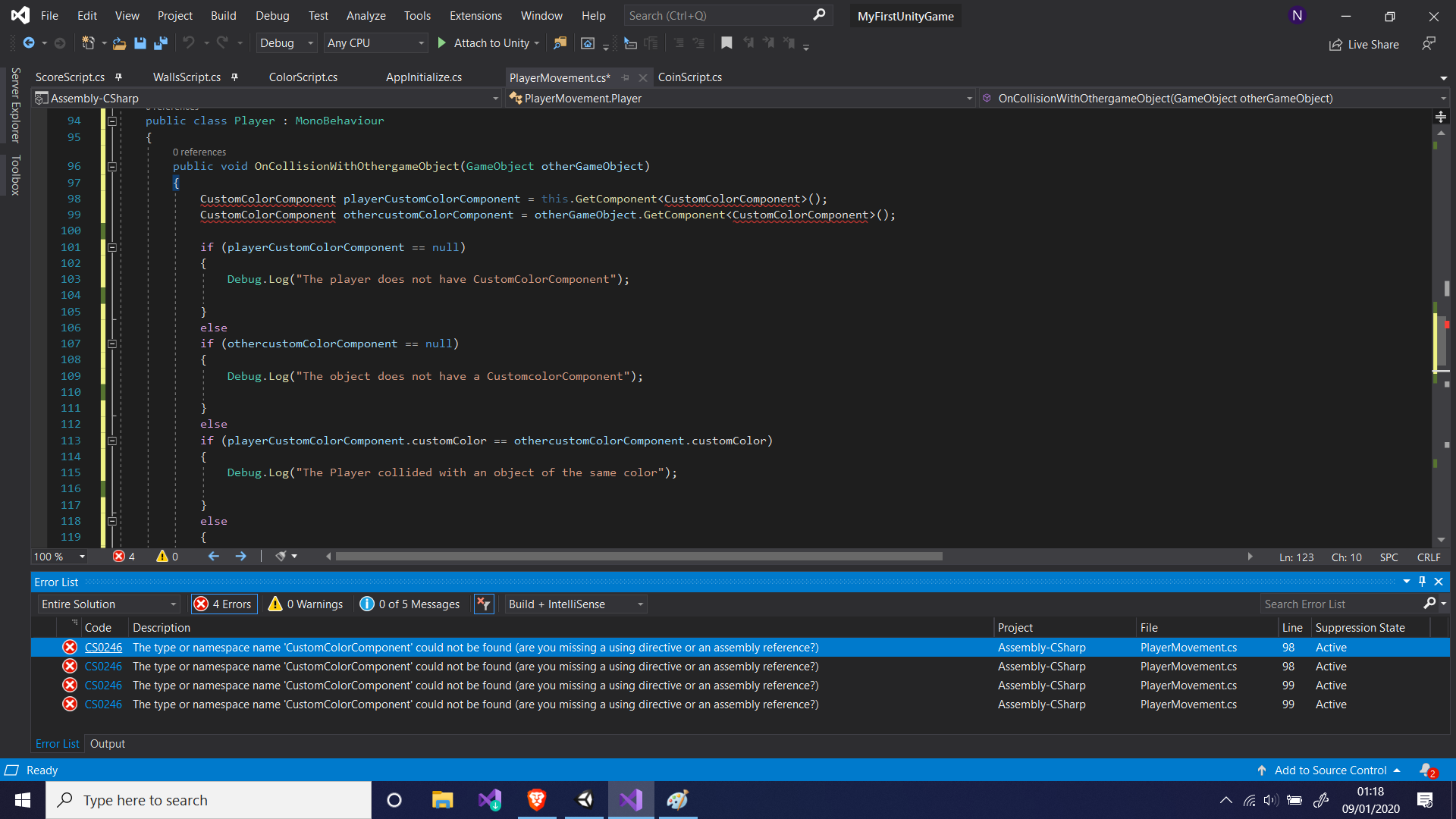
alt textThank You! But I am getting Compiler errors. The same happened with other solutions I tried as well. Perhaps I have to use a specific namespace??


untitled.png (179.5 kB)
Comment
Add comment · Show 2 · Share
10 |3000 characters needed characters left characters exceeded
▼
  • Viewable by all users
  • Viewable by moderators
  • Viewable by moderators and the original poster
  • Advanced visibility
Viewable by all users
avatar image Ady_M · Jan 09, 2020 at 01:50 AM 1
Share

Did you create a script called CustomColorComponent.cs and put the code in it? It's not a component that comes with Unity.

And please remember that the class name and the file name have to be the same.

avatar image NuclearWaterBoiler Ady_M · Jan 09, 2020 at 02:44 PM 1
Share

Hmm! I see what is the problem now. I just wrote the code inside an existing player script ins$$anonymous$$d of creating a new one called CustomColorComponent. Thank you for your help!

Your answer

Hint: You can notify a user about this post by typing @username

Up to 2 attachments (including images) can be used with a maximum of 524.3 kB each and 1.0 MB total.

Follow this Question

Answers Answers and Comments

117 People are following this question.

avatar image avatar image avatar image avatar image avatar image avatar image avatar image avatar image avatar image avatar image avatar image avatar image avatar image avatar image avatar image avatar image avatar image avatar image avatar image avatar image avatar image avatar image avatar image avatar image avatar image avatar image avatar image avatar image avatar image avatar image avatar image avatar image avatar image avatar image avatar image avatar image avatar image avatar image avatar image avatar image avatar image avatar image avatar image avatar image avatar image avatar image avatar image avatar image avatar image avatar image avatar image avatar image avatar image avatar image avatar image avatar image avatar image avatar image avatar image avatar image avatar image avatar image avatar image avatar image avatar image avatar image avatar image avatar image avatar image avatar image avatar image avatar image avatar image avatar image avatar image avatar image avatar image avatar image avatar image avatar image avatar image avatar image avatar image avatar image avatar image avatar image avatar image avatar image avatar image avatar image avatar image avatar image avatar image avatar image avatar image avatar image avatar image avatar image avatar image avatar image avatar image avatar image avatar image avatar image avatar image avatar image avatar image avatar image avatar image avatar image avatar image avatar image avatar image avatar image avatar image avatar image avatar image

Related Questions

FBX model material not changing (script) 2 Answers

Why is my material not rendering properly 0 Answers

Sphere Uv Distortion 1 Answer

Material cant be seen until Im very close 1 Answer

Sprite Renderer Missing Material after running 1 Answer


Enterprise
Social Q&A

Social
Subscribe on YouTube social-youtube Follow on LinkedIn social-linkedin Follow on Twitter social-twitter Follow on Facebook social-facebook Follow on Instagram social-instagram

Footer

  • Purchase
    • Products
    • Subscription
    • Asset Store
    • Unity Gear
    • Resellers
  • Education
    • Students
    • Educators
    • Certification
    • Learn
    • Center of Excellence
  • Download
    • Unity
    • Beta Program
  • Unity Labs
    • Labs
    • Publications
  • Resources
    • Learn platform
    • Community
    • Documentation
    • Unity QA
    • FAQ
    • Services Status
    • Connect
  • About Unity
    • About Us
    • Blog
    • Events
    • Careers
    • Contact
    • Press
    • Partners
    • Affiliates
    • Security
Copyright © 2020 Unity Technologies
  • Legal
  • Privacy Policy
  • Cookies
  • Do Not Sell My Personal Information
  • Cookies Settings
"Unity", Unity logos, and other Unity trademarks are trademarks or registered trademarks of Unity Technologies or its affiliates in the U.S. and elsewhere (more info here). Other names or brands are trademarks of their respective owners.
  • Anonymous
  • Sign in
  • Create
  • Ask a question
  • Spaces
  • Default
  • Help Room
  • META
  • Moderators
  • Explore
  • Topics
  • Questions
  • Users
  • Badges