
Wayback Machinekoobas.hobune.stream
May JUN Jul
Previous capture 12 Next capture
2021 2022 2023
1 capture
12 Jun 22 - 12 Jun 22
sparklines
Close Help
  • Products
  • Solutions
  • Made with Unity
  • Learning
  • Support & Services
  • Community
  • Asset Store
  • Get Unity

UNITY ACCOUNT

You need a Unity Account to shop in the Online and Asset Stores, participate in the Unity Community and manage your license portfolio. Login Create account
  • Blog
  • Forums
  • Answers
  • Evangelists
  • User Groups
  • Beta Program
  • Advisory Panel

Navigation

  • Home
  • Products
  • Solutions
  • Made with Unity
  • Learning
  • Support & Services
  • Community
    • Blog
    • Forums
    • Answers
    • Evangelists
    • User Groups
    • Beta Program
    • Advisory Panel

Unity account

You need a Unity Account to shop in the Online and Asset Stores, participate in the Unity Community and manage your license portfolio. Login Create account

Language

  • Chinese
  • Spanish
  • Japanese
  • Korean
  • Portuguese
  • Ask a question
  • Spaces
    • Default
    • Help Room
    • META
    • Moderators
    • Topics
    • Questions
    • Users
    • Badges
  • Home /
This question was closed Aug 31, 2018 at 01:20 PM by TheSartremaster for the following reason:

The question is answered, right answer was accepted

avatar image
0
Question by TheSartremaster · Aug 31, 2018 at 11:16 AM · physicsphysics2dignorecollision

Player Collider isn't found by Physics2D

I am trying to have a bullet fly out my ship. However, the bullet doesn't move and I think I have the error down to the fact, that it collides with my ship.

This is the Firing-Coroutine:

     IEnumerator FireGun()
     {
         GameObject bulletClone = Instantiate(bullet, transform.position, player.GetComponent<Transform>().rotation);
         bulletClone.GetComponent<BulletBehavior>().damage = damage;
         bulletClone.GetComponent<Rigidbody2D>().AddForce(bulletClone.transform.up * bulletSpeed);
         Physics2D.IgnoreLayerCollision(8, 9);
         Debug.Log(bulletClone.transform.up * bulletSpeed);
         Debug.Log(bulletClone.GetComponent<Rigidbody2D>().velocity);
         Debug.Log(Physics2D.GetIgnoreLayerCollision(8, 9));
         yield return null;
     }

The Player does have the Layer 8, the Bullets do have the Layer 9 and the Log shows those layers get ignored. Log also shows, that a force of 0,500,0 should be applied, but the velocity is 0,0,0.

This is the error: ""MissingComponentException: There is no 'Collider' attached to the "Player" game object, but a script is trying to access it. You probably need to add a Collider to the game object "Player". Or your script needs to check if the component is attached before using it.""

This is my player: alt text
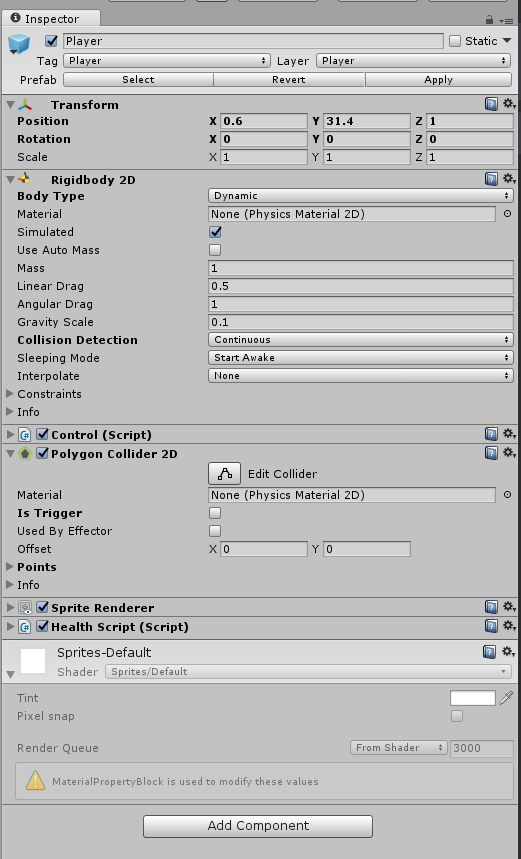
It clearly has a collider.

Does anybody know what is happening here? Thanks very much in advance Jan

unbenannt.png (60.2 kB)
Comment
Add comment · Show 2
10 |3000 characters needed characters left characters exceeded
▼
  • Viewable by all users
  • Viewable by moderators
  • Viewable by moderators and the original poster
  • Advanced visibility
Viewable by all users
avatar image Casiell · Aug 31, 2018 at 12:23 PM 1
Share

Wait, am I blind or you didn't include the code where you try to access the collider?

avatar image TheSartremaster Casiell · Aug 31, 2018 at 01:13 PM 0
Share

I do not actually access the player collider directly. I try to Ignore the Collision via the layers. I used to have the following code:

 Physics2D.IgnoreCollision(player.GetComponent<Collider2D>(), bulletClone.GetComponent<Collider2D>());


Which doesn't work either. "player" is a GameObject with pointing at the player.

However: Wierdly enough the Error $$anonymous$$essage is gone after I switched out the Collision detection again (Layers to colliders).... The bullets still don't move though.

2 Replies

  • Sort: 
avatar image
0
Best Answer

Answer by TheSartremaster · Aug 31, 2018 at 01:20 PM

Okay the problem is gone.

The collider error did just disappear... no clue why. The bullets now fly after I just cranked up the speed. Thanks everyone

Comment
Add comment · Share
10 |3000 characters needed characters left characters exceeded
▼
  • Viewable by all users
  • Viewable by moderators
  • Viewable by moderators and the original poster
  • Advanced visibility
Viewable by all users
avatar image
0

Answer by myzzie · Aug 31, 2018 at 01:14 PM

Attach a collider to the player game object

Comment
Add comment · Show 2 · Share
10 |3000 characters needed characters left characters exceeded
▼
  • Viewable by all users
  • Viewable by moderators
  • Viewable by moderators and the original poster
  • Advanced visibility
Viewable by all users
avatar image TheSartremaster · Aug 31, 2018 at 01:17 PM 0
Share

The screenshot is the player game object. There is a collider.

Refering to my comment though: The error message is now miraculously gone after I went back to checking the collision via player and bullet collider directly.

avatar image myzzie TheSartremaster · Aug 31, 2018 at 01:25 PM 1
Share

Can't see anything wrong with your script as long as bullet speed is higher than 0 and the bullet's rigidbody is setup correctly. Good luck

Follow this Question

Answers Answers and Comments

156 People are following this question.

avatar image avatar image avatar image avatar image avatar image avatar image avatar image avatar image avatar image avatar image avatar image avatar image avatar image avatar image avatar image avatar image avatar image avatar image avatar image avatar image avatar image avatar image avatar image avatar image avatar image avatar image avatar image avatar image avatar image avatar image avatar image avatar image avatar image avatar image avatar image avatar image avatar image avatar image avatar image avatar image avatar image avatar image avatar image avatar image avatar image avatar image avatar image avatar image avatar image avatar image avatar image avatar image avatar image avatar image avatar image avatar image avatar image avatar image avatar image avatar image avatar image avatar image avatar image avatar image avatar image avatar image avatar image avatar image avatar image avatar image avatar image avatar image avatar image avatar image avatar image avatar image avatar image avatar image avatar image avatar image avatar image avatar image avatar image avatar image avatar image avatar image avatar image avatar image avatar image avatar image avatar image avatar image avatar image avatar image avatar image avatar image avatar image avatar image avatar image avatar image avatar image avatar image avatar image avatar image avatar image avatar image avatar image avatar image avatar image avatar image avatar image avatar image avatar image avatar image avatar image avatar image avatar image avatar image avatar image avatar image avatar image avatar image avatar image avatar image avatar image avatar image avatar image avatar image avatar image avatar image avatar image avatar image avatar image avatar image avatar image avatar image avatar image avatar image avatar image avatar image avatar image avatar image avatar image avatar image avatar image avatar image avatar image avatar image avatar image avatar image avatar image avatar image avatar image avatar image avatar image avatar image

Related Questions

ignoreing enemy collisions when hit, and turning the coliders back on 1 Answer

Collision 2d is not working perfectly 0 Answers

OnTriggerEnter2D triggering multiple times when moving around inside the trigger area. 1 Answer

Set ContactFilter2d to not use child object's triggers. 2 Answers

Adding force at an angle 2D,Adding force at an angle 1 Answer


Enterprise
Social Q&A

Social
Subscribe on YouTube social-youtube Follow on LinkedIn social-linkedin Follow on Twitter social-twitter Follow on Facebook social-facebook Follow on Instagram social-instagram

Footer

  • Purchase
    • Products
    • Subscription
    • Asset Store
    • Unity Gear
    • Resellers
  • Education
    • Students
    • Educators
    • Certification
    • Learn
    • Center of Excellence
  • Download
    • Unity
    • Beta Program
  • Unity Labs
    • Labs
    • Publications
  • Resources
    • Learn platform
    • Community
    • Documentation
    • Unity QA
    • FAQ
    • Services Status
    • Connect
  • About Unity
    • About Us
    • Blog
    • Events
    • Careers
    • Contact
    • Press
    • Partners
    • Affiliates
    • Security
Copyright © 2020 Unity Technologies
  • Legal
  • Privacy Policy
  • Cookies
  • Do Not Sell My Personal Information
  • Cookies Settings
"Unity", Unity logos, and other Unity trademarks are trademarks or registered trademarks of Unity Technologies or its affiliates in the U.S. and elsewhere (more info here). Other names or brands are trademarks of their respective owners.
  • Anonymous
  • Sign in
  • Create
  • Ask a question
  • Spaces
  • Default
  • Help Room
  • META
  • Moderators
  • Explore
  • Topics
  • Questions
  • Users
  • Badges
